This is a question that can be confusing to many engineers. This is because the terms "insulators" and "di-electrics" are often used interchangeably. Insulators are substances which permit very less current flow through them. Substance such as porcelain, wood are examples.
Dielectrics are also insulators. But, more specifically, they are materials which can be polarized. In dielectric materials, the electrons are bound to the nucleus and have limited movement. When an external voltage is applied to the dielectric, the nucleus of the atoms is attracted to the negative side and the electros are attracted to the positive side. Hence, the material gets polarized. This is a key feature of a dielectric.
Thus a dielectric can be defined as an insulator that can be polarized. Thus all dielectrics are insulators, but all insulators are not dielectrics. A dielectric can thus store charge. This characteristic makes it very useful in the form of capacitors.
Dielectric substances conduct very little electricity but are good supporters of electric fields. They also dissipate very less energy, i.e. have low dielectric loss.
Showing posts with label an. Show all posts
Showing posts with label an. Show all posts
Tuesday, March 28, 2017
Cleaning an Infected Computer
Cleaning an Infected Computer
Keeping Digital World Secure from Computer Virus - Symptoms, Treatment and Prevention
Dear Readers, as you may already know about the existence of threats to our digital life such as Viruses, Worms, Trojans and/or other malwares. In this post, well discuss on removing these threats on both environments i.e. Normal and Dangerous (Heavily Infected Systems). First of all, well start with the basics on how to recognize a PC Infection that Whether a PC is infected or not although the very first signs of PC infection may be transparent to both the user and the OS i.e. You may not know the difference by any percent whether your system is infected or not but still there may be infection running on your system without your knowledge.Q: How to Identify whether PC is Infected or Not?
There are several ways you can recognize whether your PC is infected or not.
- Start Task Manager>Processes>Check Show Processes from all users. If you find any processes running unusual with odd looking names like or similar to jqlysc.exe, svrexe.exe, qrckm.exe, DIIHOST.EXE, XPLORER.EXE etc and any .pif files or programs running, then youre system is 100% infected.
- Right Click on each of your Local Drives, if the first menu item is AutoPlay or AutoRun, then your system as well as root of that drive is infected...
- Open Folder Options>Enable View Hidden Files and Folders, Uncheck Hide Protected System Files, Uncheck Hide Extensions for Known File Types. Open any of your drive and see if there are any unusual hidden files and folders. (Note: Dont double click to open your drives, this will infect your system immediately if infection is present in your system... Always type drive letter followed by colon in My Computers or Explorers address bar eg. Type C: for opening C drive of your system.)
- BSOD (Blue Screen of Death) occurs more often even if you have latest and stable drivers for your hardware and you havent made any recent hardware modifications such as Adding New Hardware (USB Sticks and/or Removable Media including Human Interference Devices such as Keyboard/Mouse and other Plug n Play Devices are an exception to this case)
- Your PC Wont Boot into Safe Mode. Task Manager, Registry Editor, Msconfig and other Utilities disabled.
- Foul and/or threatening messages being displayed on your PC etc.
Treatment of Virus (Cleaning Process)
- The very first step is to get disconnected from internet and restart your computer in safe mode by rapidly tapping F8 function key while your system is about to load Windows.
- In Safe Mode, Open RUN command either from Start Menu or by pressing Windows logo button on keyboard + R key from keyboard.
- Type in " msconfig ". This will open Microsoft configuration utility.
- Point toward start-up options and disable any unknown or all entries, that you may find infectious.
- Now go to control panel > folder options> view option> uncheck hide protecting operating system files, hide extensions for known file types etc.
- Now open your explorer either via running Windows explorer or double clicking my computer icon and Right click on your system drive usually C: and check whether there is Any option related to AutoRun, AUTORun, AuToPlAY, AuToPlAY etc any thing similar to this, then DO NOT DOUBLE CLICK ON ANY DRIVES TO OPEN THEM IF SUCH MESSAGE EXISTS BECAUSE THE VIRUS/TROJAN/WORM OR ANY OTHER MALICIOUS FILE WILL THEN AUTOMATICALLY BE TRIGGERED AND INFECT YOUR SYSTEM
- Open your Windows Task Manager. If any virus has disabled your task manager, try finding alternative of task manager and disable any suspicious processes except the processes that are marked System or Local Service and Download ComboFix from here or from Mediafire or from its official webpage (Bleeping Computer) and Run with Administrator Privileges by Right Clicking the downloaded file and selecting Run as Administrator (Windows Vista/7/8) and Let it perform the Scan. (DO NOT SCAN WITH YOUR ANTIVIRUS AS IT MAY ALREADY HAVE BEEN HEAVILY INFECTED FOR EITHER NOT FINDING INFECTIONS OR INFECTING FILES WHILE SCANNING..)
- Download Additional Malware/Spyware detection tool such as MalwareBytes Anti-Malware here http://www.malwarebytes.org/ or any other.. and Scan Your System.
- If possible, Download Antivirus Rescue Disks from Antivirus Vendors such as Avira (Recommended), Kaspersky (Recommended), Norton, AVG etc. and Create a Bootable USB Stick or CD/DVD Disk and Scan your System from Boot... If your system is heavily infected, then thoroughly scan your system and delete any infected files found because those files will only spread infection and cannot be recovered.. (Please Note, this process may render your System Unstable or Even Unbootable.. Follow this Process only if you already have minded up to Install a Fresh OS)
- If everything else fails, The next Best thing you can do is Install a Fresh Operating System and Follow Step no. 9 above... This ensures you that if you Install Fresh OS, itll not get Corrupted or Infected just after Installation although it may get infected if Infection is Still Residing on your system. If above step is followed, your system will not be getting Infected until you receive infection from a medium such as USB Drives or files downloaded from Internet...
Prevention:
There isnt any 100% developed way to Completely Protect your Computer from Viruses and/or other malware because of the changing nature and way of infecting and creation of viruses and/or other malware every few seconds.. Still you can follow these precautions to lessen the chances of your system getting Infected:
There isnt any 100% developed way to Completely Protect your Computer from Viruses and/or other malware because of the changing nature and way of infecting and creation of viruses and/or other malware every few seconds.. Still you can follow these precautions to lessen the chances of your system getting Infected:
- After you have Installed Fresh Operating System or Bought a New System Pre-Installed with OS, Always Install a good Antivirus Software from known developers at first such as Avira, Kaspersky, Avast, Norton, Quick Heal, AVG, Bitdefender etc. You dont always need a Paid or Full Version Software although it adds to the Security enhancement and added features but Still you can keep pace with Free Antivirus at First...
- Install an Anti Spyware or Anti Malware for added Security Layer such as MalwareBytes Anti Malware or SpyBot - Search & Destroy or any of your favorite AntiMalware Software..
- Always keep or at least try to keep your Anti Virus and Anti Malware upto date...
- Use Sandboxie or your favorite Sandbox software to test drive software or files you download straight from Internet such as using Sandboxed browser.
- Dont double click to open USB Sticks/Pen Drives/Removable drives including CD/DVDs to explore its contents.. Open using address bar by typing C: for C drive or H: for H drive...
Accidently Formatted your Hard Drive or Partition or Deleted Files - Recover them Go here..
Task Manager Disabled by Your Administrator - Fix this Problem here..
Registry Editor Disabled by Your Administrator - Fix this Problem here..
Tags: how to clean infected computer, remove infection, clean virus, trojans, spyware, worm, pc infection
Available link for download

Tuesday, March 21, 2017
Why An Iron Ship Does Not Sink
Why An Iron Ship Does Not Sink
If you put a nail or a lump of iron in a vessel of water it sinks at once. A piece of wood of the same size floats. So, until fifty years or so ago, people thought all boats and ships must be built of wood, or they would sink.
Take a sheet-iron pan from the kitchen and put that on the water. It floats. It weighs just as much as the lump of iron that sinks, but the weight is spread or distributed over a larger volume of water That is all. It has been made lighter than the total amount of water it rests upon. A ship is just such a hollow vessel, whether made of iron or wood. When there is nothing in it, a ship stands high, almost on the surface of the water. As it is loaded with goods and people, it rides deeper. Load your sheet iron pan with a cargo of toys. Watch it go deeper. Dont fill it to the top. That would make it as heavy as if it were solid. Then it would sink.
If you live in a lake or sea-port town, you will find that all ships have a water-line painted plainly around the hull. This is the safety loading line. No ship owners are allowed to load a vessel so heavily that that water line sinks below the surface of the water. Air spaces must be left, to keep the ship and its cargo lighter than the water that is beneath them. In the old days overloaded wooden vessels often sank. Today, iron ships ride the ocean safely.
Source: http://chestofbooks.com/reference/The-New-Student-s-Reference-Work-Vol5/Why-An-Iron-Ship-Does-Not-Sink.html#.ViIG-fkrLIU#ixzz3ooQryes9
Available link for download
Sunday, March 19, 2017
Perfect Compress v 6 13 An All in One Compressor Archivator
Perfect Compress v 6 13 An All in One Compressor Archivator
Perfect Compress v 6.13 - An All in One Compression-Decompression Software
Perfect Compress is a collection of Many Compressors/Decompressors such as File PreOptimization, Data Compression, Archive Optimization, Archive Converter, Store on Disk etc. So far, one of the Best Compression Tool..
Perfect Compress is able to compress files to over 35 formats including ZIP, 7z, PAQ, ZPAQ, RZM, Flashzip, Rings, Hook, PACKET, BZP and a lot more formats. The software also features a format that is a combination of PAQ and 7z which the author calls UCA ("ULTRA Compressed Archive" or for a longer name "ULTimate peRfect space sAver Compressed Archive"). The software is also able to extract all of the mentioned compression formats
Why he created the UCA format? Well, basically, it is not a new format, but rather a PAQ compressed file compressed again in 7z, so it is PAQ + 7z. The advantage of using UCA is that when using PAQ, you must use the same version to extract it, but UCA writes a file to the 7z archive which tells the software what version of PAQ was used for compression so it can use the same for the extraction. As of version 3.10, it is possible to use RZM as main compression engine for those who wants speed rather than compression..
Download Here
or
Download (Non-Adf.ly Version)
Tags: Perfect Compress ; Extreme Compression ; Best Compression ; Best Archiver ; Best all in one compression and decompression tool ; maximum compression ; free best compression archiver download
or
Download (Non-Adf.ly Version)
Tags: Perfect Compress ; Extreme Compression ; Best Compression ; Best Archiver ; Best all in one compression and decompression tool ; maximum compression ; free best compression archiver download
Available link for download
Saturday, February 25, 2017
Basic Electricity What is an amp
Basic Electricity What is an amp
Basic Electricity - What is an amp.
Watt Is An Amp?
Frequently Asked Question:
What is a watt? What is an amp? And why is it important for me to know how many watts or amps my equipments draws? This is a very good and much asked question. Its important to know how much electricity your equipment consumes, because all sources of power are finite. Whether youre connected to a battery, a standard AC wall outlet, or the power pole outside your theater, theres a limit to the quantity of power available (albeit a pretty BIG limit, when it comes to the poles power line :-) This answers the last
part of the question, because knowing the wattage or amperage (along with the voltage) allows you to determine the type of power source required to operate your equipment. Now the first parts . . . An amp is a unit of electrical current. The quantity tells you how much electricity is being drawn through the power cable. A product that draws 10 amps sucks twice as much electricity as a product that draws 5 amps. (Thats why it needs thicker wires.) A watt is a unit of electrical power. The quantity tells you how quickly electricity is being consumed through the power cable. "Consumption" differs from "draw" in that its relative to voltage, while draw is not. Two products may both draw 5A (5 amps), but if one is 12V and the other 6V, the 12V product will consume twice as much electricity as the 6V product. The 12V product will consume twice as many watts as the 6V product, even though they both draw amps at the same rate.* P=IV Power = Current x Voltage Watts = Amps x Volts All of these equations say the same thing. You multiply amps by volts to determine watts. Or you divide volts into watts to determine amps. Most equipment will specify the voltage required, and either the current draw (amps) or power consumption (watts); once you know two of the figures, you can use the above equation to calculate the third. An example is in order. Most electrical products draw 120 VAC. Most electrical circuit breakers are rated at 20A. 20x120=2,400; therefore, you can plug 2,400W of equipment into most AC wall outlets and know that the breaker will not kick.** Well thats pretty much it for watts and amps. * Purists may flame me for using the term "consumption" in association with "Watts", but I believe I made it clear that I was talking about the "rate" of consumption, not the actual consumption itself. Power "consumption" is measured in Watt-Seconds, or Joules. (But unless you plan to dispute your electric bill with the utility company, its really not necessary for you to know this. :) ** An individual standard wall outlet is usually rated at 15A. There are usually a number of these outlets on one 20A breaker. You can draw a total of 2,400W by using two or more of these outlets. You cant actually plug 2,400W into one 15A outlet, as the article may have implied.
Available link for download
Sunday, February 5, 2017
Bluetooth device was not discoverable or An error occured changes could not be saved and the bluetooth device may not be plugged in
Bluetooth device was not discoverable or An error occured changes could not be saved and the bluetooth device may not be plugged in
Solution:
1] Click Start > Run > type devmgmt.msc and hit enter.
2] Device Manager window will be opened and expand Bluetooth radios.
3] Right click on Wireless Bluetooth Module > Properties > Power Management tab.
4] By default windows turn off the bluetooth and wireless device.
5] Make sure that there is no tick mark in Allow computer to turn off this device to save power as shown in picture below.
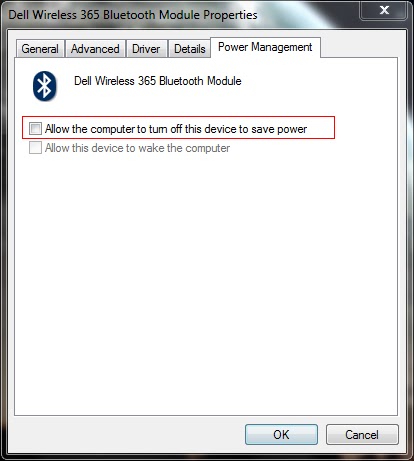
6] Click OK to close the properties box.
1] Click Start > Run > type devmgmt.msc and hit enter.
2] Device Manager window will be opened and expand Bluetooth radios.
3] Right click on Wireless Bluetooth Module > Properties > Power Management tab.
4] By default windows turn off the bluetooth and wireless device.
5] Make sure that there is no tick mark in Allow computer to turn off this device to save power as shown in picture below.
6] Click OK to close the properties box.
7] Also expand the Network Adapters in the device manager window.
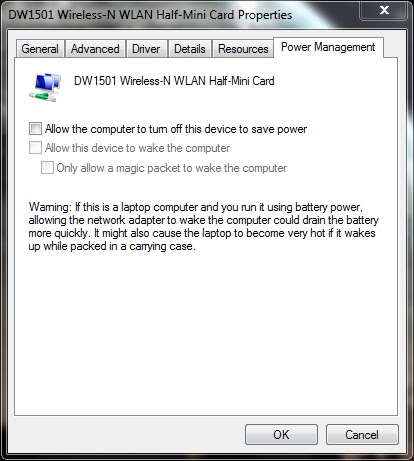
8] Right click on Wireless-N WLAN Half-Mini Card > Properties > Power Management tab
9] Make sure that there is no tick mark in Allow computer to turn off this device to save power.
10] If there is tick mark then the error will be pop-up saying your bluetooth device was not plugged in.
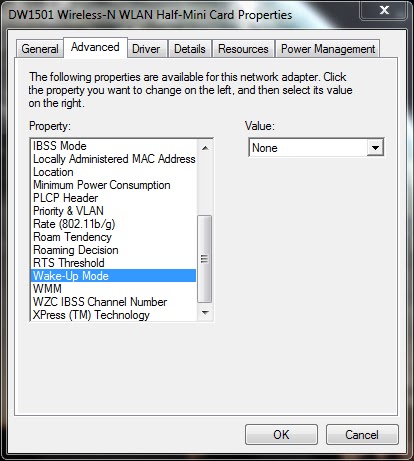
11] Now select Advanced tab > select Wake-up Mode > set Value as Disabled (or) None.
12] Click OK and close the Device Manager window.
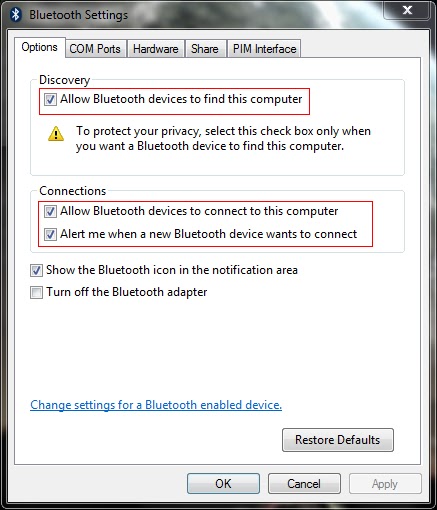
13] Now right click the Bluetooth radio button in the notification area of the taskbar and open settings.
14] Put the tick mark near the following options
- Allow bluetooth devices to find this computer
- Allow bluetooth devices to connect to this computer
- Alert me when a new bluetooth device wants to connect
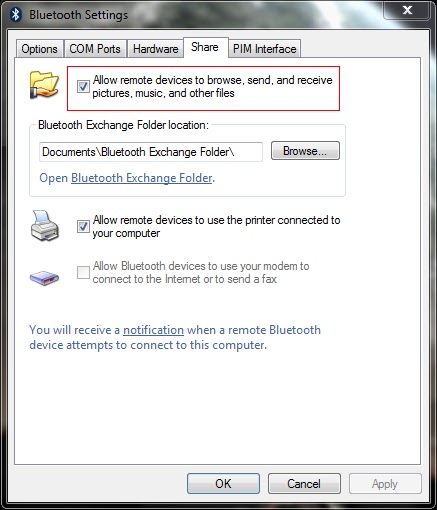
15] Now select the Share tab and put the tick mark near Allow remote devices to browse, send and receive pictures, music and other files.
16] Atlast click Apply and OK.
========================================================================
If the problem still exist then you have to check the bluetooth service.
1] Click Start > Run > type services.msc and hit enter.
2] Services window will be opened.
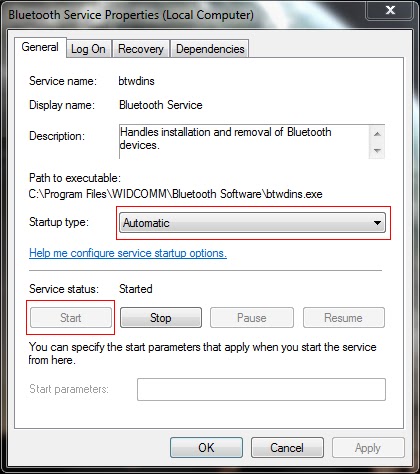
3] Locate the Bluetooth service and right click > properties.
4] Set the Startup type as Automatic and Start the service if it has Stopped.
5] Click Apply and OK.
6] Locate the Bluetooth Support service and right click > properties.
7] Set the Startup type as Automatic and Start the service if it has Stopped.
8] Click Apply and OK.
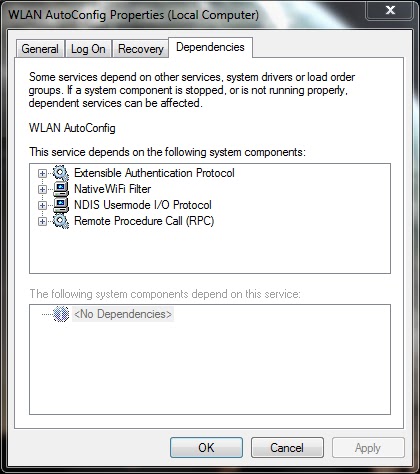
9] Similarly locate the WLAN AutoConfig service and repeat same procedure.
10] If you cant able to start the service, select the Dependencies tab and start all the services related to it by following the above steps.
Note: Also read my new post on "Bluetooth keyboard/mouse disconnects frequently in Windows 7 laptops"
Available link for download
Saturday, January 14, 2017
Adblock Plus now available as an Android app
Adblock Plus now available as an Android app
http://m14hackersworld.blogspot.com
Adblock Plus now available as an Android app.

Popular ad blocking service ‘Adblock Plus’, which has been widely successful on desktop browsers, is now available for Android smartphones. The app brings with it the same functionality as its desktop counterpart.
The app is available free on the Google Play store and is a 1.8MB download. Adblock Plus blocks all annoying ads on your Android device. No root required! It blocks all online advertising when browsing, and when using apps like Angry Birds.
Read more »Adblock Plus now available as an Android app.
Popular ad blocking service ‘Adblock Plus’, which has been widely successful on desktop browsers, is now available for Android smartphones. The app brings with it the same functionality as its desktop counterpart.
The app is available free on the Google Play store and is a 1.8MB download. Adblock Plus blocks all annoying ads on your Android device. No root required! It blocks all online advertising when browsing, and when using apps like Angry Birds.
Available link for download
Thursday, January 12, 2017
An Important Instruction
An Important Instruction
As kali linux is new to all of us, being a learner we all come with a new issue and try to resolve it as quickly as possible. While installing software, most of us dont know the dependency packages that are installed or removed from the system. A great feature that kali linux provide is that when we run apt command, it checks the available package/s in the repository and accordingly asks if to install. Meanwhile, it also checks the un-necessary packages that is not required. Here is a command that removes the un-necessary packages. From the root terminal window, please type apt-get autoremove. When you hit return or enter key, it checks the packages that is to be removed from the system. Please read those packages carefully, before you make confirmation to remove it from the system.
Available link for download
Saturday, January 7, 2017
What is the diffrence between an insulator and dielectric
What is the diffrence between an insulator and dielectric
What is the difference between an insulator and a dielectric?
Source : electrotechnik
Available link for download
Thursday, December 29, 2016
An Easy Way to Hide Files on Android So Nobody Can See Tutorial
An Easy Way to Hide Files on Android So Nobody Can See Tutorial
An Easy Way to Hide Files on Android So Nobody Can See

In most cases, you don’t need third party tools to hide sensitive files on your Android device. There’s an easy way out, and it has been around for quite a long time now.
Open your file manager, create a new folder as you normally would, and name it whatever you want for easy recognition. Dump the files that you want to hide — pictures, videos, documents, anything — into this folder.
Read more »In most cases, you don’t need third party tools to hide sensitive files on your Android device. There’s an easy way out, and it has been around for quite a long time now.
Open your file manager, create a new folder as you normally would, and name it whatever you want for easy recognition. Dump the files that you want to hide — pictures, videos, documents, anything — into this folder.
Available link for download
Thursday, December 22, 2016
How to Write Attractive Content Like An Attractive Girl
How to Write Attractive Content Like An Attractive Girl
How to Write Attractive Content Like An Attractive Girl
For a successful online business, quality of a content matters a lot. It is considered as the backbone of your online business. If you have a great content on your website, it will boost SEO ranking and traffic. Now we will break down some tips for creating a good content.

Original Content
Content should be written in such a way that it looks unusual. The material of content should be based on originality. If you copy the contents of others, it has a very bad impact on your website and Google also punish you for this. You should have a complete knowledge about the topic you are writing for your website. if you rehash the posts of other people again and again, it will not be original and there will be no link. So use your own words and knowledge and must focus on quality and originality of content. It wills gives you good return for years.
Piece of Real Writing
Your content should be a piece of real writing. Content should be in small paragraphs and carefully written with beginning, middle, and end. You content should be written in such a way that your first paragraph introduce your topic, middle to give complete information and the ending paragraph must summarize each point at the topic.
Headlines Should be Strong
Headlines are a very important part of content. It attracts the attention of your reader. If your headlines are attractive and strong, you can easily attract the reader. 80% of readers just read the headlines and decide whether they should read the material or not.
Actionable Content
A good content is that which can be easily actionable. While writing content, must keep in mind your reader. It should be written in such a way that the reader can understand that how to apply it and how to use the material you are offering them.
Accurate Information
For a good content, information should be accurate and detailed. Correct information builds the trust of your readers. If you are writing a content of your own site or for your company’s blog and you wrote any wrong information, it will be very harmful for you and your company and damage your reputation. Thousands of people read it so it must be based on accurate information. If your blog is based on any statistic information, it must be verified as blog is the reflection of your company.
Add videos and Images
The taste of your readers is different from each other. Some like to read and some like to see. So a good content is that which fulfills the desires of all the readers and they feel convenient and take interest to read your blogs. You can add pictures, videos and diagrams to demonstrate your points.
To the Point Content
A good content is that which is to the point and short. If content includes extra and too much long information, it will bore the reader and will be a waste of time and money. Mostly writers focus on the words count. It is not necessary that a long post is a good post. Reader prefer a post which is brief and to the point. No doubt, writing a short post is more difficult but it will be very fruitful for you.
Frequent Updates
World is changing too fast and people want change in every second. If you have a blog or website, you have to update it on regular basis. You have to post new articles on daily basis as the readers want innovation. If you don’t then the search engines will not favor your site.
Available link for download
Wednesday, November 30, 2016
Ultimate Boot CD an Alternative to Hirens Boot CD
Ultimate Boot CD an Alternative to Hirens Boot CD
Ultimate Boot CD 5.2.7 ISO
UBCD 5.2.7 ISO
Ultimate Boot CD is a must have tool for everyone to tackle problems during boot. UBCD is an alternative to HBCD (Hirens Boot CD). UBCD is a collection of Complete Comprehensive tools and Utilities that youll need in each case for Diagnosting, Boosting Performance, Optimizing, Self Defense, Drivers Backup & Update, Browsers, File System Tools, Formatting, Recovery tools, Video Tools, CD/DVD Utilities, ISO Utilities, Compression Tools, Archivators, Tweaks etc... |
| Click to Download Ultimate Boot CD 5.2.7 ISO |
or if above link isnt working for you, try this alternate direct link
Click here to for Direct download
Tags: ubcd, ultimate bood cd, ultimate boot disk, UBCD, direct download, download, free download ubcd
Available link for download
Monday, November 7, 2016
Friday, November 4, 2016
An Important Suggestion
An Important Suggestion
A suggestion to those who want to experiment or do testing with their OSes. I suggest you not to make your system with dual or triple partition. If you are not sure with partition table or with boot loader, then you may mess up with mapping partition of OSes in boot loader. Its really a tedious job, and if the OS is not mount properly your important data may be lost which you may not able to recover in future. Dual partition makes you no good to your system other than the user interface to access different OSes of your choice. I suggests you to install virtual manager or server, like vmware player, oracle virtualbox, virtual pc in your OS, where you can experiment with different OSes, do testing, unlocking of codes, hacking and lots more than you can expect. Happy Hacking.......
Available link for download
Subscribe to:
Comments (Atom)