Showing posts with label may. Show all posts
Showing posts with label may. Show all posts
Sunday, February 5, 2017
Bluetooth device was not discoverable or An error occured changes could not be saved and the bluetooth device may not be plugged in
Bluetooth device was not discoverable or An error occured changes could not be saved and the bluetooth device may not be plugged in
Solution:
1] Click Start > Run > type devmgmt.msc and hit enter.
2] Device Manager window will be opened and expand Bluetooth radios.
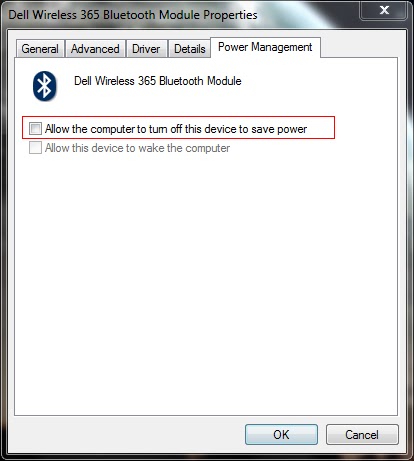
3] Right click on Wireless Bluetooth Module > Properties > Power Management tab.
4] By default windows turn off the bluetooth and wireless device.
5] Make sure that there is no tick mark in Allow computer to turn off this device to save power as shown in picture below.
6] Click OK to close the properties box.
1] Click Start > Run > type devmgmt.msc and hit enter.
2] Device Manager window will be opened and expand Bluetooth radios.
3] Right click on Wireless Bluetooth Module > Properties > Power Management tab.
4] By default windows turn off the bluetooth and wireless device.
5] Make sure that there is no tick mark in Allow computer to turn off this device to save power as shown in picture below.
6] Click OK to close the properties box.
7] Also expand the Network Adapters in the device manager window.
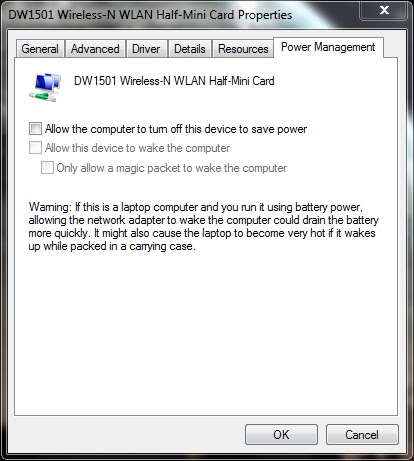
8] Right click on Wireless-N WLAN Half-Mini Card > Properties > Power Management tab
9] Make sure that there is no tick mark in Allow computer to turn off this device to save power.
10] If there is tick mark then the error will be pop-up saying your bluetooth device was not plugged in.
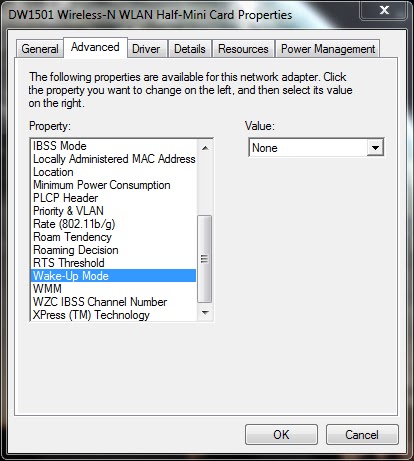
11] Now select Advanced tab > select Wake-up Mode > set Value as Disabled (or) None.
12] Click OK and close the Device Manager window.
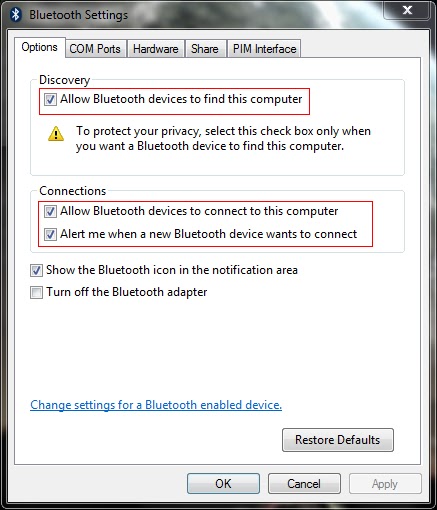
13] Now right click the Bluetooth radio button in the notification area of the taskbar and open settings.
14] Put the tick mark near the following options
- Allow bluetooth devices to find this computer
- Allow bluetooth devices to connect to this computer
- Alert me when a new bluetooth device wants to connect
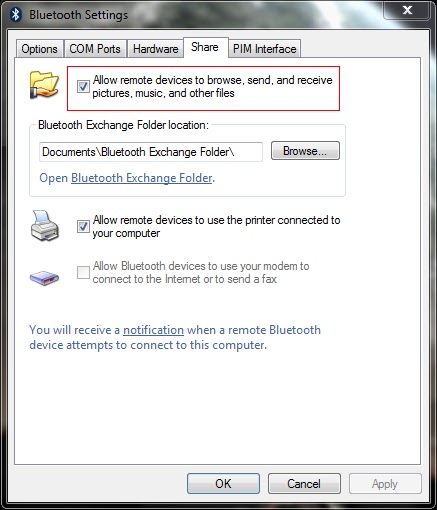
15] Now select the Share tab and put the tick mark near Allow remote devices to browse, send and receive pictures, music and other files.
16] Atlast click Apply and OK.
========================================================================
If the problem still exist then you have to check the bluetooth service.
1] Click Start > Run > type services.msc and hit enter.
2] Services window will be opened.
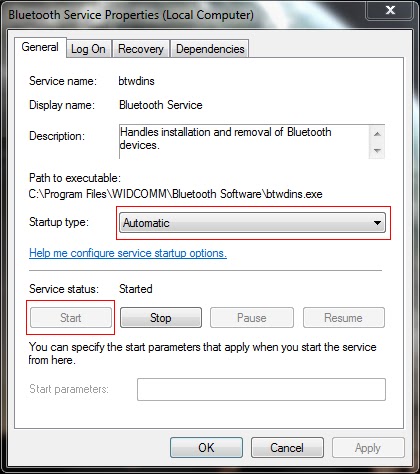
3] Locate the Bluetooth service and right click > properties.
4] Set the Startup type as Automatic and Start the service if it has Stopped.
5] Click Apply and OK.
6] Locate the Bluetooth Support service and right click > properties.
7] Set the Startup type as Automatic and Start the service if it has Stopped.
8] Click Apply and OK.
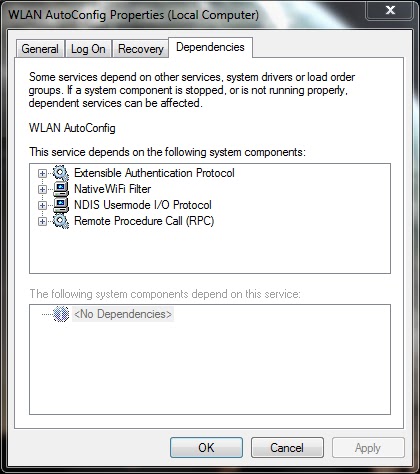
9] Similarly locate the WLAN AutoConfig service and repeat same procedure.
10] If you cant able to start the service, select the Dependencies tab and start all the services related to it by following the above steps.
Note: Also read my new post on "Bluetooth keyboard/mouse disconnects frequently in Windows 7 laptops"
Available link for download

Friday, December 23, 2016
Setup was unable to format the partition The disk may be damaged
Setup was unable to format the partition The disk may be damaged
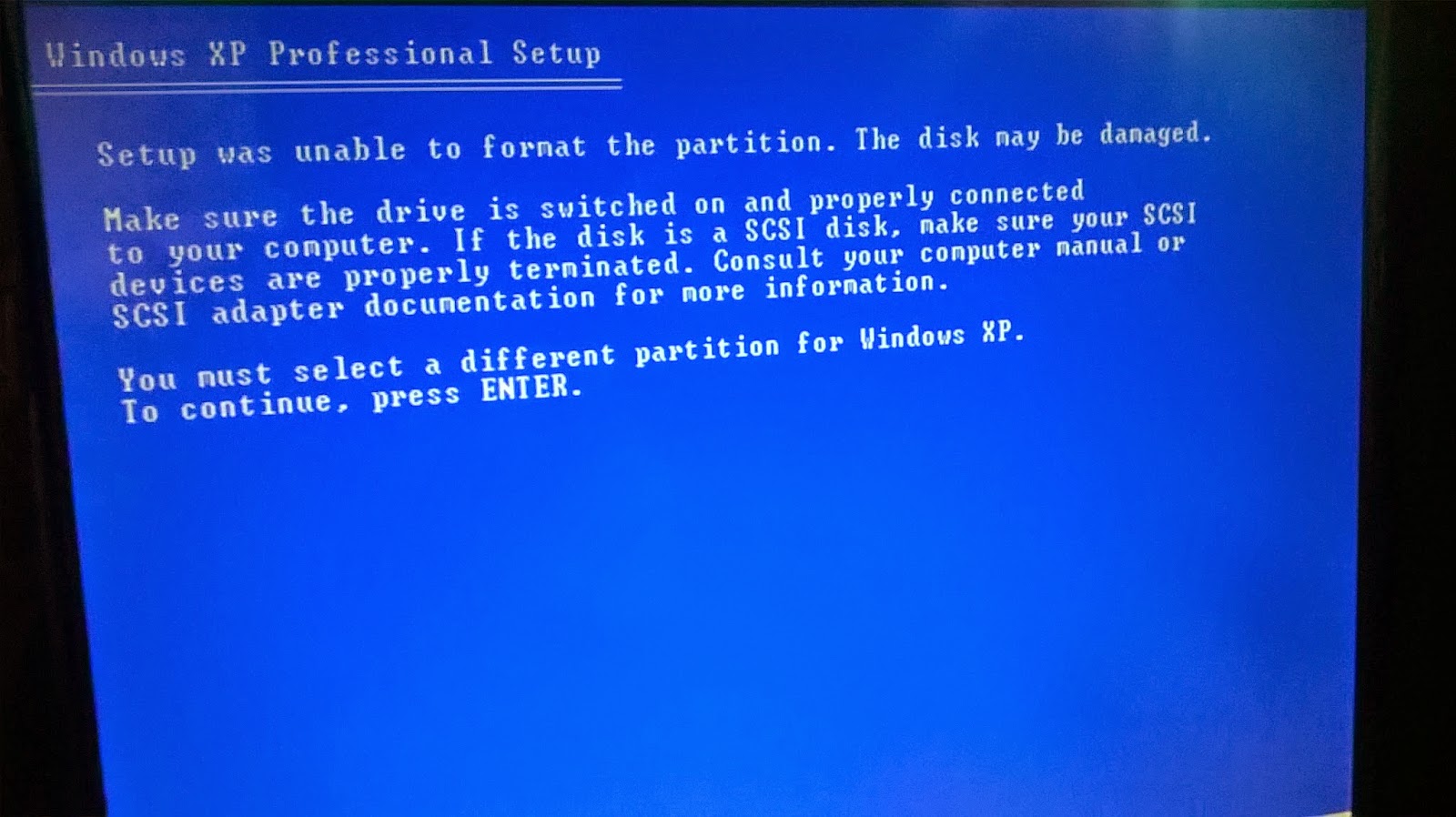
Setup was unable to format the partition The disk may be damaged Windows XP Professional Setup
Setup was unable to format the partition. The disk may be damaged.
Make sure the drive is switched on and properly connectedIf the disk is a SCSI disk, make sure your SCSI
to your computer.
devices are properly terminated. Consult your computer manual or
SCSI adapter documentation for more information.
You must select a different partition for Windows XP.
To continue, press ENTER.
solve this problem
1.Using third-party software to format the drive to NTFS/Fat32 before running XP Setup disc (If not solve .)
2.You should change hard disk drive (hdd).
I Hope This Is Permanent Solutions
Available link for download
Tuesday, October 11, 2016
Kids And Texting 3 Dangers They May Face
Kids And Texting 3 Dangers They May Face

Despite some obvious benefits, there are some drawbacks to allowing your kids access to text messaging as well. Here are just 4 dangers that they may face when they have a cell phone and send texts.
Cyber Bullying
It seems like everyday that you turn on the news there is a new story about kids getting bullied or committing suicide because they were bullied. The attacks can come from people they know or even people that they meet on the internet. It’s becoming an epidemic.Sexting
As kids get older and head into their teens, they start to get curious about their bodies and start wondering about their sexuality. Some teens have started to practice sexting, which involves sending naked pictures or suggestive text to people they know or would like to know. Many scandals have arisen from those text messages getting forwarded. Teens need to work hard to protect their reputations in a digital age and refraining from sexting is one way to do so. Since their relationships are young and volatile, a person who they trust now may be an enemy next week. What’s to stop that person from sharing those private texts that were sent?Phishing Scams
Another way kids can become victims is through phishing scams. Even with the FCC cracking down, they still exist and kids are easy pray. They usually come in the form of a text message that tricks someone into replying. Once they reply, they are signed up for a premium service and their bill gets charged. They may never know they are being scammed.Predators
Online predators are everywhere. They lurk on social media, forums and chat rooms. Make sure that your kids aren’t making themselves susceptible to these predators. Tell them to be wary of anyone who they don’t know contacting them online.What’s the solution? Teach your kids to not give their number out to just anyone. Also, they should never be sharing their phone number on social media sites like Facebook. Unfortunately many have their number on Facebook right on their profile and may not even realize it. Some of those phone numbers show up in their “friends” contacts in their phones. I was surprised when I linked my social media accounts to my phone how many private phone numbers showed up. If their phone number is in their profile someone that they don’t know could be text messaging them.
Image Credit: David Castillo
Author Bio:
Jill Myers is a mom and drivers education instructor. When not helping others learn to drive, she is contributing her knowledge to the blog at Phone Sheriff, parental control software that helps parents keep track of what they are doing online.Available link for download
Subscribe to:
Posts (Atom)