Showing posts with label use. Show all posts

Thursday, March 23, 2017

How to Use Miracast Screen Mirroring from Windows or Android To Television


How to Use Miracast Screen Mirroring from Windows or Android To Television


Miracast is a wireless display standard included in Windows 8.1 & Windows 10, Android 4.2, and newer versions of these operating systems.if older versions Miracast is not available but you can also download from Google playstore Screen 
mirroring App, With a Miracast receiver plugged into a TV or another display nearby, casting your screen should be easy.This feature is also available on devices running Amazon’s Fire OS and Microsoft’s Windows Phone 8.1 and newer. Bear in mind that Miracast is notoriously finicky and problematic.

Windows 8.1+
If your computer came with Windows 8.1 or Windows RT 8.1,Windows 10, it should support Miracast. If you’ve upgraded an old PC to Windows 8.1, it may or may not support Miracast.
You may have to get the latest drivers from Windows Update or your computer Manufacturer’s website before you’ll see the “Add a wireless display” option below.


The below option also refused to show up until we uninstalled VirtualBox on our Surface Pro 2. Miracast depends on having a “clean” networking stack, so programs that interfere with the networking stack VirtualBox, VMware, and
similar applications may need to be uninstalled
before this option will appear.

To access the Miracast options, swipe in from the right or press Windows Key + C and select the Devices charm. Click or tap the “Project” option.


To access the Miracast options, swipe in from the right or press Windows Key + C and select the Devices charm. Click or tap the “Project” option.

If you see an “Add a wireless display" option,your computer supports Miracast. To actually project to a Miracast device, tap or click the Add a wireless display option and select the device in the list. To disconnect from the wireless display, open the Devices charm, tap or click the Project option, and click the Disconnect button under the wireless display.


These options are also available in PC Setting. Click or tap the Change PC settings link at the bottom of the Settings charm to access it. Navigate to PC and devices > Devices. To scan for nearby Miracast receivers, tap Add a device. Miracast receivers you’ve added appear under Projectors on this screen.


Android 4.2+

Miracast is available on Android devices with 4.2 Jelly Bean and newer versions of Android. Android devices do need the appropriate hardware, so your Android phone or tablet may not support Miracast especially if it’s an old device that’s been updated to the latest versions of Android.We performed this process with a Nexus4 running Android 4.4.4.

First, open your device’s settings screen that’s the Settings app in your app drawer. Under the Device section, tap Display. Scroll down on the Display screen and tap Cast Screen. (You can alsocast to
Chromecast devices from here, although those
don’t use the Miracast protocol.)


Tap the Menu button at the top of your screen and select Enable wireless display. Your phone will scan for nearby Miracast devices and display them in a list under Cast Screen. If your Miracast receiver is powered on and nearby, it should appear in the list.


Tap the device to connect and begin casting your screen.A notification will appear, providing a visible indication that you’re casting your screen.Pull down the notification shade at the top of your screen and tap the Disconnect button to stop casting your screen


You can also cast from the Quick Settings screen if you’ve enabled the wireless display feature under Cast Screen. Pull down with two fingers from the top of your screen to open Quick Settings, tap the Cast Screen button, and you’ll see a list of nearby devices you can cast to. Tap one to start casting.


If your computer, smartphone, or tablet supports Miracast and you have a Miracast receiver nearby, it should be this easy. Miracast uses Wi-Fi Direct, so the devices don’t even have to be on the same network to communicate with each other.Issues with your home network or router shouldn’t even be a factor. This should simplify things, but Miracast-enabled devices often refuse to work together or have issues with playback glitches and dropped streams even after they connect.

Available link for download


Read more »

Thursday, February 23, 2017

How to Use Multimeter


How to Use Multimeter


Available link for download


Read more »

Thursday, January 19, 2017

Sandboxie Use Keygens and other cracks without infecting your system


Sandboxie Use Keygens and other cracks without infecting your system


Sandboxie - Allows you to execute dangerous but much needed files such as Keygens and/or Patches without Infecting your system.. 

Dear Friends, as you all know while downloading keygens/cracks/patches from internet are usually found to be Trojans/Viruses by our Antivirus software. But the problem arises when we desperately need that crack/keygen to run so sandboxie is the solution to all of your problems. Although i dont prefer using keygens/cracks since they involve software piracy.


How it works: Sandboxie runs your programs in an isolated space which prevents them from making permanent changes to other programs and data in your computer.


Sandboxie


The red arrows indicate changes flowing from a running program into your computer. The box labeled Hard disk (no sandbox) shows changes by a program running normally. The box labeled Hard disk (with sandbox) shows changes by a program running under Sandboxie. The animation illustrates that Sandboxie is able to intercept the changes and isolate them within a sandbox, depicted as a yellow rectangle. It also illustrates that grouping the changes together makes it easy to delete all of them at once.
Benefits of the Isolated Sandbox
Secure Web Browsing: Running your Web browser under the protection of Sandboxie means that all malicious software downloaded by the browser is trapped in the sandbox and can be discarded trivially.
Enhanced Privacy: Browsing history, cookies, and cached temporary files collected while Web browsing stay in the sandbox and dont leak into Windows.
Secure E-mail: Viruses and other malicious software that might be hiding in your email cant break out of the sandbox and cant infect your real system.
Windows Stays Lean: Prevent wear-and-tear in Windows by installing software into an isolated sandbox.


Download Here

NOTE : SUPPORT THE AUTHOR OF THE SOFTWARE BY BUYING IT..

Available link for download


Read more »

Tuesday, January 17, 2017

Whether Tantalum capacitors are safe for use in new designs


Whether Tantalum capacitors are safe for use in new designs


           The answer is "When you used properly". Tantalum capacitors are highly reliable.
They have the advantage of high capacitance per volume and good decoupling characteristics due to relatively low internal resistance and low inductance compared to traditional alternatives such as aluminum wet electrolytic capacitors.
            The catch is in the qualifier "when used properly".Tantalum capacitors have a failure mode which can be triggered by voltage spikes only slightly more than their rated value. When used in circuits that can provide substantial energy to the capacitor failure can lead to thermal run-away with flame and explosion of the capacitor and low resistance short-circuiting of the capacitor terminals.
            To be "safe" the circuits they are used in need to be guaranteed to have been rigorously designed and the design assumptions need to be met.This does not always happen.Tantalum capacitors are safe enough in the hands of genuine experts, or in undemanding circuits, and their advantages make them attractive. Alternatives such as "solid aluminum" capacitors have similar advantages and lack the catastrophic failure mode.
             Many modern tantalum capacitors have built in protection mechanisms which implement fusing of various sorts, which is designed to disconnect the capacitor from its terminals when it fails and to limit pcb charring in most cases.
If when, limit and most are acceptable design criteria and/or you are a design expert and your factory always gets everything right and your application environment is always well understood, then tantalum capacitors may be a good choice for you.

Source : electronics.stackexchange.com

Available link for download


Read more »

Monday, January 9, 2017

Why we use Zero Ohm Resister


Why we use Zero Ohm Resister


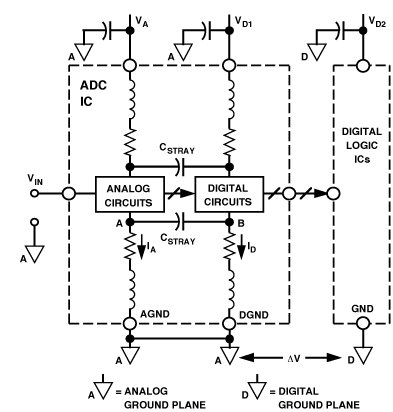
                In a mixed signal system its recommended to join AGND and DGND close to the mixed-signal IC, often the one performing the A-D function. The reason for this is to reduce differential noise in the mixed-signal IC. See the diagram below. The objective of minimising noise coupling from B to A is aided by joining the GNDs on a low-impedance ground plane. In a system with both an AGND plane and a DGND plane it is common to connect both the planes at this point with a link to minimise differential voltages. Sometimes this link is a wire with a ferrite bead, sometimes its a zero-ohm resistor or even just a narrow PCB trace.
See a good description here.
As for the Zero Ohm resistor. Think of it as a link that is easily placed by a pick and place machine during manufacture and also easily removable for experimentation on prototypes, if required. Because its a physical component, the ground plane connection is easily identifiable in PCB design tools which makes it easier for the designer and layout engineers to communicate intent.
enter image description here

Available link for download


Read more »

Tuesday, December 6, 2016

Why do we use a diac for triggering a triac


Why do we use a diac for triggering a triac


Why do we use a diac for triggering a triac?

triac phase control
               It is possible to give a gate pulse on triac directly by using something that produces gate pulses. A DIAC is just such a device and is doing just what you suggest. A TRIAC gate is not designed to switch at a tightly controlled voltage or current and if a rising voltage source is connected to the gate the TRIAC will turn on in a "soft" and ill defined manner and time location. The DIAC allows input voltage to rise to a wellish defined level and then dumps a more than high enough voltage, energy source (capacitor) into the gate.

Available link for download


Read more »

Saturday, November 26, 2016

Aero Isn’t Gone in Windows 8 6 Aero Features You Can Still Use


Aero Isn’t Gone in Windows 8 6 Aero Features You Can Still Use


http://m14hackersworld.blogspot.com

Aero Isn’t Gone in Windows 8: (6 Aero Features You Can Still Use)

Many people think Aero is completely gone in Windows 8, but this isn’t true. Microsoft hasn’t helped matters by saying they’ve “moved beyond Aero” in several blog posts. However, hardware acceleration and most Aero features are still present.

Aero is more than Glass. What’s actually gone is the Aero branding and the Aero Glass theme with transparent, blurred window borders. The Flip 3D feature, which wasn’t used by many Windows users, has also been removed.
Read more »

Available link for download


Read more »

Friday, November 4, 2016

What is MOSFETs and How to Use Them


What is MOSFETs and How to Use Them


Available link for download


Read more »

Friday, October 28, 2016

BlueStacks HD App Player Pro Use Android apps on Windows Platform Offline Download


BlueStacks HD App Player Pro Use Android apps on Windows Platform Offline Download


BlueStacks HD - An Android Emulator for Windows XP/7 & 8 - Offline Download

BlueStacks HD App Player - Android Emulator
BlueStacks HD App Player

BlueStacks HD App Player allows users to run Android applications on a Windows XP/7/8 PC. Never miss out your android touch with Bluestacks App Player. Bluestacks is a Silicon Valley-based software company that produces BlueStacks App Player and BlueStacks Cloud Connect. Both products revolve around enabling Android applications to run on Windows PCs, Macintosh computers and Windows tablets...

Click here to Download


Click here to Download the Offline Version - Direct Link

Tags: android emulator, bluestacks, how to run android apk apps on windows

Available link for download


Read more »

Monday, October 24, 2016

Use Keyboard as Mouse Trick


Use Keyboard as Mouse Trick


Use Keyboard as Mouse Trick

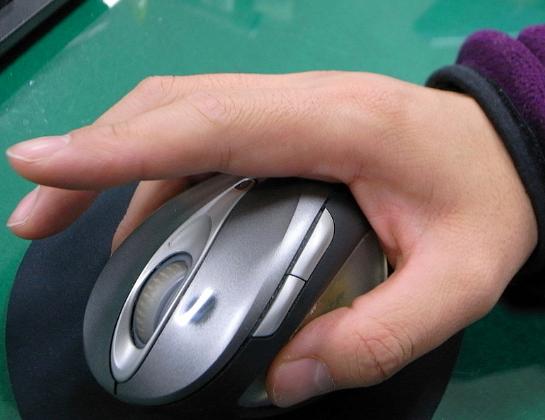
If your mouse is not working and you dont wish to wait till you get a new mouse, you would definitely like to know how you can use your keyboard as mouse. It is easy to use your mouse as keyboard in Windows using the On Screen Keyboard utility, but it is also possible to do the reverse.
Keyboard Mouse

All you need to do is:

Windows XP Users:-
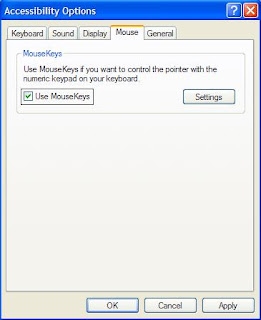
  1. Go to Control Panel.
  2. Then click on Switch to Classic View.
  3. Then Click on Accessibility Options.
  4. Then Click on the Mouse Tab.
  5. Select Use MouseKeys.
  6. Click on OK.
  7. Then activate NumberLock (by pressing the NumLk key).
  8. You should hear a beep sound.
  9. Now you can control the mouse pointer using the arrow keys on the numeric keypad.
use keyboard as mouse


More Tricks

  • Save you Facebook ID from Hackers
  • Very Basic Batch Tutorials
  • Increase facebook Followers Via List Exchange Trick
  • How to Lock a Folder in Windows 7/8/8.1
Windows 8, Windows 7 and Vista Users:

  1. Open Ease of Access Center by clicking the Start button , clicking Control Panel, clicking Ease of Access, and then clicking Ease of Access Center. 
  2. Click Make the mouse easier to use.
  3. Under Control the mouse with the keyboard, select the Turn on Mouse Keys check box.

You can also increase the acceleration and speed of your mouse movements according to your needs.

You can alternately press the Alt+Shift+Num Lock combination to instantly activate Mouse keys.
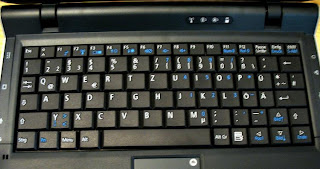
Laptop Keyboard Mouse

For laptops, this will only work if your keyboard has a numeric keypad or alternate keys which you can enable by pressing the Number Lock or the Function key.

On my laptop, number 6 key of the numeric keypad moves the mouse pointer left, number 4 key moves the mouse pointer right, number 2 key moves it down, number 8 key moves the mouse pointer up, number 5 and + key serve as right click while the number 0 key works as left click.


Available link for download


Read more »

Friday, October 7, 2016

Use Trial Software for Forever Longer Extended time


Use Trial Software for Forever Longer Extended time


There are a lot of shareware softwares and games that are available for download as a trial version. But we really get annoyed when these trial versions expire after a fixed period of time and you need to enter a serial number to continue using the software. Previously i posted tutorials "How To Get Cracks and Serials to Any Program using Craagle" and "Top Sites to Find All the Serials You Need". The bad thing is that there are softwares that is hard to find a serial numbers for them, like System Mechanic or BitDefender, thats when you should use a program which is able to freeze a trial versions, so you can use your software indefinitely forever. You can tell trial version of the software to not count days or do not bother about time. The software will stay and keep working like original software forever and will not expire or cease to work.


Time Stopper is a tiny utility which eliminate the time limit existing into trial software usage period.

Time Stopper works with any software executable file and practically will extend the trial period of the program for an unlimited amount of time.

Time Stopper is very easy to install and use: you just have to browse for the executable file of trial program (generally located in C:Program Files) and select the new installation date. Now, your program trial period will be automatically extended to another 30 / 90 days, depending on the software.

TimeStopper will not modify the time and date of the operating system, therefore is safe to use.Using Time stopper you can use trial version software without expiring. If you dont have enough trial period of any trial version software you can extend the trial period using Time Stopper.  However,We recommend to buy trial version software which you really want.

Download - Official Link


Available link for download


Read more »

Saturday, October 1, 2016

Use Facebook Gmail hacking Softwares


Use Facebook Gmail hacking Softwares


Dont Use Facebook/Gmail hacking Softwares


1.Pro Facebook hack -: Fake no need for that!!


A fake hacking tool is here i have check a BlooDy cheaters blog who shared this tool and try to hack his visiters by giving the download link of this fake software...!!


guyz if you Dont know about these softwares never use it. n0 need for that fake softwares like hacker pro 

there are many people who creates their servers and renamed wiD hacker pro software name me 2 creates 5 -6 fud servers and upload them into mediafire gess what 38 peoples download it and i recieve 25 logs. 
now B alert 


2.Facebook Freezer 200% Fake software!! ~ Dont Use it!


A fake BaD request you will Get hacked remotly!!


Fake usage of facebook freezeer?

As Mentioned by Hackers "Facebook Freezer software helps to hack Facebook account as it constantly tries to login to victim Facebook account by random password and thus, his Facebook account is locked. Thus, even when victim tries to login his Facebook account using correct password, he is not able to login to his Facebook account, thus you can hack Facebook account thanks to Facebook Freezer. This Facebook Freezer works cool on windows xp and windows vista (even supports earlier version of windows)."

itz 100% fake when you click on freeze you recieve  408 BaD request thats its! unfortunatly not your victim but you get hackeD lolz..!! these are advanceed servers which can trace your ip and hack your pc remotly.


so guyz these softwares are 100% fake you can hack fb/gmail wiD just a click!
for that you need to create servers and for smart victims crypt them and make your victim fool for hacking them...!!
I need your Feedback openion and comment to keep this Topic Alive!

Available link for download


Read more »