Showing posts with label password. Show all posts

Wednesday, March 15, 2017

Windows Password Key Christmas 2012 Promotion


Windows Password Key Christmas 2012 Promotion


Jingle bells, jingle bells... Jingle all the way....

Hello friends, Christmas 2012 is coming soon. It is a time for giving and gratitude. In this warm and wonderful holiday season,  it  marks the start of online shopping season of the year. Though 2012 Christmas is  few days away, there is a collection of software giveaways, discount sales and promotions on the Internet.
So this Christmas (25th of December), don’t be scared to take advantage of some terrifyingly great deals available on software which can potentially save you dozens of dollars.
Good news! PasswordSeeker introduces a special offer for PC users as a Christmas gift. Buy Windows Password Key Enterprise in only $44.95 ( orginal $ 79.95 , up to 35% discount) for those who want to reset any Windows domain or local password and get Advanced PDF Converter to convert word,excel,ppt to pdf or pdf to word for free now.
With this package you can easily regain access to your computer and enjoy reading PDF files made by yourself in Christmas.


PasswordSeeker may you a happy Christmas and a great promotion of your computer life  in 2012!

Just feel free to visit: http://www.lostwindowspassword.com/christmas.htm

Source: http://www.resetwindows-password.com/windowspasswordky-christmas-promotion.html


Available link for download


Read more »

Tuesday, March 14, 2017

Twitter Password hacking software free download


Twitter Password hacking software free download


Twitter Password Hacker 2016 free download
Twitter Password Hacker 2016  free download 


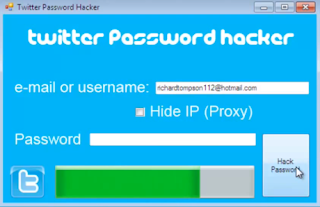
Twitter Password Hacker 2016  free download  is Free instrument to Hack any twitter account inside a moment. This Hacking device is produced by A gathering of programmers in the web. The motivation behind why they need to provide for you free is they needs just credits. Simply make an utilization of it. Its Testes and Works superbly.

PASS HACKER is the main existing arrangement permitting TWITTER clients to locate their lost or overlooked passwords. The product has an effective investigating algorithmic, a capacity to hack and rapidly unscramble passwords. You never spared the passwords? This is the thing that happens when you dont have the foggiest idea about the watchword of the record, it is difficult to associate on it. Today the main and best arrangement which can explain this is PASS HACKER. It effortlessly finds the secret word of every record!

How can it work?

Twitter Password hacking software  free download  naturally begins after you introduce it. Take after the directions on the PC screen. With the email location of the record that you entered, PASS HACKER will unravel your secret word and will indicate it on the screen of your PC with a plausibility to spare it in a content document so that you always remember it once more (it must be available). PASS HACKER is customized to decode scrambled SHA or MD5 passwords

Steps And directions:

1: First of all include the casualties id

2: Then enter your email address where you need a secret key

3: Then tap on Hack

4: After this the advancement bar will load and u will get messages if u enter substantial id u will get secret word.

5: after this check your record following 24 hours and appreciate.

Twitter Password hacking software  free download 


Available link for download


Read more »

Thursday, March 9, 2017

How to Bypass Windows XP Password to Download Things


How to Bypass Windows XP Password to Download Things


bypass windows xp passwordTo safeguard the computer, when you are trying to run some program it will ask for admin permission. How to solve that problem in Windows XP? Get the admin password or bypass windows XP password? Let’s see this question firstly:

“Tom:” I could not download anything on my sister’s Windows XP computer. When I need to download it ask for admin password and I want to know how I can bypass it to be able to download things again”

This is because you are not an administrator. Get the administrator password from your sister. If it failed, you still can resort to Windows password reset tool to bypass Windows XP password. These programs are designed to automatically recover or reset lost user credentials. This is how they work:

1. Download, Install and run a password recovery tool with an accessible PC which you can run as admin.
2. Burn a windows password reset disk.
You need to first place an empty CD /DVD or USB towards the working computer after which pick the password recovery mode: Totally reset windows local password or Totally reset windows domain administrator password. Next, choose “CD/DVD” or “USB” option. Ultimately, click “Burn” button to begin burning. Once the burning finishes, you simply remove the CD/DVD or USB.
3. Bypass unknown windows XP admin password.
Place the burned CD/DVD or USB towards the target/locked computer, and hang it boot from Compact disc/DVD or USB in BIOS. You can totally bypass password XP easily based on the simple wizard around the interface.

That is the simplest way to help you bypass Windows XP password. Since these applications are from various develop teams, their interfaces and usability differ from each other. Among them, Windows Password Recovery Tool from http://goo.gl/o9bjv is a highly-appraised one.

Check more introductions and videos for this tool and learn how to bypass your Windows XP admin password on its official site.

Video guide: http://www.youtube.com/watch?v=YCFjfSOqtsk

More detail guide on Windows password recovery on Squidoo.

Source: How to Bypass Windows XP Password?

Available link for download


Read more »

Thursday, March 2, 2017

WiFi Password Recovery v1 0 Build 1887 Full Version With Patch Latest


WiFi Password Recovery v1 0 Build 1887 Full Version With Patch Latest


With its fast speed and high performance, Wi-Fi Password Recovery enables you to recover your forgotten or lost Wi-Fi password (WPA-PSK/WPA2-PSK passwords) with ease. Moreover, it supports 5 advanced attack types to hack Wi-Fi password with no time limitation.


Wi-Fi Password Recovery  Features
  • Dictionary Attack
  • Word Attack
  • Mask Attack
  • Combination Attack
  • Hybrid Attack
How To Activate ?
  1. Download & install program
  2. Copy patch into installation directory
  3. Run patch,apply patch button
  4. Goto => Help>Registration code
  5. Enter any email & any registration code
  6. That’s it, Enjoy
Download WiFi Password Recovery v1.0 Build 1887 Full Version With Patch
File Size: ( 5 MB )
Server  Name
Download  link
https://userscloud.com/250v7txq6wps
http://www.datafilehost.com/d/f0dc278b
http://up.ht/1AjySeT
http://www71.zippyshare.com/v/u6hM5tMT/file.html
Mirror Links

Available link for download


Read more »

Sunday, February 26, 2017

Windows Password Reset Recovery Disk Win 8 7 Vista XP ISO


Windows Password Reset Recovery Disk Win 8 7 Vista XP ISO


Windows Password Reset & Recovery Disk(Win 8 7 Vista XP)[.ISO] (Size: 55.21 MB)


Windows Password Reset & Recovery CD:
Win8
Win7
Vista
XP
NT

Forgot or unknown password recovery tool - PC Login Now v2.0
Easily clear Administrator and user passwords to access PC!
This .iso image file when burned to CD is totally bootable and works great!  


 http://clicknupload.com/mvn16k4vskju
 

Available link for download


Read more »

Saturday, February 18, 2017

Advanced Office Password Recovery Pro 5 50 47 Full Version Crack Download


Advanced Office Password Recovery Pro 5 50 47 Full Version Crack Download


Advanced Office Password Recovery Professional 5.50.47 Crack-Patch-Keygen-Activator Full Version Download

Advanced Office Password Recovery Pro 5.50.47 Full Version Crack Download-iSoftware Store


iSoftware Store Present’s Advanced Office Password Recovery Pro 5.50.47 ,An advanced softwaresolution designed to help you recover forgotten or lost passwords for your Office documents, be they Word, Excel, Access Outlook, Project, Money, PowerPoint, Visio, Publisher, OneNote, Backup, Schedule+ or Mail files.

iSoftware Store SPECS

Title:

Advanced Office Password Recovery Pro 5.50.47
Filename:

setup.exe

File size:

28.30 MB

Requirements:

Windows 2000 / XP x32/x64/ Vista x32/x64/ Windows7 x32/x64 8 32-bit / 8 64-bit

Languages:

Multiple languages

Date Added:

Aug 08 , 2013

License:

Commercial Freeware

Download Latest/final Crack,keygen,patch,serial keys,license keys,activator,reg/dll crack full version download


iSoftware Store FEATURES

  •  Dictionary and brute-force attacks with user-defined masks and advanced templates
  •  Hardware acceleration (patent pending) reduces password recovery time by a factor of 50
  •  Patent-pending GPU acceleration technology with NVIDIA or ATI video cards
  •  Allows up to 32 CPUs or CPU cores and up to 8 GPUs
  •  Instantly unlocks documents with previously recovered passwords
  •  Exploits all known backdoors and tricks in the Office family for instant recovery
  •  Supports all versions of Microsoft Office applications from 2.0 to 2010
  •  Instant password recovery for multiple products
  •  Completely automatic preliminary attack may recover documents in less than 10 minutes
  •  Highly optimized low-level code for optimum performance


v Click Here To Know How to Download this file


DOWNLOAD LINKS
Uploaded Download Link
Rapidgator Download Link

Available link for download


Read more »

Thursday, February 16, 2017

How to Send Email with Password Protection in Gmail Yahoo and Outlook Encrypted mails


How to Send Email with Password Protection in Gmail Yahoo and Outlook Encrypted mails


        Privacy on Internet in becoming so tough with the some Government laws in these days, Even some big companies which say that they are give high importance to their privacy are also bending to the Governments. 
lock+email


And there are some E-mail providers like Gmail who track the emails of their users to serve the targeted ads to them. So if you would like to tighten the security of your Emails then there are some best tools available on Internet which can help you to send the encrypted emails.
Before you start using these encryption software you need to know some basic about some terms which are often used.
Public Key: This is used to encrypt the data or message. You can share this key with any one.

Private key:This key is used to decrypt the encrypted message. This key should be kept screct. In other words this key is just like your password to access the message.


Mailvelope:


  • Mailvelope Is one of the best encryption email service tool, which you can use it any where and protect your Emails from others spying on you.
  • I love using Mailvelope because it works on all the three major email providers which are Gmail,Yahoo mail and OutLook and also GMX( I dont use this service regularly).
  • Mailvelope is a open-source tool where any one can contribute to it. Mailvelope uses the OpenPGP encryption to safeguard your email.


Mailvelope is having a great and simple user interference. Sending Encryption mail using mailvelope is dead easy where even a small child can use it. And the best feature we love on mailvelope is no copying of the encrypted text or message from the email you received into mailvelope to decrypt the text or message.Mailvelope integrates directly into the user interference of almost all the web mail services.


Download Mailvelope:

Right Now Mailvelope is available as Chrome Extension you can get this from Here and for Firefox the Mailvelope is in testing stage.(At the time of writing this). You can also try it by downloading the add on from GitHub Download Link


Sendinc:

 This is a web based email service to encrypt the data. Sendinc uses the 256 bit Encryption code to safe guard your emails.This encryption is usually used by E-Commerce and Banking sites.In this web based email service your message is first encrypted with 256 bit encryption and sent to the SendInc Data centers so even the SendInc cant access your message on there servers as it is encrypted.SendInc then generates the Encryption key and sends to the recipients in the form of Link in your emailing list.When they click on that link they are redirected to other page where they can enter the password to decrypt the email.


SendInc also lets you to also encrypt the attachments in your email. In basic you can get encrypt upto 10MB of attachments.If you want to encrypt more amount of data then you need to get a paid plan from SendInc.


Available link for download


Read more »

Sunday, February 12, 2017

How to reset Windows password with Kali Linux


How to reset Windows password with Kali Linux


Download Kali Linux and burn the ISO to a CD/DVD. Boot Windows machine with the LiveCD. On the boot menu of Kali Linux, select Live (forensic mode). Kali Linux initialize and when it loads, it will open a terminal window and navigate to the Windows password database file. Almost all versions of windows password is saved in SAM file. This file is usually located under /Windows/System32/config. On your system it may look something like this: /media/hda1/Windows/System32/config. Below is the screenshot.
The SAM database is usually in the /media/name_of_hard_drive/Windows/System32/config

The screen shot below lists the SAM database file on my hard drive. The screen shot below lists the SAM database file on my hard drive.

Type command chntpw -l SAM and it will list out all the usernames that are contained on the Windows system.
The command gives us a list of usernames on the system. When we have the username we want to modify and we simply run the command chntpw -u “username” SAM

In the example below we typed: chntpw -u “Administrator” SAM and we get the following menu:

We now have the option of clearing the password, changing the password, or promoting the user to administrator. Changing the password does not always work on Windows 7 systems, so it is recommended to clear the password. Therefore you will be able to log in with a blank password. You can also promote the user to a local administrator as well.


Available link for download


Read more »

Monday, January 23, 2017

What a Powerful Windows 7 Password Recovery!


What a Powerful Windows 7 Password Recovery!


A powerful windows 7 login password provides a layer of protection for your private data, but it may be difficult that you should keep an eye on it. How to proceed should you forgot windows 7 password?
Should you register with Microsoft account, go to Microsoft account sign-in web page and totally reset it. Should you register having a local user account, following information is going to do a favor.
Windows 7 enables you to produce a password hint and password totally reset disk in front of failing to remember the password. Then when you forgot windows 7 password, you will get back or login windows PC using the following techniques:
* Recover windows 7 password with the password hint.
* Totally recover windows 7 password having a formerly-produced password totally reset disk.
* Totally reset windows XP password using another admin account.

forgot windows 7 password

Recommendation: Windows Password Recovery
The windows 7 password recovery techniques in the above list are helpful, but may be not appropriate for both you and your situation. For the reason that situation, the very best option would be to produce a boot password totally reset disk to break Windows 7 password. To get this done, you just need a competent  windows password totally reset utility.
Windows Password Recovery is a well-liked windows password totally reset tool liked by most lost windows password customers. It enables you to definitely bypass any forgotten Home windows password by burning a boot password totally reset disk with Compact disc/DVD or USB memory stick. It supports  windows 8/7/Vista/XP/2008/2003/2000. Following may be the how-to:

Part1: Produce a boot windows 7 password totally reset disk

Step One: Install the windows password totally reset tool in almost any windows-based computer that you could run as administrator.
Next, place a USB memory stick or Compact disc/DVD in computer and launch the installed application, after which click Burn USB or Burn Compact disc/DVD button to create Windows 7 password reset disk. The password totally reset disk is going to be burned inside a couple of seconds.

Part 2: Totally reset Forgotten windows 7 password with boot disk
Step One: Place the burned boot password totally reset disk within the computer you need to totally reset password of.
Step Two: Energy on the pc and hang it boot in the placed disk. After loading files, Windows Password Recovery with your windows 7 user aaccounts can look.
Step Three:Choose the consumer account you need to totally reset password of and click on Totally reset button.
Step Four:Click OK whenever a dialog box appears to see if you’re sure to totally reset the password from the selected windows 7 user account. And also the windows 7 user password is going to be totally reset immediately.
Step Five : Click Reboot button to restart the pc. Please take away the placed boot disk throughout restarting.

Once the windows 7 logon screen seems, sign in it without password. That’s all! The entire windows 7 password recovery process can cost you a maximum of a few minutes. 100% secure. No data loss or damage. You don’t need to feel frustrated whenever you forgot windows 7 password.

For more: http://www.powerpointpasswordrecovery.net/windows-7-password-recovery.html

Available link for download


Read more »

Saturday, January 21, 2017

How to Hack Facebook Password using Facebook Hacking Software


How to Hack Facebook Password using Facebook Hacking Software


Hacking Facebook Account Password: Facebook Keylogging for Hacking Facebook

Everyday I get emails wherein my readers ask me How to Hack a Facebook Account? You as the reader are most likely reading this because you want to hack into someone’s facebook account. So in this post I have decided to uncover the real and working way to hack any facebook account. Actually there are many ways to hack someones facebook password like PhishingKeylogging or using Hacking softwares used to hack facebook password. In this post im going to show you how to hack someones facebook account password using a keylogger - Emissary Keylogger.

|                               This tutorial is for Education Purpose only don’t misuse it.                                      |
|                 WWW.karanhackssmashtheworld.blogspot.in will Not Hold any responsibility.                     |

========================================================================

How to Hack Facebook Password using Keylogger?


1. First of all 
Download Emissary Keylogger. It takes screenshots of the victims computer and sends it to your gmail along with the logs.

2. Make sure that you have Microsoft .Net Framework installed in your Windows. You can download it from www.microsoft.com/net/. Else it wont work.

3. Extract the files using WinRar or any other zip/unzip program.

4. Open "Emissary.exe" to see something like this:


5. Now, fill in your Gmail username and password in respective fields (You can create a gmail account that youre going to use only for keylogging). Enter the email adress where you wanna receive facebook passwords. Choose a name for the server.exe file. You can set timer as you wish. This timer controls the time interval between two logs emails.

6. In the "Options" section you can see what this evil little buddy can do ;)
  • Block AV Sites: Blocks VirusScanning Websites on victims computer
  • Add to Startup: Adds to Startup via Registry
  • Antis: Anubis, BitDefender, Kaspersky, Keyscrambler, Malwarebytes, NOD32, Norman, Ollydbg, Outpost, Wireshark
  • Disable TaskManager: Disable TaskManager on victims PC
  • Disable Regedit: Disables Regedit on victims PC

7. Check "Trojan Downloader" to Downloade and Execute a trojan on victims PC. You can also create a fake error message and scare your victim, like:


8. After youre done, hit on "Build" and you will get server keylogger file created in current directory.

9. Now, to hack facebook password, you have to send this server file to victim and make him install it on his computer. You can use BinderCrypter or Fake Hacking Software to bind this server file with say any .mp3 file so that whenever victim runs mp3 file, server is automatically installed on his computer without his knowledge.

10. Now because this is a server.exe file you cant send it via email. Almost all email domains have security policy which does not allow sending .exe files. So to do this you need to compress the file with WinRar or upload it to Free File Storage Domains, like Mediafire, Speedyshare, Ziddu.com, etc.

11. Once the victim runs our sent keylogger file on his computer, it searches for all stored passwords and send you email containing all user-ids and passwords, like:


Now you have all victim email passwords in your inbox and you can now hack victim facebook accounts easily. I have personally tested this free keylogger and found it working 100%. Enjoy Hacking.


Very Important: Do not scan these tools on VirusTotal. Use http://scanner.novirusthanks.org and also check the "Do not distribute the sample" option.


Available link for download


Read more »

Sunday, January 1, 2017

PDF Password Remover 5 0 0


PDF Password Remover 5 0 0


PDF Password Remover 5.0.0


PDF Password Remover is a small application to decrypt PDF file with owner/master password. It can directly remove PDF restrictions on editing, copying, printing and more. And it can also used to remove PDF user/open password if you have the correct password.

Key Features
- Remove PDF Password and Restrictions
- Directly remove restrictions on editing, copying, printing and more from secure PDF files. No original passwords required.
- Able to remove PDF user/open password if you have the correct password.
- Support PDF files protected with all versions of Adobe Acrobat Reader (including Acrobat X) using different (RC4, AES) encryption methods.

Instant and Easy to Use for Everyone
- PDF password and restrictions can be removed in seconds, no matter how long and complicated the Password (If need).
- 100% security is guaranteed. No any damage or loss.
- 2 simple steps: Import PDF files-> Remove password from PDF.
- Support batch decrypting and decrypt large PDF files in seconds.

More about PDF Password
- There are 2 kinds of PDF passwords: PDF user password and PDF owner password.
- PDF User Password, also known as open password, protects your PDF files from opening.
- PDF Owner Password, also known as permissions /master password, restricts you of printing, editing or copying PDF.


http://clicknupload.com/ls5so86malxr
 

Available link for download


Read more »

Sunday, December 25, 2016

Change Window 7 Password Without Knowing Current Password


Change Window 7 Password Without Knowing Current Password


Change Window 7 Password Without Knowing Current Password

More Tricks

  • Save you Facebook ID from Hackers
  • Very Basic Batch Tutorials
  • Increase Facebook Followers Via List Exchange Trick
  • How to Lock a Folder in Windows 7/8/8.1
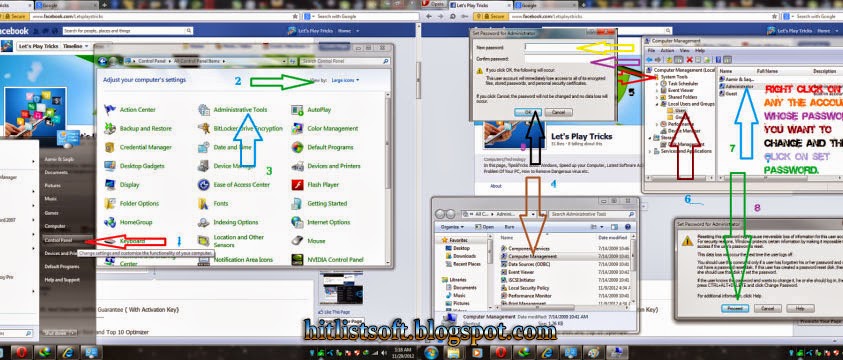
Step 1 :

Go to Control Panel and click on the Administrative Tools 

Step 2 : 

Under this section double click on Computer Management.
Select System Tools from right window pane.

Step 3 : 

Under this, just double clickon Local Users and Groups and then on Users

Step 4 : 

Now you will see all the login accounts of your computer.

Step 5: 

.Right click on any the account whose password you want to change and then click on Set Password.

Step 6 :

A warning message will popup on your screen just click on Proceed button.

Step 7 : 

Now enter your New Password and click on OK button.
Enjoy...........


Available link for download


Read more »

Tuesday, December 20, 2016

How to Recover Windows 7 Password with 3 Common Methods


How to Recover Windows 7 Password with 3 Common Methods


Is it troublesome when you forgot Windows 7 password? What if you have created a password hint or password reset disk in advance? Or What if you have another administrator account? In this post, I would like to show you 3 options to deal with forgotten Windows 7 password. With these options, forgotten windows 7 password will never be a problem.

Option 1: Try Windows Password Reset disk

Windows 7 provides the easiest method to recover forgotten 7 password by using “Password Reset Disk” which we have created it in past. We can create it through Windows User Accounts menu when we can open “Windows Control Panel”, Select “User Accounts” and then click the left pane “Create a password reset disk”.
That is also easy and only takes a few seconds. First you need to insert it into PC. At the login screen, you can see “Reset password” Option, follow the “Password Reset Wizard” tutorial to reset it. It will allow you to access your Windows 7 finally.
Tips: Definitely it is a good habit to create a password reset disk when set Windows 7 password. Who knows? We will need it someday. Many Windows users agree that it is one of the best way s to recover windows 7 password. Once it is completed, please put it in a safe place and make sure you can find it when you need it.

Option 2: Apply another Available Admin Account

But unlike Windows XP, the built-in Administrator account in Windows 7 is disabled or hidden by default. If you are able to log in your computer with other available administrative account, it’s quite easy for you to reset forgotten Windows 7 password as follows:
1. Type lusrmgr.msc in the Start search box and hit Enter to pop up the Local Users and Groups window.
2. Expand Users folder to display all the user accounts in the Windows 7 machine.
3. Right-click the account whose password you forgot and select Set Password.
4. Click Proceed to go on your operation.
5. Type and confirm your new password and click Ok.

Option 3: Get Windows Password Recovery Software

If you are unable to find your forgotten windows 7 password from the above methods then you can opt for Windows password recovery software. But which is the best solution when you need to break forgotten Windows 7 password? I have searched on the internet and found that Ophcrack, Offline NT Password & Registry Editor, PC Login Now, Kon-Boot, Cain & Abel and John the Ripper has been top 6 free windows password recovery program. Among them, Ophcrack is the most popular and also the fastest one to unlock Windows 7 password. By using LM hashes through rainbow tables, it can help you bypass forgotten win 7 password easily and quickly.

Unfortunately, on one hand, you can’t get Ophcrack to work unless you have basic password cracking skills. On the other hand, 100% password recovery rate is not guaranteed. In addition, it is no safe to use free password recovery program. So if you are computer newbie, you had better try easy-to-use windows password reset tool such as Windows Password Recovery Tool 3.0, Windows Password Key Professional, etc.

windows 7 password recovery

Here take “Windows Password Key Professional” for example. Normally, the program can easily reset the password to “Blank” with no -reformatting or installation. Do all of the job for you automatically. With it, you can reset lost passwords on all popular Windows platforms. No need of any computer skills of the forgotten Windows password; No need to ask help form others. You can solve it by yourself with this powerful tool. No matter how complicated the password is. Here I would like to give you a detailed guide on how to operate it.

How-to Guide:
(1): Get Windows Password Key Professional from www.lostwindowspassword.com and then run it on any pc except the locked one.
(2): Insert a blank CD/DVD to burn a password reset disc. Next start the burning process by click “Burn CD/DVD” button.
(3): Set this PC boot from CD/DVD in BIOS after you insert the burned password reset disc to the target PC.
(4): Start this tool with password reset disc and reset the password after a few clicks.
Note: You can try to bypass forgotten Windows 7 password with Windows Password Key Professional as well. However you should not use it to hack someone else’s pc as it is illegal. You can only hack your own pc. Other it will bring you some trouble.

Summary:

You may hear this old saying for many times: Every coin has two sides. As a result all of these ways have its pros and cons. So make certain that you apply the appropriate way according to your own situation.
At last, you probably won’t forget your Windows 7 password, but you may well need to help a friend or you family. So just share these ideas with them.

Other Hot Topics on Windows 7 Password

Maybe you just need to recover, reset or break Windows 7 password, not to bypass  win 7 password. Here I would like to share some helpful posts with you.

1. How to Break Windows 7 Password?
2. How to Reset Windows 7 Password with USB?
3. How to Reset Windows 7 Password from Command Prompt?

Source: http://www.zippasswordcracker.net/recover-windows-7-password.html

Available link for download


Read more »

Wednesday, December 14, 2016

How to reset root password


How to reset root password


1. Boot the machine and wait until GRUB Boot Loader comes up. Select recovery mode and then press e to edit.

2. Change the permission mode from ro to rw and modify boot loader file in init=/bin/bash and then F10 make the changes and reboot the system.

3. Once the system reboot, shell prompts you for the password to manage the system. Type passwd root and then type the desired password of your choice. Confirm the password and then hit enter. If new password and retype new password matches correctly, then you will get the message password updated successfully. Type shutdown -h now to press power button to shutdown the system and then boot the system again.

4. Type root and the new password. If you type the new password correctly, then you will desktop screen of Kali Linux.

Available link for download


Read more »

Saturday, December 10, 2016

WIFI Password Hacker v3 1


WIFI Password Hacker v3 1


WIFI Password Hacker v3.1

Wi-Fi  is a popular technology that allows an electronic device to exchange data wirelessly (using radio waves) over a computer network, including high-speed Internet connections. The Wi-Fi Alliance defines Wi-Fi as any “wireless local area network (WLAN) products that are based on the Institute of Electrical and Electronics Engineers’ (IEEE) 802.11 standards”.[1] However, since most modern WLANs are based on these standards, the term “Wi-Fi” is used in general English as a synonym for “WLAN”.


 =
Wi-Fi  is a popular technology that allows an electronic device to exchange data wirelessly (using radio waves) over a computer network, including high-speed Internet connections. The Wi-Fi Alliance defines Wi-Fi as any “wireless local area network (WLAN) products that are based on the Institute of Electrical and Electronics Engineers’ (IEEE) 802.11 standards”.[1] However, since most modern WLANs are based on these standards, the term “Wi-Fi” is used in general English as a synonym for “WLAN”.


HOW TO DOWNLOAD


CLICK THIS LINK FREE DOWNLOAD

WIFI Password Hacker v3.1


DOWNLOAD    LINK 1
DOWNLOAD    LINK 2


Available link for download


Read more »