Showing posts with label lost. Show all posts
Showing posts with label lost. Show all posts
Sunday, January 22, 2017
How to Find Stolen or Lost Android Mobile Using Android Device Manager
How to Find Stolen or Lost Android Mobile Using Android Device Manager
I am Sure this is Awesome post for Android lovers and will enjoy.Yes! This is something big.Now you can find your lost,Misplaced and stolen Android device easily without any third party apps.In our previous post we explained how to Trace your lost android mobile with some apps but Here in this post you dont need any app to find your device where it is. This is can done by simply using Android device manager.
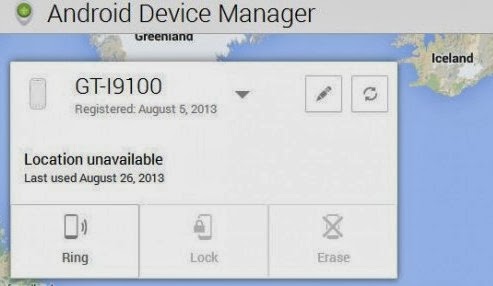
Android Manger is one which it will get installed directly on your device when you use Google play for the first time.So you dont need to download any third party apps.
Nobody knows that they will lost their device if they know that they will keep them safe for sure so maximum of people dont install any tracking app to trace their lost device.For this people android device manger can work like miracle.
Some Advantages:
- You can find your misplaced mobile or tab.
- You can erase data in your device from any where
- Helps you to trace your lost device.
- Lock your device from anywhere.
How to use Android device manger to find lost device:
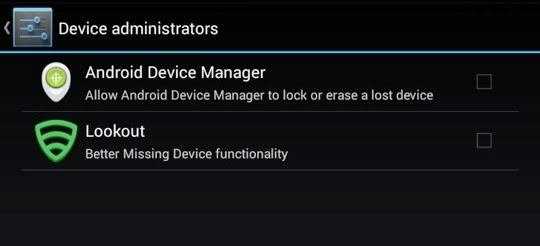
- First thing you need to do is using your device navigate to security in settings and then to device administrator.
- Now tap on it and activate if it is off.
Note: I suggest you to do this step right now because device administrator must be activate to take advantage of Android device manger.
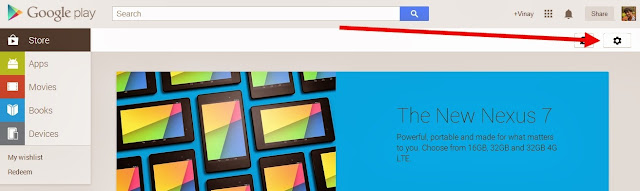
- Now go to Google Play Store.
- You can find Gear icon at right side top. Just like in below screen capture.
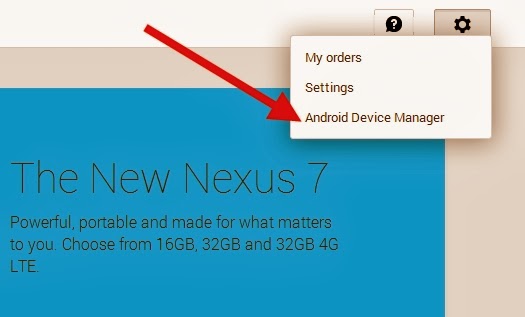
- Now Click on Gear icon then you can find three options My Order,Settings and then last Android device manager.Just click on Android device manager.
- As soon as you click on android device manager it will find the device with which it is associated.
- As soon as Android device manger find your device it will show you on Google maps. It will also indicate how far is your distance from you.
You can find 3 Options:
- Ring: If you click on Ring then your device mobile or tab will ring though it is in silent mode.This feature fails when device is switched off.
- Lock: If you click on Lock then it will lock your device and you can get new password to access your device.
- Erase: If you click on Erase then total memory in that device will be erased automatically.Make sure once you click erase then all the data will be deleted including android device manager so it wont work again.
Available link for download

Monday, December 12, 2016
How To Trace your Lost Or Stolen Laptop
How To Trace your Lost Or Stolen Laptop
Did you ever loose your personal laptop? Now-a-days all the important information is being stored in the personal or office laptops. Once they are stolen, everything is gone. Some people may also loose their jobs because of this issue. If you are worried about loosing your laptop or it getting stolen, you have to install a tracking device on your device so that you can trace it back if it goes missing. - See more at:

Prey is an open source app that allows you to keep track of all your electronic devices(laptop,tablet and mobile phones). Once you install pray on your laptop, it will silently run in the background and will wait to receive a signal through the internet from you. trace it When you have lost your laptop, you can log in to the web interface of pray from anywheretrace it in the world and send a signal to your laptop. Once the signal is received by the Prey software on your laptop, it will allow you to perform the following actions,all remotely through the internet.

Features of Software:
1. Show the location of your device on a geographical map.


To manage the tracking settings related to a specific device, simply go to the Prey Control Panel. This page will allow you to specify what actions can be performed in case your device is stolen.

Prey is an open source app that allows you to keep track of all your electronic devices(laptop,tablet and mobile phones). Once you install pray on your laptop, it will silently run in the background and will wait to receive a signal through the internet from you. trace it When you have lost your laptop, you can log in to the web interface of pray from anywheretrace it in the world and send a signal to your laptop. Once the signal is received by the Prey software on your laptop, it will allow you to perform the following actions,all remotely through the internet.
Features of Software:
1. Show the location of your device on a geographical map.
2. Take photo of the person using your device using the inbuilt camera.
3. Lock down your laptop so that it cannot be used.
4. Take a screenshot of your computer screen to find out more information about who is using your laptop. For example you may be able to capture the email account and facebook account that the user is logged into.
5.Set off a loud alarm on your missing laptop.
6. Display an alert message on your laptop screen with the text of your own choice.
7. Erase all saved passwords and history.
After completing the above steps, you can seek the help of police to trace down your laptop. But for all this, you need to install the prey software on your laptop. You can download it from the website.
· After downloading the software, start the installation wizard. Select the Configuration Prey Settings. Click on New User.
Enter your contact details and click on create button in order to create your Prey account and add your devices to it.
Log into your email account to verify your identity by clicking on the link sent to you by the Pray Project.
Once you activate your account, Prey will start working and tracks your laptop when it is lost or stolen. You can login to your web control panel and manage all the settings.
To manage the tracking settings related to a specific device, simply go to the Prey Control Panel. This page will allow you to specify what actions can be performed in case your device is stolen.
Click on Save Changes button once you complete the settings. In case your device goes missing, log in to the prey website, open the control panel change the status from OK to MISSING. After a few minutes, You will receive a detailed report about your missing device from the Prey Project.
This report may contain a bunch of information related to your missing device.
Available link for download
Saturday, October 29, 2016
Smart Partition Recovery Recovery Software Damaged or Lost Partition
Smart Partition Recovery Recovery Software Damaged or Lost Partition
Smart Partition Recovery - A tool to recover damaged or lost partition of HDD or USB Drive..
Ever encountered with " Disk not Formatted ! Do you want to Format it now ? " error, then this tiny tool can come very handy for you. The error occurs usually as a result of removing the drive while it is in use or when it is infected with a virus.. Use this tool to recover your damaged or lost partition of your drive that contains your valuable and precious data and you just cant format the drive to make that drive usable once again..
When Explorer does not find a disk, this does not mean that the data has been lost. The data is OK most of the time, but a disk boot sector is damaged. Smart Partition Recovery restores deleted logical disks. In an automatic mode, Smart Partition Recovery will easily make it possible for you to restore access to the lost sector. You can also use the "Make boot image of the system" option to make a copy of the disk boot sector as a set of files, and later you can use this copy in case of data loss. The saved files can be stored on a floppy disk, flash-drive or CD. In a manual mode, you can re-record a disk boot sector with our file. This may be a pre-recorded copy or a copy of the boot sector of a similar disk with a comparable size and file system recorded on your PC or another computer.
Note: Use the Run as Administrator command from right click context menu for Windows Vista/7/8 Users.. otherwise the software wont be able to list all or even a single of your attached or primary HDD or USB drive..
Download Here
or you can try this direct link
Direct Download
Password: kalyani-786
or you can try this direct link
Direct Download
Password: kalyani-786
Available link for download
Subscribe to:
Posts (Atom)