Showing posts with label disable. Show all posts
Showing posts with label disable. Show all posts
Wednesday, January 25, 2017
Prevent or disable Remote Shutdown From Command Prompt on Windows 7
Prevent or disable Remote Shutdown From Command Prompt on Windows 7
How To Stop Remotely Shutting Down Computers

Windows 7 Shutdown Command - The Basics

Sooner or later everyone makes the mistake of accidentally shutting down the local machine instead of the target computer that they really wished to reboot. To recover from this mistake pay close attention to the syntax of the abort command Shutdown /a.

As can be seen in the example above, youll have different options to choose from in the Remote Shutdown Dialog. First specify the name or IP address of the computer you want to shutdown by clicking the Add button. Next, select Shutdown and keep the Warn users of the action checked if you want to warn the user of the shutdown before it occurs. Next, in the Shutdown Event Tracker, choose the Option you want the Event Log to show and enter a comment.
If you are running a training session and the delegate from hell keeps shutting down other students machines by abusing shutdown -s or -r, then configure a policy to prevent Force Shutdown From A Remote Machine.
Launch GPMC or SECPOL.MSC
Navigate to Local Policies, User Rights Assignment.
Experiment by assigning just your account, rather than all administrators.
Launch GPMC or SECPOL.MSC
Navigate to Local Policies, User Rights Assignment.
Experiment by assigning just your account, rather than all administrators.
Then click Apply and ok.
How can I remotely shutdown another Windows computer?
To start the GUI version of this command click Start, Run, and in the Run line type: shutdown -i and press enter. After running this command you should see a dialog window shown in the example below.
The shutdown executable is available at the command line in Windows 7, Vista, XP and also the Windows Server family. Once you launch the DOS box by typing cmd, your first decision is do you want to shutdown (/s), or reboot (/r) the computer?
CMD-->shutdown -i window appear
Sooner or later everyone makes the mistake of accidentally shutting down the local machine instead of the target computer that they really wished to reboot. To recover from this mistake pay close attention to the syntax of the abort command Shutdown /a.
As can be seen in the example above, youll have different options to choose from in the Remote Shutdown Dialog. First specify the name or IP address of the computer you want to shutdown by clicking the Add button. Next, select Shutdown and keep the Warn users of the action checked if you want to warn the user of the shutdown before it occurs. Next, in the Shutdown Event Tracker, choose the Option you want the Event Log to show and enter a comment.
Available link for download

Tuesday, January 3, 2017
How to disable automatic page or section break in MS word 2013
How to disable automatic page or section break in MS word 2013
By default MS word has auto page/section break in which the last line of the page gets jumped to next page/column before completion of the sentence. In order to disable this feature follow these simple steps.
1. Right click on a paragraph > select Paragraph option. (OR) Click Paragraph settings button from home menu or Page layout menu.
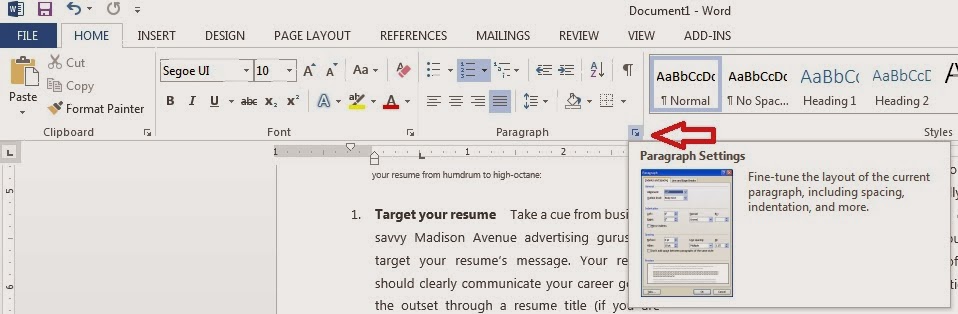
2. Clear the check box for Widow/orphan control under line and page breaks tab and click OK.
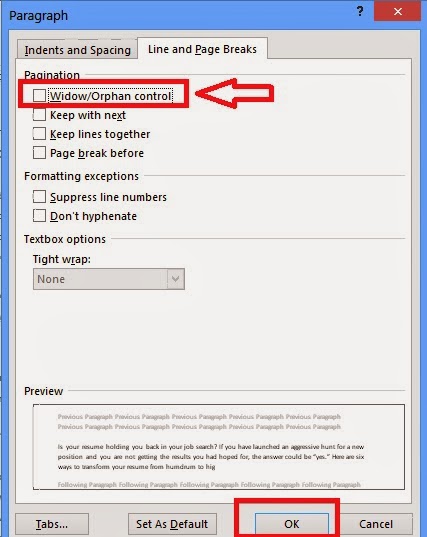
1. Right click on a paragraph > select Paragraph option. (OR) Click Paragraph settings button from home menu or Page layout menu.
2. Clear the check box for Widow/orphan control under line and page breaks tab and click OK.
Available link for download
Tuesday, October 4, 2016
Disable Windows 10 Tracking for x32 x64 bit OS Apps Download Free
Disable Windows 10 Tracking for x32 x64 bit OS Apps Download Free
Disable Windows 10 Tracking is similar to Destroy Windows 10 Spying tool. Functionality wise, it is the smallest tool but size wise it is the largest. It displays privacy options, all of which focuses on deactivating tracking.

Whats New:
1. Option to disable Windows Defender
2. Optimizations
3. Fixed "Allow Telemetry"
4. Finally changed the exe manifest to automatically request Administrator privileges.
5. Logging! If an error occurs, DisableWinTracking.log will contain detailed information about the error so we (the developers) can help you fix it.
?S: Windows 10
Instructions:
• Right click and press "Run as Administrator"
• Choose any/all of the options youd like
• Press "Get privacy!" or "Revert" to revert options
• You can read the output in the console dialog to see if it worked.
• Thats it!
Download Disable Windows 10 Tracking for x32/x64 bit OS Apps
File Size: ( 7 MB ) | |
Server Name | Download link |
 |  |
 | |
 | |
 | |
 | |
| Mirror Links | |
Available link for download
Subscribe to:
Posts (Atom)