Showing posts with label webmaster. Show all posts
Showing posts with label webmaster. Show all posts
Wednesday, November 16, 2016
How Can You Improve Your SEO Performance with Webmaster Tools
How Can You Improve Your SEO Performance with Webmaster Tools

The greatest advantage of Webmaster Tools is that it allows you to view one or more sites from the Google angle.
It is necessary if you want a strong SEO impact. With the toolset, you can view your site in a way Google does. It gives you insights into the indexed pages of your site, the various links that are pointing to it, the most popular keywords etc.
Hence, a site that is active in Webmaster Tools has much better chances of being fully indexed and rank well as compared to the ones that are inactive in the toolset. You can also get other deeper insights from the tool set, which can be leveraged to get the best Search Engine Optimization benefits.
If you are not yet active in Google Webmaster Tools, let me tell you that it’s pretty simple. All you need to do is sign up for an account, login to the dashboard of Google Webmaster Tools and from there, add your website. You will then be asked to prove that the domain is yours. On the basis of your host, Google may offer to do the needful through an uncomplicated pop-up process that allows you to login and verify in a few steps.
The other options include getting a Google-provided meta tag to your homepage, followed by an HTML file upload to the root folder of your site, or confirming your ownership with the help of Google Analytics, if that is already installed in your website. It generally starts populating data within 24 to 48 hours.
Google Webmaster Tools Features:
The best SEO Company India says that once you are done with the site set up, its time to log in and make yourself familiar with the interface. The toolset, at its core, is all about metrics i.e. what’s getting indexed, linked and traffic.The data you get should then be broken down in different ways to use it to formulate a plan regarding the steps you need to take to get your SEO campaign going.
The various Webmaster Tools metrics are:
Search queries:
It shows four metrics:
Impressions: It indicates the number of times a website is visited through a particular keyword. It, thus, helps you renew your web content with keywords of greater value.
Clicks: This shows the number of people who have taken action and clicked on your site in the search result.
CTR: This shows the number of users who have clicked on your website from the search results. If you find your number to be dissatisfactory, you can change your meta description to attract more traffic.
Middle position: This tells your exact rank for each keyword that you use. It helps you determine your performance and the impact you have on your traffic.
The best SEO company will always suggest you to use Google Webmaster Tools when developing an SEO strategy, as it offers you better opportunities and the perfect medium to determine the performance of your site.
Impressions: It indicates the number of times a website is visited through a particular keyword. It, thus, helps you renew your web content with keywords of greater value.
Clicks: This shows the number of people who have taken action and clicked on your site in the search result.
CTR: This shows the number of users who have clicked on your website from the search results. If you find your number to be dissatisfactory, you can change your meta description to attract more traffic.
Middle position: This tells your exact rank for each keyword that you use. It helps you determine your performance and the impact you have on your traffic.
Keywords:
In order to understand how your keywords are performing, you need to click on the terms while being on the search query section. Studying the data for individual keywords informs you about the pages that are ranking for those keywords. This way, you not only understand your overall SEO achievements but also get to know about the different elements of your content campaign.Top Pages:
Within “Search Queries”, you get the opportunity to view “top pages”. This indicates content that gets the maximum number of impressions and clicks. It, thus, offers low hanging fruit opportunities you can easily capitalize on.Page Level Strategy:
A site is structured in a way, so that each keyword points to a section of the website. Webmaster Tools enables you to identify ideal keywords for each of the sections. Once you get your keywords mapped, use them to rank tracking tool to find out extra data like competition and traffic.Author statistics:
It allows you to tie in guest posts on other websites by linking to your Google + account. It can be easily accomplished by the “rel=author’ tag that is embedded as a link in particular write-ups. Your picture appears next to your content; and readers find it easier to read your other write-ups.The best SEO company will always suggest you to use Google Webmaster Tools when developing an SEO strategy, as it offers you better opportunities and the perfect medium to determine the performance of your site.
Author Bio:
Sarmista Aun writes for a professional digital marketing company. She tries to guide all new online advertisers through her writings. Available link for download

Monday, October 10, 2016
How To Fix Crawl Errors In WebMaster Tools
How To Fix Crawl Errors In WebMaster Tools
How To Fix Crawl Errors In WebMaster Tools

All website owners frequently visit Google WebMaster tools to check their website’s performance. Along with Google Analytics, it is a great platform to know almost everything about your site. It tells you about the exact queries which have fetched your site the maximum clicks and about how many URLs have been crawled ever since you submitted the sitemap.
More Tricks
- Keyboard Dancing Led Light Trick
- Learn To Make Dangerous Virus In A Minute
- How To Open Number Of Sites With A Single Click ?
- How to Lock a Folder in Windows 7/8/8.1
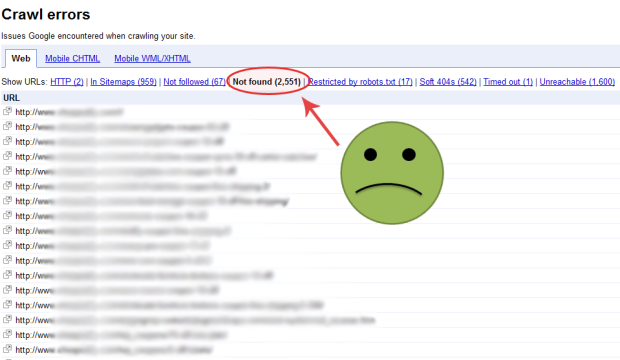
Another important feature of Webmaster is that it reminds you of any crawl error which may have been introduced unintentionally. When you open the dashboard, you see three options with the leftmost being the Crawl Errors section. Here, you can check if there is any URL on your site which is inaccessible.
In case there are no crawl errors, then things are fine. But if you do see a crawl error, it is important to remove those defunct URLs so that they do not appear in search engine results. These errors are usually 404 Not Found errors, which means that for some reason, that particular URL does not exist. So, here is how you remove them:
1. Login to your Google WebMasters account and click on Crawl Errors. You will see all the URLs which are erroneous.
2. Copy the URL. Now go to Remove URLs under Google Index in the left menu. Create a new removal request, paste the URL and submit it. Your request will be submitted and will be shown as Pending.
3. Do the same for every faulty URL.
4. Once you have submitted removal request for each URL, under Crawl Errors, tick each URL and click on Mark as Fixed. With this, the URL’s will now no longer be shown.
5. After some days, you will see that WebMaster will stop showing you any crawl errors, which means that your defunct URLs have been removed successfully.
NOTE: It is important that you fix crawl errors. This will ensure that your organic search results do not take a beating. So, if you have any errors, remove them rightaway.
Available link for download
Subscribe to:
Comments (Atom)