Showing posts with label mac. Show all posts
Showing posts with label mac. Show all posts
Monday, March 6, 2017
Mac OS X Mountain Lion Free Download
Mac OS X Mountain Lion Free Download

Mac OS X Mountain Lion Free Download DMG 10.8 App Store Release. It is final bootable OS X Mountain Lion 10.8 InstallESD.DMG File for Clean OS X Install.
Mac OS X Mountain Lion Overview
OS X Mountain Lion is the ninth arrival of the Mac OS X. This working framework was made accessible for the overall population on 25th July 2012. This form of Mac OS X includes 200 new peculiarities which has upgraded the client experience. Macintosh OS X Mountain Lion has drawn quite a bit of its persuasion from iOS which is the working framework for iPhone and iPad. The antecedent of Mac OS X Mountain Lion was Mac OS X Lion and the Mountain Lion is proposing the refinement in the status of this working framework. With Mountain Lion the client can undoubtedly deal with the substance. in the event that you are occupied with Latest Features then Download Mac OS X Yosemite.Macintosh OS X Mountain Lion has some new gimmicks and some of them are as per the following Mac OS X Mountain Lion has another and overhauled Safari program with variant 6. Notes and Reminders have been presented as individual application and are no more incorporated with Mail and Calendar. The iChat application from past OS X forms have been supplanted with Messages from iPhone. Another malware blocking framework known as Gatekeeper has been presented in Mac OS X Mountain Lion. Notice Center is the checked gimmick included Mac OS X Mountain Lion and it will inform you about the applications that has been right now opened and about their overhauls. You can likewise Download Mac OS X Mavericks which was discharged after Mountain Lion.
All things considered Mac OS X Mountain Lion is an extremely convenient working framework which has some new and some upgraded gimmicks bringing about improved client experience.


Features of Mac OS X Mountain Lion:
Below are some noticeable features which you’ll experience after Mac OS X Mountain Lion free download.- Adds 200 new features.
- Enhanced user experience.
- Inspired from iOS.
- User can easily manage the content.
- New and updated Safari browser included.
- Notes and Reminders have been included as individual applications.
- iChat application is replaced by Messages from iPhone.
- New malware blocking system Gatekeeper introduced.
- Notification Center included.

Mac OS X Mountain Lion Technical Setup Details
- Software Full Name: Mac OS X Mountain Lion 10.8 Official App Store Release
- Setup File Name: Mountain_Lion_10.8_InstallESD.dmg
- Full Setup Size: 4.05 GB
- Setup Type: Offline Installer / Full Standalone Setup:
- Compatibility Architecture: 32 Bit (x86) / 64 Bit (x64)
- Latest Version Release Added On: 12th Jan 2015
- License: Official App Store Release (To be Installed on Mac)
- Developers: Apple Mac OS

System Requirements For Mac OS X Mountain Lion
Before you start Mac OS X Mountain Lion free download, make sure your PC meets minimum system requirements.- Memory (RAM): 2GB of RAM required.
- Hard Disk Space: 8GB of free space required.
- Processor: Intel Pentium 4 or later required.
Mac OS X Mountain Lion Free Download
Click on download catch to begin Mac OS X Mountain Lion Free Download. This is finished disconnected from the net installer and standalone setup for Mac OS X Mountain Lion. This eventual good with both 32 bit and 64 bit windows.Download Here
Available link for download

Friday, February 17, 2017
Google Earth PRO Now FREE for PC MAC Download Full Version License Key Free By Google
Google Earth PRO Now FREE for PC MAC Download Full Version License Key Free By Google
Google Earth PRO Now FREE for PC & MAC: Download Full Version License Key Free By Google

Great news! Google Earth Pro, which formerly cost US$399 per year, is now available to download for FREE for both Windows & Mac. Google Earth is a geospatial software application that displays a virtual 3D interactive globe, which offers users access to world-wide imagery, and a large number of location-based layers. Google Earth Pro is the commercial-oriented upgrade to Google Earth and offers even more powerful tools.
Read more »Great news! Google Earth Pro, which formerly cost US$399 per year, is now available to download for FREE for both Windows & Mac. Google Earth is a geospatial software application that displays a virtual 3D interactive globe, which offers users access to world-wide imagery, and a large number of location-based layers. Google Earth Pro is the commercial-oriented upgrade to Google Earth and offers even more powerful tools.
Available link for download
Saturday, January 28, 2017
Get BlazeVideo Video Converter Pro for Mac with License Key Full Version free Download
Get BlazeVideo Video Converter Pro for Mac with License Key Full Version free Download
Get BlazeVideo Video Converter Pro for Mac with License Key Full Version free Download

BlazeVideo Video Converter Pro, a powerful and reliable converter for Mac OSX system comes with the ability to produce best output quality that perfectly suits almost all latest smartphone and tablet. Adjust audio/video settings, subtitle, Watermark, clip segments, crop video before sending them to portable devices.
Read more »BlazeVideo Video Converter Pro, a powerful and reliable converter for Mac OSX system comes with the ability to produce best output quality that perfectly suits almost all latest smartphone and tablet. Adjust audio/video settings, subtitle, Watermark, clip segments, crop video before sending them to portable devices.
Available link for download
Saturday, December 17, 2016
Mac OS X Common problems Solved
Mac OS X Common problems Solved
Common Mac OS X problems solved
1. Persistent Beachball -Mac Pointer Hang

Quite often, Mac pointer turns into a spinning beach ball while your Mac keep on doing the thinking. Occasionally it stays that way. Mostly with Browsers like Chrome
First, try pressing Cmd + . to cancel whatever process is running. If that has no effect, switch to Finder or another app (using Option+Tab) or from Dock, and carry on working. In case you choose to wait, the app will finish what its doing and give you its full attention.
First, try pressing Cmd + . to cancel whatever process is running. If that has no effect, switch to Finder or another app (using Option+Tab) or from Dock, and carry on working. In case you choose to wait, the app will finish what its doing and give you its full attention.
If youre convinced the application isnt going to recover, force it to quit by holding Option or by pressing Cmd+Option+Esc. Rarely, it refuses to die, or its windows may disappear while its Dock icon retains its open indicator.
Restarting your Mac will get rid of it, but could give a message saying the app failed to quit. Hold down the power button to force shutdown like you do for Windows :(
Restarting your Mac will get rid of it, but could give a message saying the app failed to quit. Hold down the power button to force shutdown like you do for Windows :(
You can also use a Unix command for this: run Terminal – found in Utilities within the Applications folder – and type sudo shutdown –h. Close other apps first to avoid losing data.
2. Deleting of File by Mistake
When you think youve mislaid an important file is to ask Spotlight. Press Cmd+[Space] to open the search bar, and type as much of the filename as you remember; pause after each letter to see what comes up.
If youve overwritten your work with a new file of the same name, or emptied the Trash, youve have a problem. if you have backed up Time Machine users you may be in luck, as Spotlight will find files that dont currently exist but have been backed up. The software is built into OS X 10.5 and later, and you only need is a USB or FireWire hard disk.
If you havent set it up yet, you may need a disk-recovery utility such as Data Rescue 2. This detects and restores deleted files as well as tackling more general disk problems.
Its wise to stop using the disk as soon as you realise youre missing something; the likelihood of rescuing a deleted file depends on whether new data has been saved over it.
3. Documents open in the wrong app
Although hardly a catastrophe, this can be an ongoing source of frustration. Yet its easy to fix once you know how. For example, when you download a JPEG file, double-clicking it will normally open Preview. But if you habitually use Photoshop to work with photos, Preview may be irrelevant.
To change this, select any JPEG and press Cmd+I (Get Info). Under Open with, select your preferred app, such as Photoshop, and click Change All. Confirm this and all JPEGs will always open in Photoshop.
This works for any combination of file type and compatible application. The files themselves arent changed; youre just altering the Mac OSs list of file associations.
4. Mac wont start
A total lack of response to the power button could mean a blown fuse in the plug, so check first. If its not completely dead, the Mac will do a power-on self-test (POST) as it boots up, and beep if it finds a fault. The power LED may flash too.One, two or three beeps points the finger at RAM modules (see here for more info). Try easing them into place, in case theyve become unseated. Your manual will tell you how to get at the RAM, or go to www.apple.com/support and search for install memory and your Macs model name.
Four and five beeps indicate problems with the system ROM or processor, while the Air also has an SOS code consisting of three short, three long and then three short beeps. If you hear these, seek professional Mac help.
5. Mac Kernel panic
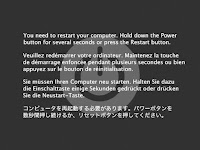
When the OS crashes it can only bow out with the message You need to restart your computer. This is a kernel panic. Its rare and, thankfully, often fixed by restarting.
If not, try unplugging all add-ons from your Mac and restarting. Internal upgrades – including dodgy RAM – can provoke kernel panics, as can devices such as USB hubs. Another possibility is that a system file has become corrupted.
Restart while holding x; if this works, go to System Preferences, click Startup Disk and ensure the correct disk is selected. Or, restart holding down Option, releasing it when icons appear; youll be asked which disk to start up from. Or zap the PRAM (see the tip above).
If none of those work, perhaps youve moved, renamed or deleted a system file. Reversing this may sort it out – or not.
The last resort is to reinstall Mac OS X. Start up from your Macs OS X DVD, run the installer and choose Archive and Install. Youll need to reinstall your apps, though.
Available link for download
Friday, December 2, 2016
Capture One Express 6 for Mac PC with Serial key Full Version Free Download
Capture One Express 6 for Mac PC with Serial key Full Version Free Download
Capture One Express 6 for Mac & PC with Serial key Full Version Free Download

Capture One Express 6 is an essential raw converter and image editing software with wide range of camera support and high performing processing that give you the power to achieve the ultimate image quality from your raw files and edit and enhance your images like a professional.
Read more »Capture One Express 6 is an essential raw converter and image editing software with wide range of camera support and high performing processing that give you the power to achieve the ultimate image quality from your raw files and edit and enhance your images like a professional.
Available link for download
Tuesday, November 22, 2016
How to Get the Mac OS X 10 11 El Capitan Public Beta Preview
How to Get the Mac OS X 10 11 El Capitan Public Beta Preview
Lately Apple announced the release of their newest Mac OS X version at this years WDC- Worldwide Developers Conference, and its called "El Capitan."
Like the majestic rock formation its named after (located within Yosemite National Park), El Capitan promises to emphasize and expand on some of the great features we used on 10.10 Yosemite.
If you cant wait for few months to try out some of the new features coming this fall, like more intuitive Spotlight searches and improved window management, then do sign up for the Public Beta preview, which isnt exclusive to just developers.

How to Sign Up for the El Capitan Beta Preview
To sign up for the Public Beta preview right now, visit the Apple Beta Software Program page.
Start by hitting "Sign Up," then enter in your Apple ID credentials and accept the agreement to join the OS X Beta Program. This will sign you for both the iOS 9 and OS X 10.11 Public Betas. If youre already a member, just sign in.
Then move to the Enroll Your Devices page for Mac OS X and hit the "Download" the OS X El Capitan Public Beta" button.
This will open up the Mac App Store, automatically redeem your redemption code, and start downloading the El Capitan Public Beta.
Once youve downloaded it, I suggest you create a boot-able install disk before you install it. That way you can install it on your other Macs too without having to re-download the file. Also, its better to create a separate partition for El Capitan, so your Yosemite one is unharmed.
Available link for download
Wednesday, November 2, 2016
Disk Drill Free MAC Data Recovery Patch
Disk Drill Free MAC Data Recovery Patch
Disk Drill Free MAC Data Recovery + Patch
