Showing posts with label computers. Show all posts

Tuesday, February 28, 2017

Computers Notebooks Motherboard Components


Computers Notebooks Motherboard Components


Computers: Notebooks Motherboard Components:


  • 802.11 Power Amplifier
  • 802.11 Transceiver
  • Analog Video
  • Audio
  • Battery Chargers
  • Battery Selectors
  • Bluetooth® Power Amplifier
  • CPU Power
  • DDR Power
  • Digital Video
  • Docking Station
  • eSATA/iSATA
  • Fan Control
  • Fuel Gauges
  • Graphics Power
  • Headphone Amplifier
  • I/O Power
  • Integrated Amplifier
  • LAN
  • Laser Driver
  • LCD Display
  • Low-Noise Amplifier (LNA)
  • Microphone Amplifier
  • MIMO/Pre-802.11n Transceiver
  • PCIe®
  • PMIC
  • Protection ICs
  • Speaker Amplifier
  • Temp Sense
  • USB 2.0/3.0
  • Wireless
  • Wireless Video
:

Available link for download


Read more »

Monday, January 30, 2017

Connect All your Computers with Single Mouse and Keyboard


Connect All your Computers with Single Mouse and Keyboard


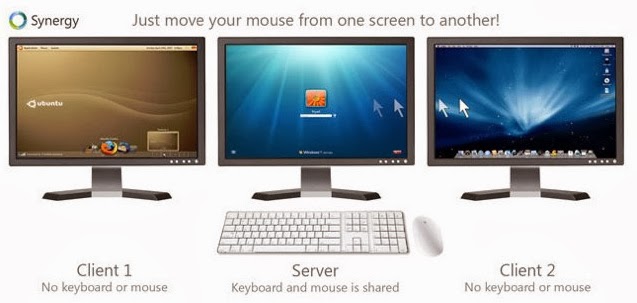
        Every computer has a keyboard, mouse, and monitor but now there is no need to have mouse and keyboard for every computer. If one computer has Keyboard then it can be used on other computers too without disconnecting the mouse and keyboard. So one mouse and keyboard are sufficient to manage all the things on multiple computers. This is made possible by Synergy.

single+keyboard+for+different+PCs

About Synergy:

Synergy is a small and powerful tool which lets you to use the mouse and keyboard on your different computers as a single mouse for all your computers.
Using synergy is so simple,It has simple user user interference which makes the users to understand the settings easily.
Synergy supports all the three major desktop operating systems Linux,Windows and MAC Os,(Under development for Mac OS X Mavericks). It is available for both 32 bit and 64 bit computers in respective formats.
connect+pc+with+single+mouse+and+keyboard

Here are great features of Synergy:

  • Supports encryption of information between your computers. (This way you can portect your files from bad guys in your network).
  • Simply move the mouse to the computer on which you want to work with your keyboard.
  • Copy the files to clipboard and share the files in other computers!.
  • Drag and Drop feature is avaible for Windows and MAC computers.
  • Only a local network connection is needed which establishes the connection between your computers.

Once look at below things:

  • Before you continue further make sure that the computers you want to use are on the same local network.
  • Make sure you turn on the network discovery and your computers are visible on local network.
  • And you need to know these terms that will be used here in this tutorial.
Server System: Here the server system is your main computer to which the mouse and keyboard are connected.
Client System: Here the client system is your secondary computer to which there is no mouse and keyboard connected. There can any number on client systems.

Installing-Configuring Synergy on your Computers

  • Now Download the Synergy software respective to your Operating systems.
  • For example if you are running Windows then you need to get the Windows version on Synergy from here [official link].
  • And if you are using Linux or MAC OS then you can get the Synergy verison which supports from here [Official link]
  • First Download this Synergy on to the server system ( which is connected with mouse and keyboard).

Configuring the server system:

  • After installation when you run Synergy on your computer you are allowed to choose the type of the computer(server or client).
  • As you have installed this software first on the system which is going to act as server. we are showing on configuring the server.
  • Click on the "configure server".
  • As you hit on "Configure Server" You will be presented with a new window titled server configuration.
2
  • Here in this screen shot Linux-Mint is my server computer and Windows 7 is my client computer (which doesnt have mouse and keyboard connection).
  • If you know what you are doing with the settings then you can play with the other advanced settings else leave them.
  • Now hit on save to complete your server configuration!.
  • And note down the server  IP address shown in the window.

Configuring the client computer:

  • Client computer is your another computer which doesnt have the mouse and the keyboard.
  • You need to install the synergy software on client system too.
  • Configuring the client computer is same as configuring server machine.except choosing the client option instead of server option (in server configuration).
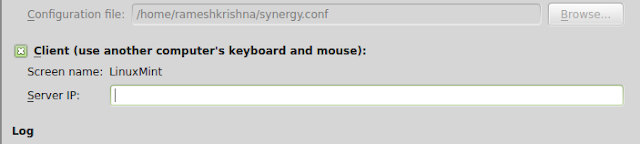
4
  • After selecting it enter the server ip address. Click on apply.
  • To starting sharing the computer.open your server computer and click on start then click on start on the client computer.
Thats it you are now done and you can share the single mouse and keyboard on multiple computers.
If you have liked this open source software..Please support them by donating.
If you feel this is hard to setup you can try the ShareMouse software which does the same work as Synergy.

Available link for download


Read more »

Wednesday, November 2, 2016

How To Hack Into Computers Through WiFi


How To Hack Into Computers Through WiFi


The internet is ever growing and you and I are truly pebbles in a vast ocean of information. They say what you don’t know can’t hurt you. When it comes to the Internet believe quite the opposite. On the Internet there a millions and millions of computer users logging on and off on a daily basis. Information is transferred from one point to another in a heartbeat. Amongst those millions upon millions of users, there’s you.

In this tutorial i am going to show you how to to access someones facebook, youtube, and many other accounts which is using the same WiFi as you.

You need:
  1. Mozilla Firefox
  2. Firesheep - A Firefox extension that demonstrates HTTP session hijacking attacks.
  3. WinPcap - WinPcap is an open source library for packet capture and network analysis for the Win32 platforms. It includes a kernel-level packet filter, a low-level dynamic link library (packet.dll), and a high-level and system-independent library.

Step 1: Install WinPcap then drag the Firesheep add-on, and put it on the Firefox icon. Firefox will open and will ask you to install the add on. Install it and restart Firefox.

Step 2: Open the add-on (You can do it by clicking on View -> Sidebar -> Firesheep), then click on Start Capturing and itll start capturing, and as soon as somebody logs in any account itll show up the logs, and then you can access their account.

Simple, but functional and VERY effective method to hack someones facebook, youtube, myspace, etc. account through WiFi.

Available link for download


Read more »