Dell OptiPlex 210L desktop drivers for Windows XP And Vista
Dell OptiPlex 210L desktop drivers for Windows XP are available on Dell’s official website, but drivers for Windows Vista are not available. You can find all the necessary Windows XP and Windows Vista drivers for Dell OptiPlex 210L on this page.
Download Dell OptiPlex 210L Desktop Intel 915GV
Chipset Driver for Win XP
Description: Intel 82915GV Chipset Utility for Windows XP only Download For XP:R96614.EXE
Download Dell OptiPlex 210L Desktop Sigmatel
Audio Driver For Win XP/Vista
Description: SIGMATEL STAC 92XX C-Major HD Audio Driver for Windows XP and Windows Vista Download For XP:R107671.EXEDownload For Vista:SIGMATEL_STAC-92XX-C-Major-H_A06_R182475.exe
Download Dell OptiPlex 210L Desktop Intel Lan
Card
Driver For Win XP/Vista
Description: Intel (R) PRO/100 VE Network Connection Driver for Windows XP and Windows Vista Download For XP:R105478.EXE Download For Vista:R105786.EXE
Download Dell OptiPlex 210L Desktop Conexant
Modem Driver for Win XP/Vista
Description: Conexant D850 56K V.9X PCI DF Modem ULD Driver for Windows XP Download For XP:R73044.EXEDownload For Vista:R162404.exe
Download Dell OptiPlex 210L Desktop Intel
Graphics
Driver For Win XP
Description:Intel 82915G/GV/910GL Grantsdale G Integrated Video Driver Windows XP Download For XP:R105167.EXE
How to Bypass Windows XP Password to Download Things
To safeguard the computer, when you are trying to run some program it will ask for admin permission. How to solve that problem in Windows XP? Get the admin password or bypass windows XP password? Let’s see this question firstly:
“Tom:” I could not download anything on my sister’s Windows XP computer. When I need to download it ask for admin password and I want to know how I can bypass it to be able to download things again”
This is because you are not an administrator. Get the administrator password from your sister. If it failed, you still can resort to Windows password reset tool to bypass Windows XP password. These programs are designed to automatically recover or reset lost user credentials. This is how they work:
1. Download, Install and run a password recovery tool with an accessible PC which you can run as admin. 2. Burn a windows password reset disk. You need to first place an empty CD /DVD or USB towards the working computer after which pick the password recovery mode: Totally reset windows local password or Totally reset windows domain administrator password. Next, choose “CD/DVD” or “USB” option. Ultimately, click “Burn” button to begin burning. Once the burning finishes, you simply remove the CD/DVD or USB. 3. Bypass unknown windows XP admin password. Place the burned CD/DVD or USB towards the target/locked computer, and hang it boot from Compact disc/DVD or USB in BIOS. You can totally bypass password XP easily based on the simple wizard around the interface.
That is the simplest way to help you bypass Windows XP password. Since these applications are from various develop teams, their interfaces and usability differ from each other. Among them, Windows Password Recovery Tool from http://goo.gl/o9bjv is a highly-appraised one.
Check more introductions and videos for this tool and learn how to bypass your Windows XP admin password on its official site.
Video guide: http://www.youtube.com/watch?v=YCFjfSOqtsk
More detail guide on Windows password recovery on Squidoo.
Windows Password Reset Recovery Disk Win 8 7 Vista XP ISO
Windows Password Reset & Recovery Disk(Win 8 7 Vista XP)[.ISO] (Size: 55.21 MB)
Windows Password Reset & Recovery CD: Win8 Win7 Vista XP NT
Forgot or unknown password recovery tool - PC Login Now v2.0 Easily clear Administrator and user passwords to access PC! This .iso image file when burned to CD is totally bootable and works great!
Make Flash USB drive Bootable for Windows XP Vista 7 8 or Linux
Making your USB Drive Bootable for Windows XP, 7 and 8 and Linux and/or based Systems.. (Links Updated)
Dear Readers, Today i will tell you about Bootable USB Stick and how to create a Bootable USB Drive, you dont need to search the internet over and over again to find the right tool for creating a bootable usb device for your needs...
Bootable USB Drive is just like a normal usb drive but it lets you boot your PC directly from USB Stick eliminating the need of a CD/DVD drive... thatll allow you to perform actions such as Installing an Operating System and / or Running Bootable Iso Files such as Antivirus Rescue Disks or Other Softwares that Run in offline mode and needed to be burned on CD/DVDs in the form of .ISO file to become operatable... There are many tools available
Windows 7 USB/DVD Download Tool (For Windows 7 and 8): This tool is provided by Microsoft itself. There is no need to find or search the internet for any other software/tool thatll make your USB bootable. This could be used for Making Bootable Windows 7 and Windows 8 Platform USB device... It wont work for Windows XP as it lacks the Install.wim file... NOTE: DotNET Framework 2 or higher (.Net FX) is required for this tool to work/Works best with Dot Net Framework 3.5... You can easily obtain Dot Net Framework 3.5 for Windows 7 on Microsofts official Downloads Page while you need to follow this guide to install dotnetfx3.5 for Windows 8 --> "How to Install Dot Net Framework 3.5 on Windows 8 All Editions"
Novicorp WinToFlash: Novicorp WinToFlash has always been my first choice to create bootable usb drives when it comes to Windows XP. It is very simple to use, you only need to enter the path, where you had extracted your Windows .ISO file (or mount the .ISO file and then browse to path). It is very handy tool for Windows XP, Vista, 7 and now it also supports Windows 8...
UNetbootin: When it comes to install rescue disks on bootable usb pen drives, UNetbootin has always been my first choice because not only UNetbootin allows you to create bootable Linux based .ISO image files but it also allows you to create bootable USB Pen drives for Linux Operating Systems and its variants such as Ubuntu etc. as well... and also allows you to download .ISO Image files and Create Bootable USB device directly from within..
So, whenever you need to make a bootable USB drive, no matter which family it belongs to, all you need is above listed three free tools... Nothing else.. Enjoy and Click on Name of tool to Download requisite tool... Tags: bootable usb ; create bootable usb disk ; bootable rescue disk ; install iso image on usb ; install windows xp/vista/7/8 from bootable usb pen drive ; install ubuntu / linux from usb ; install windows from usb
Free Download Microsoft Windows XP Service Pack 2 Ultimate Professional Enterprise 32 Bit Software or Application Full Version For Windows
Windows XP 64 Bit ISO Free Download Bootable Image. Its Windows XP Professional 64 Bit SP1 ISO Direct Single Link. Download Windows XP Pro 64 Bit ISO Free.
Microsoft Windows XP Service Pack 2
Description:- Microsoft Service Pack 2 for Windows XP as a complete download. Microsoft pounces on the subject of security. With SP2 for Windows XP to Windows machine finally be better protected against worms and viruses. Microsoft wants to cover with SP2 following security techniques: Network security: protection against attacks from the Internet, especially against worm attacks like Blaster. Memory protection: protection against the dreaded buffer overflow or underflow Secure e-mail: protection against e-mail worms like Sobig through improved control of attachments in Outlook Express and Windows Messenger. Secure web surfing: malware protection by security zone changes and convenience additions such as pop-up blocker.
Improved recruitment options: Central Management for security settings. Want to achieve the ambitious goals of the approximately 270 Mbyte thick SP2, which has a security center, where the new firewall, antivirus software and updates are managed. Furthermore, some security-critical services not automatically loaded and Windows sees itself with memory protection features of the new 64-bit CPUs. Known programs out version updates: Internet Explorer, Outlook Express, Movie Maker, Media Player.
After the repeated attacks by worms and viruses is Microsoft with this update of the operating system primarily on safety. With the Windows XP Service Pack managed to adjust network, email and memory now from a central location. The Service Pack 2 is now obsolete. We therefore recommend the download of Windows XP Service Pack 3. The core of this service pack is the new Security Center. From there, it can manage the firewall, virus scanner, and the updates and control. After installing the service pack Windows waived out some security-critical services to load at system startup. In addition, Microsoft has integrated a new function for memory protection to impede virus or worm attacks.
During the installation, the Internet Explorer, Outlook Express, Media Player, and a number of other programs are automatically updated. Part of the update is also Movie Maker 2.1.
Conclusion With Windows XP Service Pack 2, Microsoft has closed some loopholes in Windows XP. For safety reasons, however, the download of the recent Windows XP Service Pack 3
Hint With Service Pack 2 for Windows XP may result in some programs initially compatibility problems. Especially firewall software from other vendors could come with the built-in Windows firewall to poach. Many software manufacturers do offer already on updates for their products, but many others can certainly wait a while longer.
Windows xp Genuine Advantage Remover Full Version Patch
Windows xp Genuine Advantage Remover Full Version Patch,Crack,Keygen and Serial
Genuine Advantage Remover:- Genuine Advantage is a software that allow you to Remove Genuine Advanage From Your windows xp.Genuine Advantage appear when you update your window from microsoft.Genuine Advantage Check your Window that it is original or not.
Steps of Advantage Remover:- To Remove the Genuine Advantage From Your Windows XP then Follow the given steps:
1:, Double Click on "Installer.bat" File. 2:, Double Click on "Wga Tray" File . 3:, Double Click on One of the Licence key in The Licence Folder. 4:, Dialog box asking "Are You Sure You Want to Continue". 5:, Click on "Yes". 6:, Reboot Your Computer. 7:, Then again Click on Wga Tray nd License Key. 8:,Dance Arround The Room.
>>Hey Guys Diz Time Extreme Hack That You Will Never Imagine But Its Truth and We have Done It. This Time I will explain How to Install Windows XP In Just 10 minutes.<< Read On Enjoyyyyyy!~
As We all know that During Formatting a Computer After the File Copying is Completed then windows Require 39 Minutes Time...But What Extreme In It.... Yes We can Bypass this faking Time .... How TO DO IT??? So read On.. I have Included Snaps Shots That will help you.
>> INSTALLING WIN XP IN 10 MINUTES! <<
STEP1 : After the Copy Part is Over ... System is Rebooted as we all know In general Foramatting Procedure... Now After Reboot The Below Image Will Appear..
.STEP 2: Now As This Image APPEARS You Have to Press "Shift + F10 " . This Will Open The command Prompt... Now type taskmgr in it. This will open the Task manager .
STEP 3 : After The task Manager Opens Goto Processes ... And Find "Setup.exe" process and Right CLICK on It.... and set the Priority to Highest..
STEP 4: Now Just Watch the Set It will take around 9 minutes and 2 minutes for Tolerance(depends System to system)....
Thats the Overall Tutorial...Hope You all Have LIKED IT...
So When you Format your PC Next Time It will Really Save Your TIME i.e around 20 to 25 minutes....Enjoy Hacking.
1.At first you need a bootable CD/DVD/Pen drive. 2.Then you plug in pen drive or CD/DVD in your pc or laptop. 3.How to setup first boot device . 4.Press any key from CD DVD ROM....... then press any key from keyboard.
Windows XP Genuine Maker - Make your copy of Windows XP Genuine for SP1, SP2 and SP3
Need to activate your copy of Windows XP SP1/2 or SP3.. No need to search for Cracks and/or other activators that are packed with Trojans and Viruses and other Malware. All you need to is Download the provided .reg file and Just double click this registry file and add it to your system registry.. Thats all.. DONE.. Nothing you need to do after this.. Your Windows will achieve the Genuine Status and You can use Windows Updates and/or Microsoft Security Essentials and other Products from Microsoft that requires validation of Windows including Windows Media Player.
Password : kalyani-786 ( not required now ..) Download Here <--- Links Updated or you can try this direct link Direct Download Tags: Windows XP Genuine, Genuine windows xp, windows xp sp3 genuine maker, registry for windows xp to make genuine
...If You Want To Install Windows Xp Through USB You have to follow some easy Steps... 1.Download Bittorrent By Click on Below Image of Bittorrent And Then Install It...
2.Download PowerIso Full version From Below... 3.Install Power ISO And Then Register It... 4.Download BOOT.IMG. 5.Then Open PowerIso and go to action>Boot>Add Boot Information.And open boot.img that you download from above. 6.After this Add Files Of Windows Xp to POWERISO. 7.Click on Save and save as .ISO. 8.After All Above Process... 9.Download Rufus By clicking here... 10.Enter Your USB of At Least 2 GB. 11.Set Refus From Fat32 to NTFS. 12.Select your ISO of Windows Xp and Click on Start.. 13.Wait 20-35 mins. 14.After Finalizing reboot your computer. 15.boot from usb and then enjoy.
On Windows 9x and Windows NT families of Windows operating system, tapping the Windows key by itself opens the Start menu.
Pressing the key in combination with other keys allows invoking many common functions through the keyboard. What Windows key combinations ("shortcuts") are available and active in a given Windows session depends on many factors, such as accessibility options, the type of the session (regular or Terminal Services), the Windows version, the presence of specific software such as IntelliType and Group Policy if applicable.
Below is a list of notable shortcuts. Unless otherwise noted, they are valid in the next version of Windows.
Windows XP shortcut key list[edit]
The following shortcuts are valid in Windows XP:
? Win+B selects the first icon in the Notification Area.
? Win+D shows the desktop, or restore hidden programs when pressed a second time.
? Win+Eopens Windows Explorer.
? Win+F opens Windows Search.
? Win+CTRL+F opens Search for Computers. Requires Active Directory Domain Services.
? Win+CTRL+ALT+? Enter toggles full screen in Internet Explorer. This shortcut has been discontinued, replaced by F11.[when?]
? Win+F1 opens Windows Help.
? Win+L locks the desktop and prepares for switching users if Fast User Switching is not disabled.
? Win+M minimizes all windows.
? Win+? Shift+M restores windows that were minimized with ? Win+M.
? Win+R opens the Run dialog box.
? Win+U runs Utility Manager.[5]
? Win+Pause or ? Win+Break opens System Properties.
Windows XP Media Center Edition shortcut key list[edit]
Windows XP Media Center Edition adds the following:
A disk read error occurred Fix for Windows XP Vista 7 8
Why A disk read error occurred appears
The “A disk read error occurred error” appears on a black screen without an identifiable error code:
A disk read error occurred
Press Ctrl+Alt+Del to restart
Pressing the Ctrl, Alt and Del keys will only restart the computer and boot into the same error screen:
In most cases the error can appear for any of the following reasons:
faulty hard drive
IDE cables failing
bad RAM memory
issues with your computer’s BIOS version
Fix with Easy Recovery Essentials
Easy Recovery Essentials can fix many errors such as this automatically using its built-in Automated Repair option. EasyRE is currently available for Windows XP, Vista, 7 and 8 and can be downloaded and created on any PC.
Download Easy Recovery Essentials. Make sure to note your Windows version (XP, Vista, 7 or 8) before you download EasyRE. This guide can help you identify what version of Windows you have installed.
Burn the image. Follow these instructions on how to burn the bootable ISO image very carefully, as making a bootable CD can be tricky! Alternatively, these instructions explain how to create a bootable EasyRE recovery USB stick/drive.
Boot up your PC from the Easy Recovery Essentials CD or USB you created.
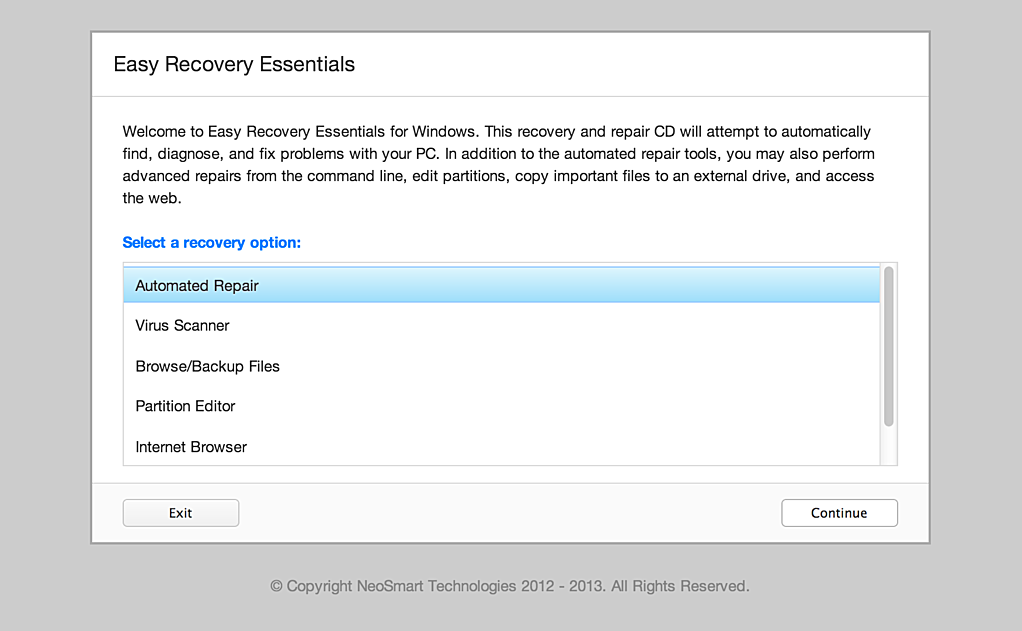
Once EasyRE is running, choose the “Automated Repair” option and click Continue.
Choose “Automated Repair” in Easy Recovery Essentials
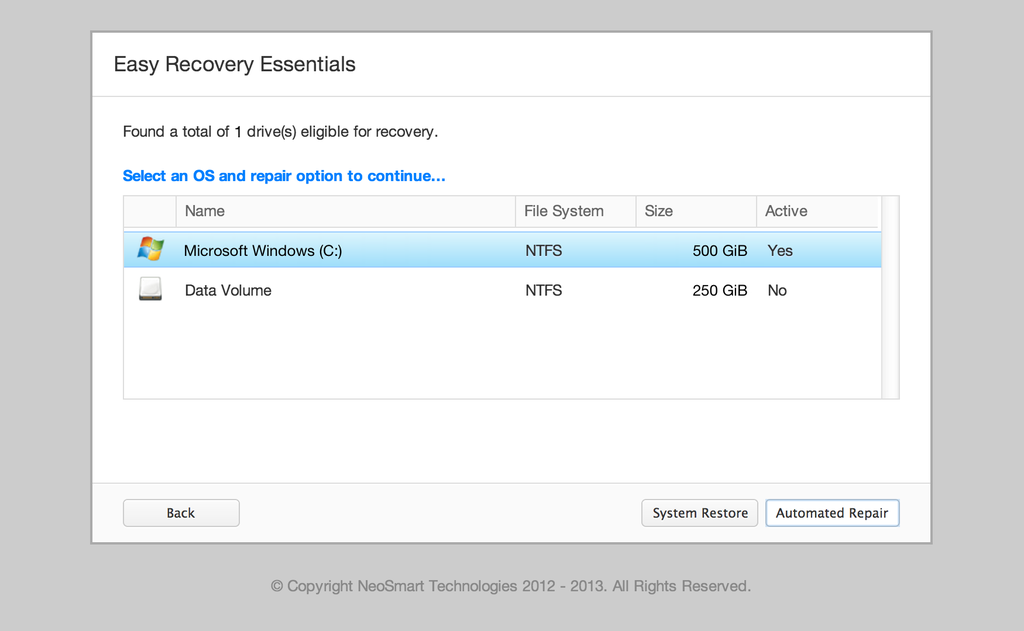
After EasyRE scans your computer’s drives, identify and select the drive letter for your Windows installation from the list, and then click on the Automated Repair button to begin.
Choose the drive associated with the Windows installation you’re trying to repair.
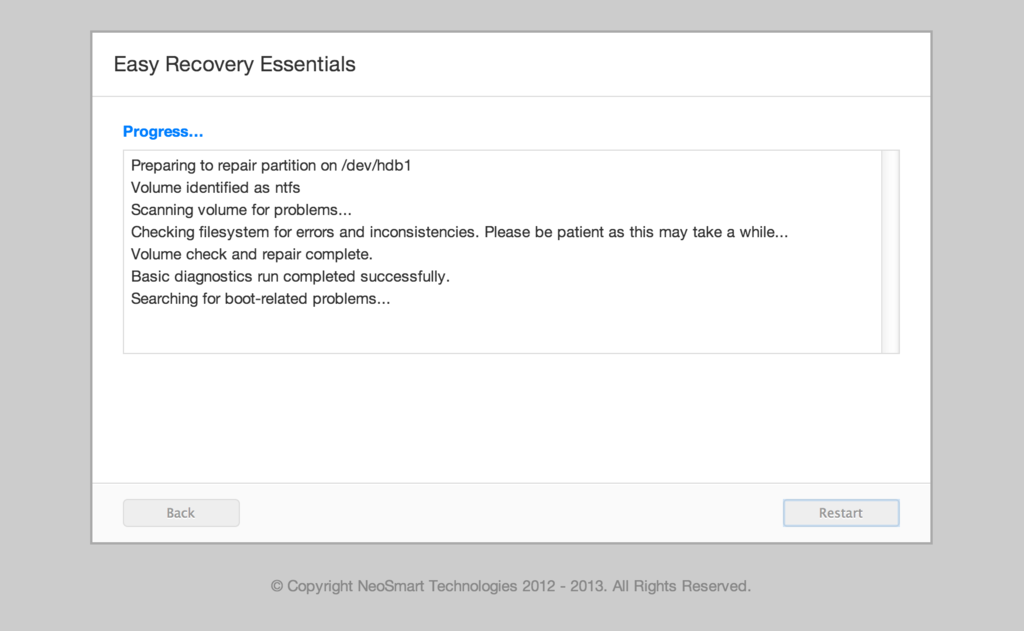
Easy Recovery Essentials will start analyzing the selected drive for problems. EasyRE will test for and attempt to automatically correct errors with the disk, partition, bootsector, filesystem, bootloader, and registry. No intervention is required, as EasyRE’s repair is fully automated:
Easy Recovery Essentials searches for errors and makes corrections to the selected Windows installation.
Once the process is complete, EasyRE will report its findings. Click on the Restart button to reboot your PC and test the changes.
The “A disk read error occurred” error should now be fixed as your PC begins to load:
Windows, booting up successfully.
You can download Easy Recovery Essentials from here.
Other fixes for A disk read error occurred
You can try and fix the “A disk read error occurred” error by following any of these methods. These fixes can be applied to the followings Windows versions:
Windows XP
Windows Vista
Windows 7
Windows 8 and Windows 8.1
Windows Setup CD/DVD Required! Some of the solutions below require the use of the Microsoft Windows setup CD or DVD. If your PC did not come with a Windows installation disc or if you no longer have your Windows setup media, you can use Easy Recovery Essentials for Windows instead. EasyRE will automatically find and fix many problems, and can also be used to solve this problem with the directions below.
Fix #1: Check RAM memory
If you recently added new RAM memory to your computer, you can try to:
Remove the new RAM modules you’ve recently added
Leave only 1 single RAM module
Restart the computer
You can also try to move the single RAM module on a different slot to troubleshoot if any of your RAM slots are damaged. To do that, simply follow these steps:
Leave 1 RAM module on Slot #1
Restart the computer
If “A disk read error occurred” still appears, move the RAM module on Slot #2 and start the computer again.
Fix #2: Check Hard Disk Cables
If the error is caused by damaged hard disk cables, try any of the following tips to fix the error:
Try a different port for the SATA/IDE cables
If you have more than 1 HDD, leave only the HDD with Windows installed and test multiple SATA/IDE ports and cables
The “A disk read error occurred” error can appear if:
The SATA/IDE cables are damaged
The SATA/IDE ports of your hard disks are damaged
If the HDD cables and ports are not damaged, the issue can also be from the hard disk itself.
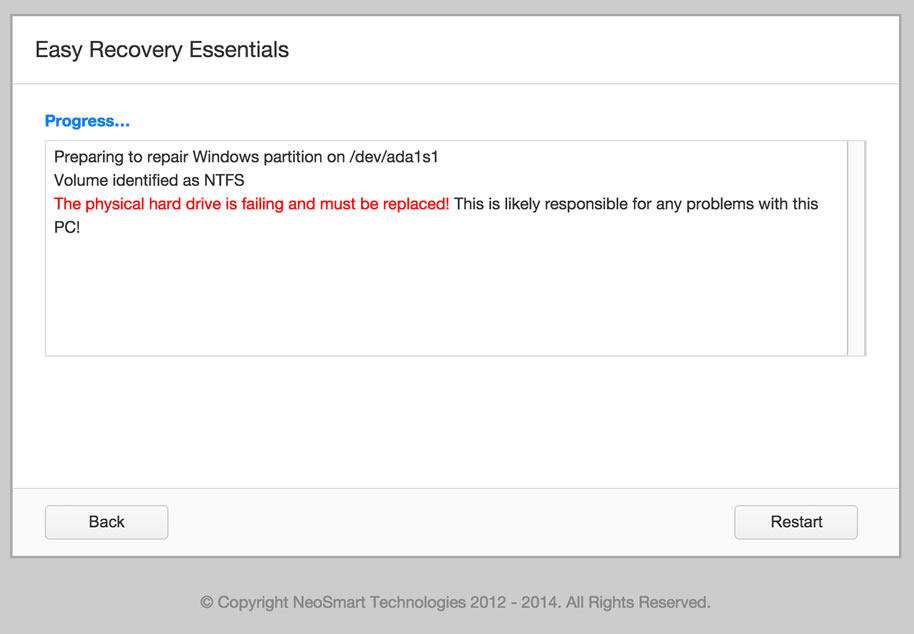
To test if your hard disk is failing or it’s already failed, use Easy Recovery Essentials’ Automated Repair. Automated Repair process will report any issues found with your hard disk or RAM memory:
Download Easy Recovery Essentials
Burn the ISO Image. Follow our instructions on how to burn a bootable ISO image. If you’d like to have a recovery USB instead, follow our instructions on how to make a recovery USB.
Boot into Easy Recovery Essentials
Select Automated Repair
Click Continue and wait for the Automated Repair process to finish. Automated Repair process will report any issues found with your hard disk or RAM memory:
To download Easy Recovery Essentials, click here.
Fix #3: Reset or Upgrade BIOS
In some cases, “A disk read error occurred” can be fixed by either reverting your BIOS to its default settings or upgrading BIOS to the latest version available for your computer.
To revert your computer’s BIOS to its default settings or default configuration, follow these steps:
Restart the computer
Press the key to boot into BIOS. This is usually any of the following keys: F2, F8, F12, Esc or Del. The key you need to press will be listed at the first screen when you boot your computer:
Once booted into BIOS, find a “Load Defaults” options. The option name to revert to default settings can be different, depending on your computer manufacturer and BIOS version:
Load Fail-Safe Defaults
Load BIOS Defaults
Load Default Settings
Load Setup Default
Get Default Values
Select to revert the settings and hit Enter to select the option
Exit BIOS by saving the changes
If reverting to BIOS defaults doesn’t make “A disk read error occurred” disappear, you can also try to update the BIOS version to the latest available.
Fix #4: Run chkdsk
The chkdsk utility checks for hard drives integrity and can attempt to fix various file system errors.
To run chkdsk on a Windows XP system, follow these steps:


 To safeguard the computer, when you are trying to run some program it will ask for admin permission. How to solve that problem in Windows XP? Get the admin password or bypass windows XP password? Let’s see this question firstly:


 Windows XP 64 Bit ISO Free Download Bootable Image. Its Windows XP Professional 64 Bit SP1 ISO Direct Single Link. Download Windows XP Pro 64 Bit ISO Free.

.jpg)

.jpg)