Showing posts with label logon. Show all posts
Showing posts with label logon. Show all posts
Monday, November 7, 2016
Alternate Logon to Windows XP without Password
Alternate Logon to Windows XP without Password
Logon to Windows XP with Secondary Logon without the need to enter a Password
Dear Readers, if you ever tried to enter a Windows XP system usually found on Schools, Cafe, Offices, Work Place etc. and were unable to logon because you didnt know the password for a specific account available in that system, then this trick may solve your problem... All you need to do is follow these instructions:
- Press " ALT + CTRL + DEL " (Without Quotes) twice at the logon screen. (Make sure there is no account with name Administrator)
- A Secondary Logon will popup.
- In the User field, enter " Administrator " (Without Quotes) and Leave the password field blank/empty.
- Press Enter. It should let you in. ( If not, there is possibility that the User had set an administrative password during Windows XP Installation).
Q: Want to know why & how this trick works ??
A: The simple answer to this question is that during an unattended Windows XP Installation or Installing Windows XP from MiniXP or Certain Modded Windows XP ISO Image* files, the Installation process skips the User Account Setup and directly asks the user to Create user account with up to 5 accounts options as you may have already noticed. This setups the secondary User Account with Administrative Privileges, while the Primary Administrator is set without or a blank password which when used with this trick, doesnt require you to enter any password...
* Modded ISO Images are modified form of an Original ISO Image file, in such a manner to allow customization of Core OS that may or may not include features, programs, customization, personalization, extra drivers, apps, themes, registry hacks, explorer hacks etc etc.
Available link for download

Thursday, September 29, 2016
Recover Reset Windows Logon Password
Recover Reset Windows Logon Password
Cant able to logon Windows / forgot password for logging. Follow these simple steps.........
Method I: Recover
1] Download Ophcrack XP LiveCD. For Vista users Ophrack Vista LiveCD.
2] Burn the .iso image file to CD.
3] Restart PC and boot from CD.
4] Now select graphic mode - automatic.
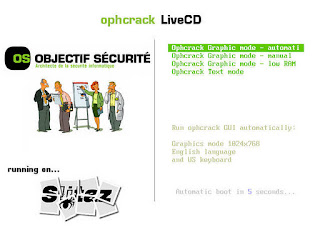
5] Your password will be revealed in a separate box after booting into Ophcrack OS.
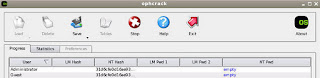
6] Note down the password for your user account and reboot the PC and take the CD out.
Method II: Reset
1] Download Offline password & Registry editor LiveCD.
2] Now extract the zip file and burn the iso image file to a CD.
3] Restart PC and boot from CD.
4] Now press Enter key to boot.
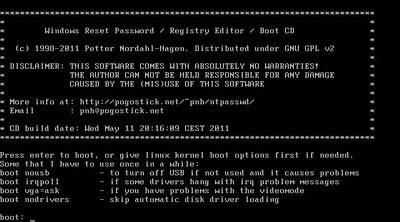
5] Type 2 to select the Windows partition disk and press Enter.
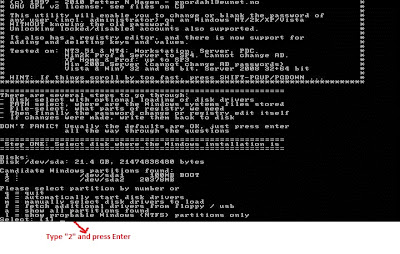
6] By default [1], press Enter for the following screen-shots.
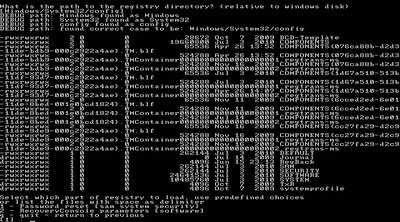
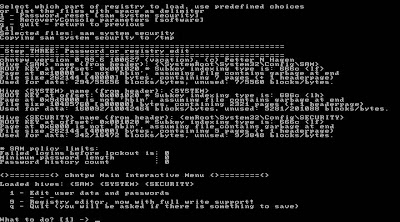
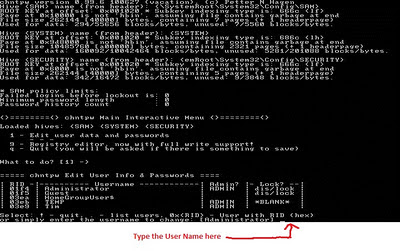
7] Now enter the user name of the account and press Enter.
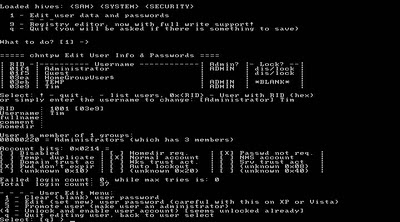
8] Now type "1" and press Enter to clear password.
9] Type ! (exclamation mark) and press Enter to leave Registry Editor.
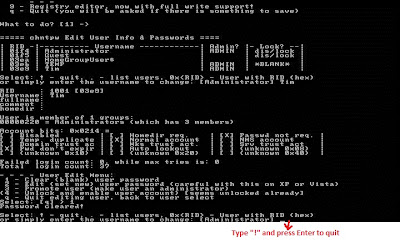
10] Now type q and press Enter to quit.
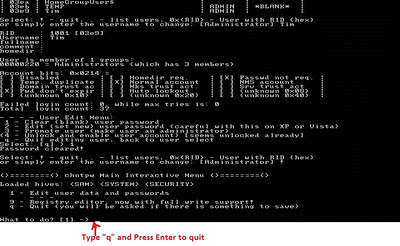
11] When asking for writing back changes to files, type y for yes and press Enter.
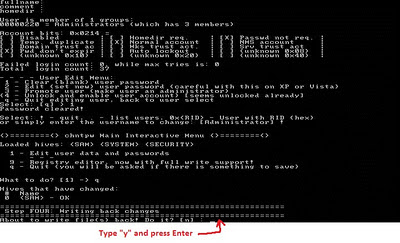
12] When you see "Edit Complete" message, everything goes fine.
13] By default [n], press Enter for not to try again.
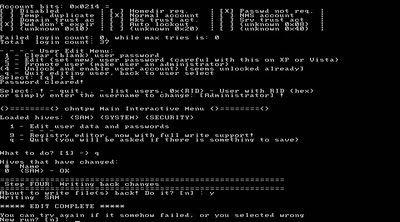
14] Now press Ctrl+Alt+del to reboot and take the CD out.
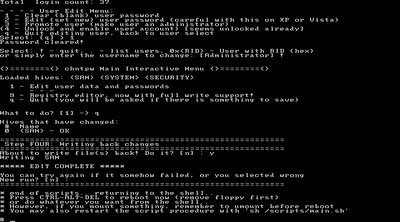
15] You can now able to login Windows without a password.
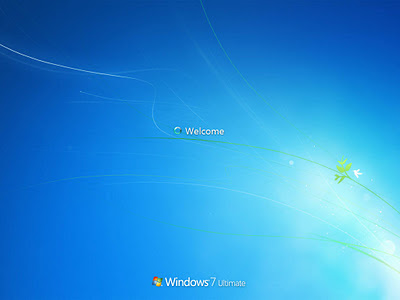
Note: If the above methods doesnt seem to work dont worry, there are several ways to access your PC without logging.
Source 1: http://pcsupport.about.com/od/toolsofthetrade/ss/ophcracksbs.htm
Source 2: http://pcsupport.about.com/od/toolsofthetrade/ss/ontpre-screenshot-guide.htm
Method I: Recover
1] Download Ophcrack XP LiveCD. For Vista users Ophrack Vista LiveCD.
2] Burn the .iso image file to CD.
3] Restart PC and boot from CD.
4] Now select graphic mode - automatic.
5] Your password will be revealed in a separate box after booting into Ophcrack OS.
6] Note down the password for your user account and reboot the PC and take the CD out.
Method II: Reset
1] Download Offline password & Registry editor LiveCD.
2] Now extract the zip file and burn the iso image file to a CD.
3] Restart PC and boot from CD.
4] Now press Enter key to boot.
5] Type 2 to select the Windows partition disk and press Enter.
6] By default [1], press Enter for the following screen-shots.
7] Now enter the user name of the account and press Enter.
8] Now type "1" and press Enter to clear password.
9] Type ! (exclamation mark) and press Enter to leave Registry Editor.
10] Now type q and press Enter to quit.
11] When asking for writing back changes to files, type y for yes and press Enter.
12] When you see "Edit Complete" message, everything goes fine.
13] By default [n], press Enter for not to try again.
14] Now press Ctrl+Alt+del to reboot and take the CD out.
15] You can now able to login Windows without a password.
Note: If the above methods doesnt seem to work dont worry, there are several ways to access your PC without logging.
Source 1: http://pcsupport.about.com/od/toolsofthetrade/ss/ophcracksbs.htm
Source 2: http://pcsupport.about.com/od/toolsofthetrade/ss/ontpre-screenshot-guide.htm
Available link for download
Subscribe to:
Posts (Atom)