Showing posts with label purpose. Show all posts
Showing posts with label purpose. Show all posts
Tuesday, January 24, 2017
What Is the Purpose of a DDoS Attack
What Is the Purpose of a DDoS Attack
Distributed Denial of Service (DDoS) attacks are usually done by individuals calling themselves “hacktivists.” Their purpose is to crash a website server by overwhelming it with activity by “bots” and is generally an aim with a political purpose. These attacks can take up 111gbps to 179gbps, and in April of 2013, took 144 million packets-per-second. If the “hacktivists” are against a company’s stance on a specific issue or multiple issues, the “hacktivist” will attack in an attempt to show opposition and illustrate the company’s weakness. A “hacktivist” may also attack a company, such as a bank or finance company, which they believe makes money off of the downtrodden of society. Some hackers have used DDoS attacks for extortion in an attempt to make companies pay a designated amount before their servers can go back online. A DDoS attack can even be carried out by hackers who deem the company in competition with another company the hacker supports. It is also beginning to look like DDoS attacks are being used in fraud techniques and many alerts have been issued to companies to be aware of these possible attacks.

Created by the marketing team at Prolexic Technologies.
Available link for download

Monday, January 9, 2017
How to split and compress a video file for mailing purpose
How to split and compress a video file for mailing purpose
Sending a video file over an e-mail is restricted to only about 25MB in Gmail, Yahoo mail and about 50MB in Hotmail. By splitting a video file into two or more files, we can it send over an e-mail. But splitting the original video files with video editors would lead to loss in video/audio quality. Here I suggest a freeware for splitting, loss-less compressing and merging the video files for sending over an e-mail as an attachment within 11MB.
Solution:
1] Download and install 7-Zip file archiver.
2] Now Right click over a video file which you need to split > select 7-Zip > select Add to archive.
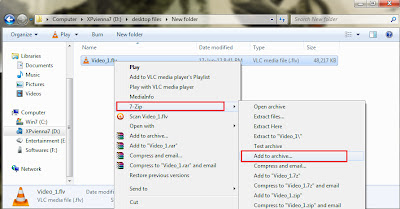
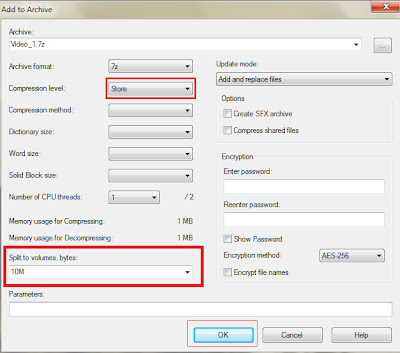
3] Now set Compression level as Store and choose 10MB from the Split to volumes, bytes box > click Ok button to split and compress the video file into several parts based upon the original size.
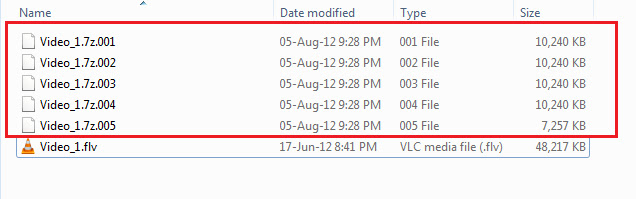
4] The resulted file types will be stored as 001, 002, 003 and so on.
5] So if a person receiving these files over an e-mail will need a similar file archiver like 7-Zip, Winzip, Peazip, Winrar etc for merging these files.
For Merging/Joining the splitted video files (7z.001, 7z.002, etc)
6] Just right click the first file 001 > select 7-Zip > select Extract here option.
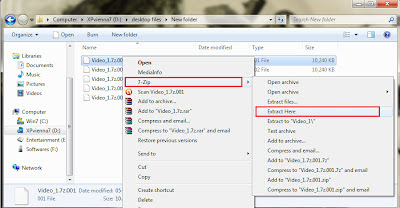
7] The resultant combined video file will be the original video file (of same size) without loss of quality.
Note1: You can also encrypt the archive by setting a password in the Add to archive box.
Note2: This method is simple and effective for the file types like flv, mpeg-4, avi etc.
Available link for download
Subscribe to:
Posts (Atom)