Showing posts with label clean. Show all posts
Showing posts with label clean. Show all posts
Tuesday, December 13, 2016
How to Create a Clean BCD file to fix Windows 7 8 8 1 Boot problem
How to Create a Clean BCD file to fix Windows 7 8 8 1 Boot problem
Note: Not for UEFI systems
So your Windows 7 PC System no longer boots and you are getting the "...An error occurred while attempting to read the boot configuration data." system error. You have reached the point that all suggestions on startup repair have failed and you may now have to re-create a clean boot configuration data (BCD) file. The following information on creating a clean, fresh BCD file maybe helpful to you.
We are going to use a system command called BCDedit to re-create the BCD file.
Introduction
BCDedit is a really powerful tool that Windows 7 and Windows Vista uses to manage the boot loader entries.
BCDEDIT needs a boot loader file to boot your system.
A boot loader is a file that contains necessary information that instruct the system how to boot/start an operating system.
• Windows 7 and Vista bootloader file is ootmgr
• Windows XP bootloader file is tldr
Bcdedit edits a file called BCD, which is located in Windows 7s hidden partition under C: ootBCD.
NOTE: Before performing any changes to your system, please make sure you have a backup of system and personal data files. A backup is essential if things go wrong, when you are making changes to your system.
How to Create a Clean BCD file:
Put your Windows 7 DVD in the drive and restart your PC. Assuming youve properly configured your BIOS to boot from CDs/DVDs before hard drives, you should get a prompt asking you to "Press any key to boot from the CD/DVD..."
Go ahead and press any key.
In the next window, select "Repair your computer" to continue.
On the next window, choose the Windows 7 installation that youd like to perform the repair on.
Click the Next button.
Proceed with the process by choosing "Command Prompt" from this list [Image below]. We could select the "Startup Repair" to fix the boot problem, but we are assuming that you already tried this option and it did not work.
In the Command Prompt window we shall perform a number of commands to create the new BCD file.

Note: Were assuming that the boot drive is drive C: below. If your computer is configured differently, be sure to use the appropriate drive letter here instead. Each command shown below is separated by a newline for display purposes only. So, command and its switches must be on the same line.
Enter the following commands:
bootrec.exe /fixmbr
X: oot ootsect.exe /nt60 all /force
Replace X in the command line above with the device letter to the CD/DVD drive that is running your Windows 7 Recovery Disk.
Now remove the old BCD registry, and create a new one instead.
del C: oot cd
bcdedit /createstore c: oot cd.tmp
bcdedit.exe /store c: oot cd.tmp /create {bootmgr} /d "Windows Boot Manager"
bcdedit.exe /import c: oot cd.tmp
bcdedit.exe /set {bootmgr} device partition=C:
bcdedit.exe /timeout 12
del c: oot cd.tmp
Now we have a clean, working Win 7 bootloader. But we need to add a Win 7 entry to it:
bcdedit.exe /create /d "Windows 7" /application osloader
bcdedit.exe should return a message with a GUID for the newly-created entry. It will look something like this:
The entry {fc8bcc18-8a93-11df-baf9-806e6f6e6963} was successfully created.
Youll need to use the value that bcdedit.exe returned for you below, along with the drive letter for the drive that Windows 7 is installed to:
bcdedit.exe /set {fc8bcc18-8a93-11df-baf9-806e6f6e6963} device partition=C:
bcdedit.exe /set {fc8bcc18-8a93-11df-baf9-806e6f6e6963} osdevice partition=C:
bcdedit.exe /set {fc8bcc18-8a93-11df-baf9-806e6f6e6963} path Windowssystem32winload.exe
bcdedit.exe /set {fc8bcc18-8a93-11df-baf9-806e6f6e6963} systemroot Windows
And, last of all, tell the Windows 7 bootloader to boot the new entry by default:
bcdedit.exe /displayorder {fc8bcc18-8a93-11df-baf9-806e6f6e6963}
bcdedit.exe /default {fc8bcc18-8a93-11df-baf9-806e6f6e6963}
Now the Windows 7 bootloader has been removed and rebuilt from scratch.
At this point, you have a clean and hopefully a fully-working bootloader with one entry for Windows 7.
Reboot your PC system to get back into Windows 7.
Enjoy!!!
© pcsoftwarehowto.blogspot.com
So your Windows 7 PC System no longer boots and you are getting the "...An error occurred while attempting to read the boot configuration data." system error. You have reached the point that all suggestions on startup repair have failed and you may now have to re-create a clean boot configuration data (BCD) file. The following information on creating a clean, fresh BCD file maybe helpful to you.
We are going to use a system command called BCDedit to re-create the BCD file.
Introduction
BCDedit is a really powerful tool that Windows 7 and Windows Vista uses to manage the boot loader entries.
BCDEDIT needs a boot loader file to boot your system.
A boot loader is a file that contains necessary information that instruct the system how to boot/start an operating system.
• Windows 7 and Vista bootloader file is ootmgr
• Windows XP bootloader file is tldr
Bcdedit edits a file called BCD, which is located in Windows 7s hidden partition under C: ootBCD.
NOTE: Before performing any changes to your system, please make sure you have a backup of system and personal data files. A backup is essential if things go wrong, when you are making changes to your system.
How to Create a Clean BCD file:
Put your Windows 7 DVD in the drive and restart your PC. Assuming youve properly configured your BIOS to boot from CDs/DVDs before hard drives, you should get a prompt asking you to "Press any key to boot from the CD/DVD..."
Go ahead and press any key.
In the next window, select "Repair your computer" to continue.
On the next window, choose the Windows 7 installation that youd like to perform the repair on.
Click the Next button.
Proceed with the process by choosing "Command Prompt" from this list [Image below]. We could select the "Startup Repair" to fix the boot problem, but we are assuming that you already tried this option and it did not work.
In the Command Prompt window we shall perform a number of commands to create the new BCD file.
Note: Were assuming that the boot drive is drive C: below. If your computer is configured differently, be sure to use the appropriate drive letter here instead. Each command shown below is separated by a newline for display purposes only. So, command and its switches must be on the same line.
Enter the following commands:
bootrec.exe /fixmbr
X: oot ootsect.exe /nt60 all /force
Replace X in the command line above with the device letter to the CD/DVD drive that is running your Windows 7 Recovery Disk.
Now remove the old BCD registry, and create a new one instead.
del C: oot cd
bcdedit /createstore c: oot cd.tmp
bcdedit.exe /store c: oot cd.tmp /create {bootmgr} /d "Windows Boot Manager"
bcdedit.exe /import c: oot cd.tmp
bcdedit.exe /set {bootmgr} device partition=C:
bcdedit.exe /timeout 12
del c: oot cd.tmp
Now we have a clean, working Win 7 bootloader. But we need to add a Win 7 entry to it:
bcdedit.exe /create /d "Windows 7" /application osloader
bcdedit.exe should return a message with a GUID for the newly-created entry. It will look something like this:
The entry {fc8bcc18-8a93-11df-baf9-806e6f6e6963} was successfully created.
Youll need to use the value that bcdedit.exe returned for you below, along with the drive letter for the drive that Windows 7 is installed to:
bcdedit.exe /set {fc8bcc18-8a93-11df-baf9-806e6f6e6963} device partition=C:
bcdedit.exe /set {fc8bcc18-8a93-11df-baf9-806e6f6e6963} osdevice partition=C:
bcdedit.exe /set {fc8bcc18-8a93-11df-baf9-806e6f6e6963} path Windowssystem32winload.exe
bcdedit.exe /set {fc8bcc18-8a93-11df-baf9-806e6f6e6963} systemroot Windows
And, last of all, tell the Windows 7 bootloader to boot the new entry by default:
bcdedit.exe /displayorder {fc8bcc18-8a93-11df-baf9-806e6f6e6963}
bcdedit.exe /default {fc8bcc18-8a93-11df-baf9-806e6f6e6963}
Now the Windows 7 bootloader has been removed and rebuilt from scratch.
At this point, you have a clean and hopefully a fully-working bootloader with one entry for Windows 7.
Reboot your PC system to get back into Windows 7.
Enjoy!!!
© pcsoftwarehowto.blogspot.com
Available link for download

Wednesday, November 16, 2016
How To Clean Video Game Consoles Hardware And Accessories
How To Clean Video Game Consoles Hardware And Accessories
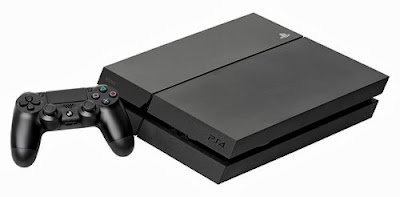
Unplug everything
This is possibly the most important step in the process. You need to unplug everything, otherwise you risk damaging the platform. Not only that, but you can also get hurt so its a good idea to apply extra caution. After all, you are working with sensitive equipment. Carefully unplug everything that can be plugged and make sure you dont forget anything.If some of the accessories arent plugged (like your controllers or headset) and are powered by batteries, instead, remove the batteries. You want to discontinue all power supply to both the console and its components.
Cleaning the exterior
There are several things that you will need here in order to accomplish this fairly simple task. First of all, buying a microfiber towel would yield better results in the cleaning process, even though this part is optional. You can use any lint-free old rag you can get your hands on. You will need two of them – one for the processing and one for the drying out. Also purchase an electronics spray (the kind of spray you can use to clean all sorts of electronics, like laptops, consoles, monitors and more). Spray some of the solution on the cloth and wipe off all the surfaces of your hardware. Dry out with the other cloth immediately so you make sure that everything works well afterwards. Never spray directly on the surface of the console or any of the periphery. This may very well damage the devices so be careful.Cleaning the interior
Cleaning the interior is a bit trickier. You should open the console because odds are you dont know what youre doing (otherwise why would you be reading this?) so you might damage it. Spraying compressed air into the air vents of your device would be enough to remove a large portion of the dust outside the console. This way you dont need to open it but you will still be able to clean most of it. Something to keep in mind is that compressed air comes out rather cold so you shouldnt be keeping the device too close to the source. Otherwise the air will condensate inside and damage the console.Cleaning peripheral devices
Use a cotton swab and some rubbing alcohol to clean the peripheral devices such as controllers, microphones, headsets, etc. Just make sure to dry it out immediately. If youre not confident in your abilities to clean the console properly, seek the help of a specialist.Author Bio:
As a professional cleaner at http://www.fasthomecleaning.co.uk , Rose knows how to clean all kind of things.Available link for download
Subscribe to:
Posts (Atom)