Showing posts with label network. Show all posts
Showing posts with label network. Show all posts
Monday, February 27, 2017
Tips Network setting in virtual machine
Tips Network setting in virtual machine
For Laptop user
When you are trying your hand on a new OS, it is always a good idea to test that OS in a virtual machine (vmware player, oracle vm virtualbox etc) rather than installing it on a hard drive. By doing so, you can not only save your time and effort but if somehow your OS crashes, due to some or the other reason, then you can re-install it easily. Virtual machine gives you a virtual environment, where you can install multiple OSes and test them easily. It also allows you to connect multiple virtual OSes in a network (every OS shown here represent different machine, that can communicate with each other via virtual ip address). If you have installed Kali Linux on virtual machine, then change the network setting to NAT mode and your virtual OS will now act as wired virtual machine in LAN. But, if you want your virtual OS to connect wireless, then change your network setting to Bridge mode on your virtual machine and it will ask ssid and password to connect to your virtual network.
Available link for download

Saturday, January 14, 2017
Is VoIP Secure Network Protocols
Is VoIP Secure Network Protocols

It is undeniably a well-known fact that one of the best ways to communicate today is through VoIP (voice over Internet protocol) yet the question of the structural integrity and security of the method still remains. How secure exactly is VoIP?
VoIP vs Traditional Telephony
If you think traditional telephony is secure enough for you, then you should have no trouble with VoIP which is at least as secure as what youre used to. Of course, generally, every sort of system has its weakness – thats just an unavoidable inherent quality of the system, itself. I guess when youre trying to protect your corporate data, this doesnt sound very convincing, but when you think about it, it actually means a lot. Using VoIP isnt more dangerous than using any sort of IP transfers, although there is always a risk, but that risk can be mitigated. You are probably transmitting lots of information over the web, anyway, which means that youre already taking those risks. If youre going through considerable lengths to protect the data you are sending, then its safe to say that VoIP will not pose a bigger security threat. You can never be truly sure if someone is listening in on your conversation, but then again – you cant be sure if youre using traditional telephony, either.Internal Networks
VoIP are most safely used in closed networks. If you run a company and you have an inner network, then connecting different divisions, for example, with VoIP would save you money and it wouldnt be risky, unless you have spies in your midst, at which case someone eavesdropping on your conversations is the least of your worries. VoIP can connect two points of the network so people can directly communicate with each other without the possibility of anyone else accessing their conversation. This wasnt the case a few years. Back then, the LAN availability wasnt controlled by switches and everyone had access. Now, with the use of switches, you can easily connect two points of the network (or more if you wish) so you will get instant and secure communication. The only risk that lies here is if your network is unprotected, but then all your data will be available, so like I said – someone listening in on your conversations will be the least of your problems.How Secure is VoIP?
Well, dont expect that VoIP is going to be the most secure way of communication the world has ever seen. If man has found a way to communicate, man will find a way to intercept that communication. Its as simple as that, however, as you can still take some measures to protect your data. VoIP is at least as secure as traditional telephony and can be made even more secure by taking the right measures. Bottom line is, if youre trusting a network enough to transmit sensitive data through it, then using it for VoIP should be just fine for you, because its secure enough.Author Bio:
Rose Finchley is passionate blogger keen on topics about Internet. She currently works as a technician at http://www.shinylondon.co.uk/end-of-tenancy-cleaning-nw1-somers-town/ and she has a lot of experience to share with the readers.Available link for download
Wednesday, November 23, 2016
How to access a drive or a folder in a network through Kali Linux
How to access a drive or a folder in a network through Kali Linux
In this scenario, I have Windows 7 and Kali Linux operating systems. Kali Linux is installed in a virtual server, i.e. vmware player.
(A) Now to create a shared drive or folder in Windows 7
- Click on Start
 and then on Computer.
 - Select the drive or the folder you want to share. Right click on it, then click on Share with and then on Advanced sharing...

- Goto Sharing tab and click on Advanced Sharing...

- Check on Share this folder, then click on Add button to give Share name and Description of the drive or folder and select the number of users that you allow to share the drive or folder. Then click on permissions and add number of users to whom you grant permission to share your drive or folder in a network. Click on OK to all pop windows that has opened so far. This will take affect and you will see shared drive or folder in the network.

(B) Open vmware player and allow Kali Linux to boot.
- Login with username and password
- Press Alt. + F2 key to bring run dialog box.
- type smb://username/shared, where username is the host name and shared is the drive or folder name that has to accessed (smb is a program of samba distribution that allows to maintain interoperability between linux/unix server and windows client), then click on Run.

- type username and password of windows 7 user to access the drive or folder (username and password is the account of the user where the drive or folder has been shared) and click on Connect.

This will mount the shared drive or folder and it will appear on the desktop of Kali Linux.

Available link for download
Friday, November 18, 2016
Wired Network “unmanaged” in Network Manager
Wired Network “unmanaged” in Network Manager
Issue:
- WLAN works fine with NetworkManager
- Wired Device (ethX) is marked as “unmanaged” and doesn’t work even if it gets DHCP-lease/IP-address
- /etc/network/interfaces looks correct
Solution:
- Open root terminal and type
...
[ifupdown]
managed=true
...
- Save the file. Inorder, to make the changes to come to an effect, type
/etc/init.d/network-manager force-reload
Available link for download
Thursday, October 27, 2016
Hack Any Password Protected Wi Fi Network
Hack Any Password Protected Wi Fi Network
Hack Any Password Protected Wi-Fi Network And Use Free Internet
Today I’ll tell you how do you hack any password protected wifi network with “CommView For Wi-Fi” software.

First you have to know what is Wi-Fi and how dose it work?
"Wi-Fi" is a type of wireless networking protocol that allows devices to communicate without cords or cables.
Available link for download
Saturday, October 15, 2016
Network Controller is not working in Windows 7
Network Controller is not working in Windows 7
If you open Device Manager, an yellow mark is indicated in network adapters section and will display as Unknown device. Even if you install the driver that comes with the CD, an error message popups saying "Driver was not successfully installed" or "Windows could not find driver for this device".
For these cases, a correct device driver from the manufacturer website must be downloaded and installed.
Solution:
1] Download Unknown Devices v1.4.20 and extract the archive.
2] Run UnknownDevices.exe
3] It will display a list of unknown devices and their appropriate device drivers.
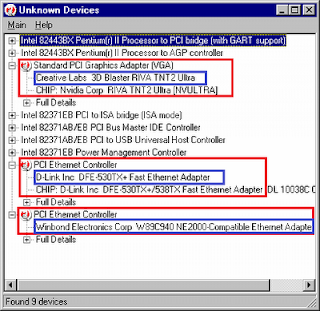
4] Note the manufacturer name or copy/paste in Google to find their respective websites to download the correct drivers for the device.
Available link for download
Subscribe to:
Posts (Atom)