Showing posts with label it. Show all posts
Showing posts with label it. Show all posts
Sunday, January 29, 2017
What is 555 Timer How it Works
What is 555 Timer How it Works
555 Timer
Timers
Timers are those circuits, which provide periodic signals to a digital system which change the state of that system. In other words, those circuits, which work on the base of multivibrator changes or a device, which can be used as multivibrator is called Timer. (We will discuss Multivibrator in detail in next coming posts)
555 Timer
555 Timer is a digital monolithic integrated circuit which may be used as a clock generator. In other words, 555 Timer is a circuit which may be connected as a stable or monostable multivibrator.
555 Timer is a versatile and most usable device in the electronics circuits and designs which work for both stable and monostable states. It may provide time delay from microseconds up to many hours.
Below is the pin diagram of DIP (Dual inline Package) 555 timer with 8 pins.
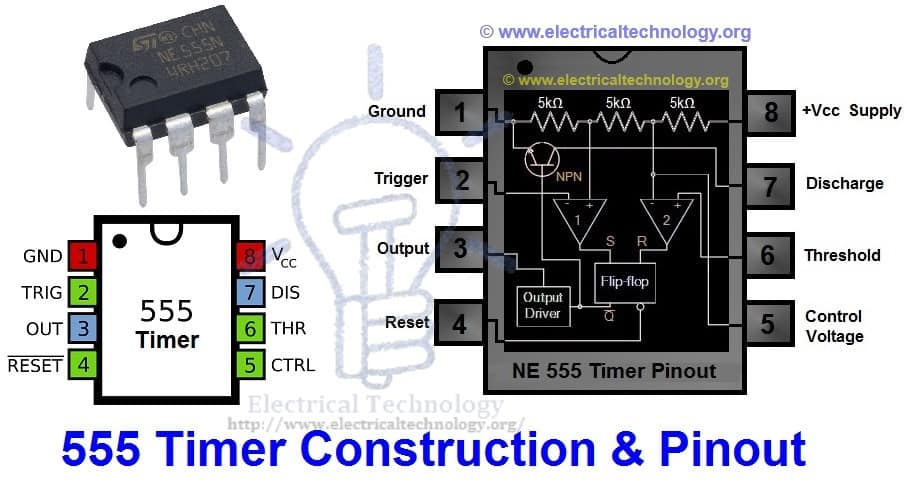
555 timer is a very cheap IC which works for wide range of potential difference (typically, from 4.5 to 15V DC) and the different provided input voltages do not affect the timer output.
555 Timer is a linear device and it can be directly connected to the CMOS or TTL (Transistor – Transistor Logic) digital circuits due to its compatibility but, interfacing is must to use 555 timer with other digital circuits.
555 Timer Construction
There are lots of manufacturers who manufacture 555 timer which included the number 555 e.g. NE555, CA555, SE555, MC14 555 etc. typically, two 555 timers sandwiched inside a single chip which is called 556. Nowadays, chips are available with four 555 timers in it. These devices are available in circular IC with eight (8), DIP (Dual inline Package) with 8 pins or DIP with 14 pins.
Here is the simple explanation of the 8 pins of 555 Timer.
1. Ground (GND)
It’s the common ground point of the circuit. The ground terminal of external circuit as well as power supply (Vcc) ground terminal is connected with this i.e. GND (Ground) terminal of 555 timer.
2. Trigger
When Trigger terminal gets one –third (1/3) of the supply voltage i.e. Vcc/3 equal amplitude’s negative trigger pulse, then the circuit output changes form Low to High.
3. Output
This terminal is used for getting output and connected with load. At any instant, its value is low or high.
4. Reset
Without taking into account the previous state of output, by providing a trigger pulse to this terminal resets the device. I.e. Its output becomes low.
5. Control Voltage
There are two third positive voltages of the total Supply voltages (Vcc) at control voltage terminal. Thus, it becomes a part of the comparator circuit. Generally, a capacitor is connected between ground and voltage control terminals.
6. Threshold Voltage
Threshold voltage and control voltage is the two inputs of comparator circuit. The circuit compares the available voltage at threshold voltage terminal to the available reference voltage at control terminal.
If the available voltage at threshold terminal (Pin 6) is greater than the control voltage i.e. two-third of Vcc, then the output would be low, otherwise, it would be high.
7. Discharge
When output is low, then Discharge terminal provides a low resistance discharge path to the externally connected capacitor. However, it acts an open circuit, when output is high.
8. +Vcc (Supply Voltage Terminal)
Supply voltage is provided at this terminal for timer operation.
A simple 555 timer circuit is shown below in fig _ which shows the internal construction of 555 timer. According to the fig, the timer contains on two comparators, an RS flip flop, an Output stitch (output buffer) and a Discharge Transistor Q1.
In addition, there are three 5k? resistors are connected in series with 5k? resistor which first end is connected with Vcc (Pin 8 = Supply voltage) and the other end is connected with ground (GND = Pin 1).
Good to Know: due to the three 5k? series connected resistors, this IC timer chip is called 555 Timer J.
Working Principle of 555 Timer
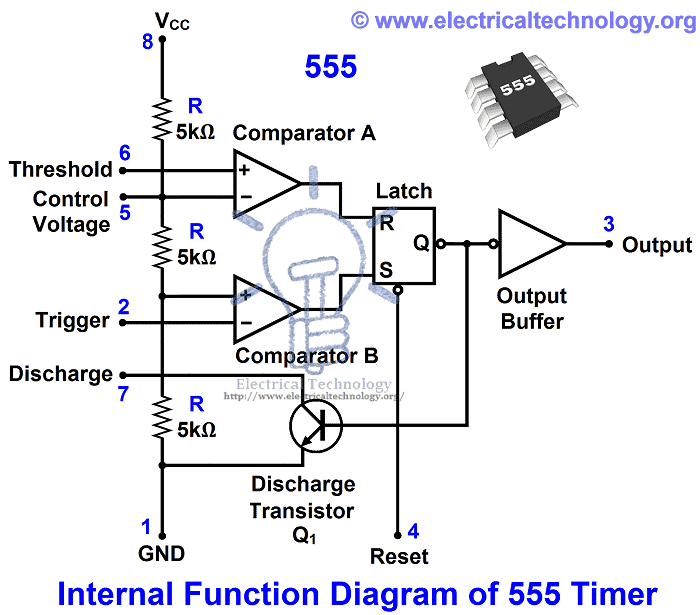
In the 555 Timer block or functional diagram, comparators are those devices which output is high, when their positive input voltage is greater than their negative input voltage and vise versa.
The voltage divider in the circuit (which contains on three series connected 5k? resistors), which provides the trigger level of one-third of Vcc (Vcc/3) and two-third (2/3) of threshold voltage. To understand this point, suppose the input value is 15V. In this case, the value of trigger level would be 5V as (Vcc/3 = 15V/3 = 5V). And the value of threshold level would be 10V as (Vcc x 2/3 = 15V x (2/3)) = 10V.
When needed, the trigger level and threshold can be adjusted by using the Control Voltage terminal (Pin 5) i.e. by changing the control voltage at Pin 5, we may change the trigger level and threshold voltage according to the required specification. However, in this case, the value of trigger and threshold would be remain equal to 1/3 Vcc and 2/3 Vcc respectively.
When the normal high trigger input value instantaneously reduce then the 1/3 Vcc, Then the output of Comparator B becomes High from Low, as a result, RS latch or RS Flip flop goes to “set”. When flip flop goes to set, then Output (at Point 3) becomes high. Simultaneously, the discharge transistor Q1 gets off and The output remains high until the value of normally low threshold input does not increase then the 2/3 Vcc.
As soon as the threshold input increase than the 2/3Vcc, then the output of comparator A becomes Low, as a result, RS flip flop get reset (because the output of comparator is directly connected to the RS flip flop’s input R as shown in the fig). When flip flop gets reset, output becomes low and discharge transistor Q1 goes to on.
The flip flop can be reset by applying external input reset without threshold circuit. Note that, the trigger and threshold inputs (Pin 2 and Pin 6) are controlled by externally components and the 555 timer can be used for Available link for download
Read more »

Saturday, January 14, 2017
Carbon a Nonmetal ! But why it is used in Dc motor brushes
Carbon a Nonmetal ! But why it is used in Dc motor brushes
One reason is the high melting temperature of carbon.
The inductances of the energized windings, and the mechanics of a brush type motor or generator make arcing and sparking an unavoidable characteristic of the machine at the brush interface. Electrical arcs produce very high temperatures. High enough to melt metals.
Carbon has a very high melting point (~3500degC) compared with other conductors. Brushes made with copper or steel would wear out faster because of factors including:
1) The melted metal will break away from, or even be vaporized, leaving the brush with less material to do its job.
2) If the melted material doesnt vaporize or otherwise move away from the interface, it creates a mess for the brush. It can weld together bristles of the brush. It can build up material that interferes with the motion of the rotor.
3) As the metal melts in the presence of an arc, conductive material can be liberated, therby prolonging the arc, exasperating the wearing action.
Carbon is less prone to those high temperature effects and associated impacts to the generator operation.
Source : Dan Church
Available link for download
Monday, January 2, 2017
What is TRIAC How it Works
What is TRIAC How it Works
For DC switching circuits this “one-way” switching characteristic may be acceptable as once triggered all the DC power is delivered straight to the load. But in Sinusoidal AC Switching Circuits this unidirectional switching may be a problem as it only conducts during one half of the cycle (like a half-wave rectifier) when the Anode is positive irrespective of whatever the Gate signal is doing. Then for AC operation only half the power is delivered to the load by a thyristor.
In order to obtain full-wave power control we could connect a single thyristor inside a full-wave bridge rectifier which triggers on each positive half-wave, or to connect two thyristors together in inverse parallel (back-to-back) as shown below but this increases both the complexity and number of components used in the switching circuit.
Thyristor Configurations

There is however, another type of semiconductor device called a “Triode AC Switch” or Triac for short which is also a member of the thyristor family that be used as a solid state power switching device but more importantly it is a “bidirectional” device. In other words, a Triac can be triggered into conduction by both positive and negative voltages applied to its Anode and with both positive and negative trigger pulses applied to its Gate terminal making it a two-quadrant switching Gate controlled device.
A Triac behaves just like two conventional thyristors connected together in inverse parallel (back-to-back) with respect to each other and because of this arrangement the two thyristors share a common Gate terminal all within a single three-terminal package.
Since a triac conducts in both directions of a sinusoidal waveform, the concept of an Anode terminal and a Cathode terminal used to identify the main power terminals of a thyristor are replaced with identifications of: MT1, for Main Terminal 1 and MT2 for Main Terminal 2 with the Gate terminal G referenced the same.
In most AC switching applications, the triac gate terminal is associated with the MT1 terminal, similar to the gate-cathode relationship of the thyristor or the base-emitter relationship of the transistor. The construction, P-N doping and schematic symbol used to represent a Triac is given below.
Triac Symbol and Construction

We now know that a “triac” is a 4-layer, PNPN in the positive direction and a NPNP in the negative direction, three-terminal bidirectional device that blocks current in its “OFF” state acting like an open-circuit switch, but unlike a conventional thyristor, the triac can conduct current in either direction when triggered by a single gate pulse. Then a triac has four possible triggering modes of operation as follows.
- ? + Mode = MT2 current positive (+ve), Gate current positive (+ve)
- ? – Mode = MT2 current positive (+ve), Gate current negative (-ve)
- ??? + Mode = MT2 current negative (-ve), Gate current positive (+ve)
- ??? – Mode = MT2 current negative (-ve), Gate current negative (-ve)
And these four modes in which a triac can be operated are shown using the triacs I-V characteristics curves.
Triac I-V Characteristics Curves

In Quadrant ?, the triac is usually triggered into conduction by a positive gate current, labelled above as mode ?+. But it can also be triggered by a negative gate current, mode ?–. Similarly, in Quadrant ???, triggering with a negative gate current, –?G is also common, mode ???– along with mode ???+. Modes ?– and ???+ are, however, less sensitive configurations requiring a greater gate current to cause triggering than the more common triac triggering modes of ?+ and ???–.
Also, just like silicon controlled rectifiers (SCR’s), triac’s also require a minimum holding current IH to maintain conduction at the waveforms cross over point. Then even though the two thyristors are combined into one single triac device, they still exhibit individual electrical characteristics such as different breakdown voltages, holding currents and trigger voltage levels exactly the same as we would expect from a single SCR device.
Triac Applications
The Triac is most commonly used semiconductor device for switching and power control of AC systems as the triac can be switched “ON” by either a positive or negative Gate pulse, regardless of the polarity of the AC supply at that time. This makes the triac ideal to control a lamp or AC motor load with a very basic triac switching circuit given below.
Triac Switching Circuit

The circuit above shows a simple DC triggered triac power switching circuit. With switch SW1 open, no current flows into the Gate of the triac and the lamp is therefore “OFF”. When SW1 is closed, Gate current is applied to the triac from the battery supply VG via resistor R and the triac is driven into full conduction acting like a closed switch and full power is drawn by the lamp from the sinusoidal supply.
As the battery supplies a positive Gate current to the triac whenever switch SW1 is closed, the triac is therefore continually gated in modes ?+ and ???+ regardless of the polarity of terminal MT2.
Of course, the problem with this simple triac switching circuit is that we would require an additional positive or negative Gate supply to trigger the triac into conduction. But we can also trigger the triac using the actual AC supply voltage itself as the gate triggering voltage. Consider the circuit below.
Triac Switching Circuit

The circuit shows a triac used as a simple static AC power switch providing an “ON”-“OFF” function similar in operation to the previous DC circuit. When switch SW1 is open, the triac acts as an open switch and the lamp passes zero current. When SW1 is closed the triac is gated “ON” via current limiting resistor R and self-latches shortly after the start of each half-cycle, thus switching full power to the lamp load.
As the supply is sinusoidal AC, the triac automatically unlatches at the end of each AC half-cycle as the instantaneous supply voltage and thus the load current briefly falls to zero but re-latches again using the opposite thyristor half on the next half cycle as long as the switch remains closed. This type of switching control is generally called full-wave control due to the fact that both halves of the sine wave are being controlled.
Read more »
Sunday, December 25, 2016
What Is A QR Code And How Does It Work
What Is A QR Code And How Does It Work
By now, you’re probably pretty familiar with QR codes (a.k.a. 2-D bar codes), whether or not you realize it. They’re the little square symbols that look like this:

The cool part is that anyone can make them. Yes, that includes you. Just Google “QR code generator” and you’ll have a plethora of websites that make it incredibly easy to make your own QR code. But that’s not even the best part. Once you have a QR code, you can mix things up, add color and graphics, and so much more. The key is to know how to keep your code scan-able.
Some people have already cracked this code, like Marc Jacobs. Others, like Yellow Pages, still have some homework to do. So how can you tell which edits will ruin your code and which ones will still allow it to be scanned? The question you should be asking is “what can’t I edit?”
The “No-Zones”
QR codes are made up of black squares and white squares. Each of these squares is called a module. In every QR code, there are certain modules that must not be covered or edited, else the code won’t scan. Here, they are all highlighted in different colors:

- The three large squares highlighted in red are the position markers. These tell the scanner where the edges of the code are.
- The smaller red square is an alignment marker. This acts as a reference point for the scanner, making sure everything lines up properly. In bigger codes, there are several of these squares.
- The red strips of alternating black and white modules are called timing patterns. They define the positioning of the rows and columns.
- The green sections determine the format. This tells the scanner whether it’s a website, text message, Chinese symbols, numbers, or any combination of these.
- The modules highlighted in blue represent the version number. Basically, the more modules in the code, the higher the version (up to v40, which is 177×177 modules). If the code is version 6 or smaller, the version does not need to be defined here because the scanner can literally count the modules and determine the version on its own.
Everything Else
So now that you know what you can’t edit, that means everything else is free game, right? Almost. All the remaining modules are grouped into sections of 8 modules. These groups (which I will call “bytes” from now on) fit together in the gray area like a jigsaw puzzle:

Now, when a smartphone or scanner reads a QR code, each byte is determined to be either completely readable or completely un-readable. That means that if you change one single module (e.g. turning a black square into a white square), the entire byte containing that module is rendered un-readable. At first, that sounds like a bad thing, but it actually makes things a lot easier. More on that in a second.
The Really Cool Part
In the Marc Jacobs code I linked to earlier, there was a sketch of a small girl covering part of the code. In spite of the fact that some of the code is covered up, it is still fully scan-able. This is because of the Reed Solomon error correction method. Basically, all QR codes are created with built-in error correction algorithms that allow them to be scanned even if a few bytes are missing/covered/replaced by a picture of your cat. The larger the version, the more bytes you can edit.
You can use the Version and Maximum Data Capacity Table on Denso-Wave’s website to determine exactly how many bytes you can turn into awesome graphic art. You need to know the version of your code (also found in the version table), and how many characters the message contains (i.e. if your code is built from the website “http://www.your-awesome-website.com”, that would be 35 characters).
The table will give you a letter that represents the level of error-correction contained in your code. Here’s what these letters mean:
- Level L – You can alter up to 7% of the code without ruining its scan-ability. If your code has 154 bytes, you can edit 10 (maybe 11) bytes and it will still scan successfully.
- Level M – You can alter up to 15% of the code.
- Level Q – You can alter up to 25% of the code.
- Level H – You can alter as much as 30% of your code.
So now you should be able to do the following:
– Generate a QR code
– Identify the No-Zones
– Figure out the placement of the bytes
– Figure out how many bytes you can edit
Now that you know just about everything involved in creating and understanding a QR code, let’s dive into how to turn it into a unique piece of graphic (or even hand-drawn) art.
Ready, Set…
At this point, it all comes down to asking yourself “what if,” and then finding the answer to that question. Look at your QR code, figure out which bytes you want to try to change, and then change them. Scan it to see if it still works. If it still works, make another change. If not, go back and figure out why. I’ll show you an example of what this process might look like.
I started out with a regular QR code, isolated which bytes I wanted to play around with, and outlined them in red (top left). First, I just scrambled all the modules within the red border (top right). It still scanned. Then, I took out all the modules completely (bottom left). It still scanned. Lastly, I filled the red border with a portrait of one of the most influential aliens from my childhood.

…Go!
It’s a matter of experimentation. Think of an idea, try it and scan it. Then work from there. Go online and look for other creative QR code graphic art, to see what boundaries other people are pushing. Pretty soon, you’ll end up doing something like this:

Resources:
http://www.ucreative.com/articles/what-is-a-qr-code-and-how-does-it-work/
http://www.systemid.com/qrcode/
http://www.denso-wave.com/qrcode/qrgene2-e.html
Available link for download
Read more »
http://www.denso-wave.com/qrcode/qrgene2-e.html
Available link for download
Subscribe to:
Posts (Atom)