Showing posts with label increase. Show all posts
Showing posts with label increase. Show all posts
Wednesday, February 8, 2017
Increase IDM Download Speed With IDM Optimizer
Increase IDM Download Speed With IDM Optimizer
 .As most of us already use IDM for downloading files from Internet , so we earlier gave you IDM 6.07 Full Version. Now to enhance and increase its speed even further, we have a small utility, called IDM Optimizer, that modifies some registry entries like it changes Connection Speed, Max Number Of Connection and many other entries
This is the window which will show up when you launch the application. Select “Maximize Now!” to increase you IDM download speed and “Restore Default” to restore the default settings.

This is the window which will pop-up when you select the “Maximize Now!” button.
Download IDM Optimizer ( Alternate Link )
Available link for download

Saturday, January 28, 2017
Android Hack Increase Internal Memory
Android Hack Increase Internal Memory
How to Increase Internal Memory of Android Phones...!!!
Not Enough Memory on your Android devices internal storage even after moving applications to SD Card..!! Then this trick should do the rest..
Requirements :
NOTE: Rooted Phone is a must.. You must Root your device in order for this trick to work..
- Rooted Device..
- (ClockWorkMod) CWM Recovery Also known as Custom Recovery.. - Search on www.xda-developers.com or www.androidauthority.com for version compatible with your Device
- Link2SD - Download Link2SD
NOTE: Rooted Phone is a must.. You must Root your device in order for this trick to work..
- Root Your Device (Rooting Phone means --> Gain Administrative access/rights just as Run as Administrator command in Windows 7 or 8)
- Backup your SD Card.. Copy every thing as your SD card will be formatted while making it a dual Partition SD Card..
- Reboot your device into Recovery mode (CWM Custom Recovery - Stock Recovery wont do any good..) & Make sure you have SD Card inserted and Backed up before further proceeding.
- Now select the Advanced option in CWM Recovery and then Select "Partition SD Card" (Youll have to use Volume keys to move cursor up or down and Power Key to Select highlighted option)
- Now Select the desired value of your Secondary Partition that will be "ext2".. as such 128 MB, 256 MB, 512 MB, 1024MB, 2048 MB & 4096 MB according to your requirements.. 1024MB will be fine for most of the cases. Beware that selecting value higher than 1024MB will certainly take much much longer to Partition your SD Card..
- Now Swap size windows will appear. Select 0 MB as Swap Size because you wont be needing to use Swap file unless you have very little RAM (Swap it similar to Pagefile for Windows PCs that act as RAM)
- After this, your SD Card will be Formatted and Partitioned, Where one will be FAT32 and second will be ext2..
- After this has been done, Restart your device.
- Install the Link2SD.apk android app and open the installed app, a popup windows will appear.
- Select ext2 from the list popped up and select ok. (A notification will appear that "creating / mounting script")
- Your device will reboot, if not, then reboot manually..
- Now open Link2sd and a list of installed apps could be seen..
- Select any app you wish to be moved to SD Card, a popup menu will appear asking for options like "Create Link", "Remove Link", "Move to SD Card", "Move to Phone", "Reinstall", "Uninstall"..
- Now select "Create Link" and Select all options thatll appear such as "Link Application File", "Link dalvik-cache", "Link library files" etc. and select OK. (WARNIING: Do not select Move to SD Card option or else your Application will be moved to SD card as usually done before Link2sd..)
- Thats it.. All DONE.. Enjoy the freed up storage.. :)
Download Link2SD.apk <---- Direct Download Link
Tags: hack for android ; increase internal memory android ; android hack internal memory increase
Tags: hack for android ; increase internal memory android ; android hack internal memory increase
Available link for download
Sunday, December 25, 2016
HOW TO INCREASE YOUR INTERNET BANDWIDTH SPEED
HOW TO INCREASE YOUR INTERNET BANDWIDTH SPEED
HOW TO INCREASE YOUR INTERNET BANDWIDTH SPEED

Many of You are suffered from the low bandwidth of your Internet Connection.Some time we are unable to afford the high bandwidth internet and then the Internet Speed is big headache for us.
QUESTION IS DID WE UTILIZE OUR COMPLETE BROADBAND SPEED FOR OUR BROWSING OR DOWNLOADING??
Obviously answer is no thats why I am writing this post for you.In windows Operating System 20 % bandwidth is always reserved for QoS Packet Scheduler.Actually If we have slow connection than we can change that setting so that we can use our 100 % Internet connection speed. Means by changing QoS Packet Scheduler setting we can Increase our Internet bandwidth Speed by 20 %.Its not less amount.So lets Try it.
STEPS TO INCREASE YOUR INTERNET SPEED OR BANDWIDTH!!
1.Go to run dialogue(Press Window+R)window and type command gpedit.msc.
2.A new window will open.Go to Computer Configuration.

3.Next Go to Administrative Template
4.Go to Network
5.Go to QoS Packet Scheduler
6.Double Click on Limit reservable bandwidth.
4.Go to Network
5.Go to QoS Packet Scheduler
6.Double Click on Limit reservable bandwidth.

7.Enable it by selecting the enable radio button.
8.Set Bandwidth Limit to 0%.
8.Set Bandwidth Limit to 0%.

Note:-As always, if you would like to leave a sensible comment, then please do so in the comments section below.
- Keyboard Dancing Led Light Trick
- Learn To Make Dangerous Virus In A Minute
Available link for download
Saturday, December 24, 2016
Increase facebook Followers Via List Exchange Trick
Increase facebook Followers Via List Exchange Trick
Increase facebook Followers Via List Exchange Trick
 Hello Guy’s I’m Saad Ali today i’m going to tell you how to increase facebook followers via list exchange system.
More Tricks
- The Fastest Way to Close All Running Programs in Windows
- Very Basic Batch Tutorials
- How To Open Number Of Sites With A Single Click ?
- How to Lock a Folder in Windows 7/8/8.1
How to make List:- |
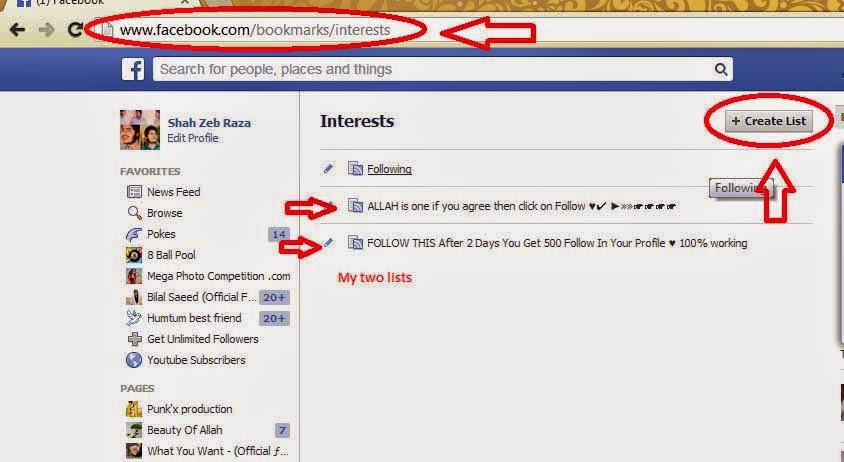
- Follow this list first ( List )
- now go to www.facebook.com/addlist
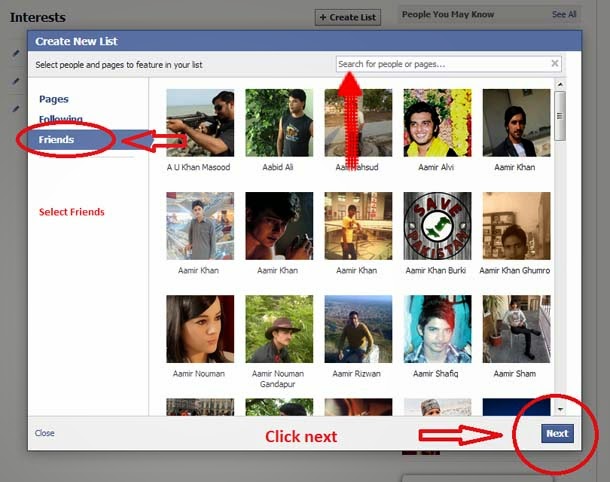
- now click on ( Create List )
- now select ( Friends ) and search your self on right side in (search option) and select your self.
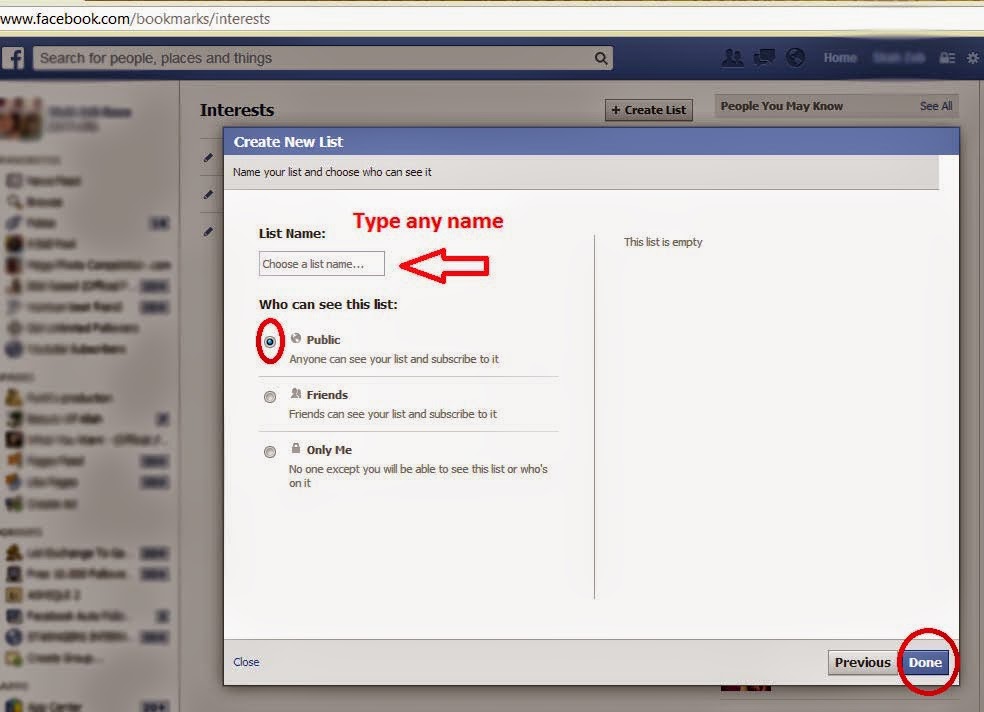
- now click on ( Next ) and put the name of your list ( you can put any name not important )
- and Click ( Done ) and tell your friends to follow your list.
| Note: |
Increase facebook Followers Via List Exchange
- Must add your self into your list.
- Your Followers will increase in 2 days. make more followers on your list and get more followers.
- Now join List exchanger groups and post your list link in these groups. follow others list they follow your list. make more followers on your list and get more followers on your Facebook profile. so simple just share link.
- and ask other people to add you in there list’s .
If you think it’s use-full article then must give your comment.
Available link for download
Monday, December 12, 2016
How To Increase The Internet Speed in PC
How To Increase The Internet Speed in PC

And when it fails to deliver, there’s no telling how worse it could be.
The slow net scenario
Now, at an era largely characterised by instant gratification, the sight of a loading icon – the circling arrow or the bar of green – could inspire automatic groans. Nobody wants them, unless this slow net thing is epidemic in your neighbourhood.What are the causes of this slow internet connection? About.com’s “Internet for Beginners” has identified at least thirteen (13) causes.
- Poor hardware
- Incorrect router configuration
- Leeching internet users
- Un-upgraded NIC
- Spyware/malware infection
- Downloads
- ISP’s routing signals
- Outdated DNS
- Full browser memory cache
- Devices disrupt signals
- Old PC
- Open windows
- Unattended dialog box
Take keen note these 13 represents the different possibilities. These may or may not necessarily disrupt bandwidth connection; it is up to you (dear user) to carefully weigh these things. The key to verifying it is by careful observation and simple logic (ie, is the connection faster with a new DNS, or not?).
Through a determined cause, you are able to appropriate a targeted solution. For instance, if the problem is caused by poor hardware, then you can purchase a newer and better model. If it’s about the incorrect router configuration, try to correct it or tap your friendly IT expert to do the works.
Or if the culprit of the internet snail-pace is your leeching neighbours (most likely the case for Wi-Fi connections), strengthen your connection’s password and utilise other security features. Infections, on the other hand, could be fixed through stringent scanning software.
Obviously, the nature of addressing your internet connection speed has something to do with the basics: consistent upgrades and investment in clearing ups. All of these serve to speed up that connection, probably faster than the proverbial energy bunnies.
They’re your key to the better world of lightning speed connection. And though you might approach them for professional service, they would be willing to extend support if you’re consistently nice to them.
Image Credit: ddpavumba
Faster than energy bunnies
There are many ways of increasing your internet connections speed. The best way to do it is to start with diagnosis. See through those aforementioned causes and learn which among those are causing your internet speed to drop.Through a determined cause, you are able to appropriate a targeted solution. For instance, if the problem is caused by poor hardware, then you can purchase a newer and better model. If it’s about the incorrect router configuration, try to correct it or tap your friendly IT expert to do the works.
Or if the culprit of the internet snail-pace is your leeching neighbours (most likely the case for Wi-Fi connections), strengthen your connection’s password and utilise other security features. Infections, on the other hand, could be fixed through stringent scanning software.
Obviously, the nature of addressing your internet connection speed has something to do with the basics: consistent upgrades and investment in clearing ups. All of these serve to speed up that connection, probably faster than the proverbial energy bunnies.
Tech buddies
Apart from those, don’t skimp on tech savvy relationships. Try to foster a friendly (and not hostile) bond with that tech – the ones from the hardware distributor, the internet connection provider, the tech support team, and so on.They’re your key to the better world of lightning speed connection. And though you might approach them for professional service, they would be willing to extend support if you’re consistently nice to them.
Awakened consciousness
Lastly, to increase the speed of your internet connection, try not to do things that could disrupt it. Avoid these disruptive things if it can be helped. And if the PC or any other device is shared among the members of the family, encourage them to perform the same measures.Image Credit: ddpavumba
Author Bio:
Manuella Theissen works as a tech support for a widely recognised hardware brand. If not busy with clients, or writing stuff, Manuella can be observed at the local community service office, as she does code-writing tutorials for free.Available link for download
Sunday, December 11, 2016
How To Increase Organic Traffic For Your Blog
How To Increase Organic Traffic For Your Blog
How To Increase Organic Traffic For Your Blog
So now i’ll tell you how you can drive Organic traffic to your blog.

Build Natural Backlinks
Focus on commenting to high PR(Page Rank websites) but don’t spam.
Also submit your blog to various web directories but also see if these are genuine or not.
Participate in discussions in Forums.
Quality And Original Content
Do not copy content for your posts and focus on delivering quality content. The better the content, more audience it attracts.
Internal Linking :
Linking your other posts in the current posts helps in SEO. It makes SEO crawlers to fund your site’s content faster and more efficiently.
It also helps the readers to know more about a current topic and helps increases the pageviews, bounce rate, etc.
But remember, one should link relevant content only because it would help readers gain more knowledge on a particular topic.
Social Media :
Link your website to various Social Networking websites such as Facebook, Twitter, Google+, etc so that you can reach more and more audience.
More Tricks
- Save your Facebook ID from Hackers
- Very Basic Batch Tutorials
- How To Open Number Of Sites With A Single Click ?
- Download Max Payne 3 PC Game
Long Trail Focus Keywords
You should put long trail focus keywords for the posts as the will have a better combination of the words which people type into the search engines as queries.
Premium Themes :
If you are using Wordpress, then go for premium themes. They help in SEO significantly.
Install Yoast Plugin for WordPress users :
You should install the most important plugin Yoast if you are using WordPress as a platform. It helps in SEO.
Increase Word Count for Posts :
You should inscrease the word count for the posts you write and ensure that each post is atleast 300 words long.
Also see if the keyword density is good.
Available link for download
Wednesday, November 23, 2016
3 Killer Tips to Increase Your Web Traffic
3 Killer Tips to Increase Your Web Traffic
3 Killer Tips to Increase Your Web Traffic

It is the desire of every webmaster and blogger to drive large number of traffic to his website or blog. To do this he or she applies number of methods, formulas and tactics that help them to achieve their goal. Some of them succeeded and some fails by using the same tactics. Why this happens that using the same techniques some people gain and some people loss. I have stated some of the important points that may help you while driving traffic towards your blog.

1:- Participation
-=-=-=-=-=-=-=-=-=-=-=-=-=-=-=-
This is the first and foremost thing that you need to do when you wish to gain maximum traffic to your website. If you want people talk about you and your blog, if you want they participate actively on your blog, if you want they share things about you in their videos, and if you want people refer others towards your blog, so you will have to participate first. Your participation on different forums enhances your worth online and makes you a prominent person in the online world. When you solve the issue of the members on different forums on the different topics, they start recognizing you and whenever they find your site, they consider you as expert and love to read, share and refer your blog with others.
2:- Social Media
-=-=-=-=-=-=-=-=-=-=-=-=-=-=-=-=-
Enhance your activities on social media sites like Face book, Twitter, LinkedIn, Google Plus etc. to promote yourself and your blog as well. Share some attractive, productive things on these social media sites that suit the interest of your fellowmen. Remember that just sharing the things is not enough; you will have to take active part in all the discussion your shared content. Social media is more powerful tool in the Google now; therefore you need to use it accordingly. Google respect those websites where traffic come from social media sites as they are considered as natural and satisfied traffic towards your blog. Google also gives weight age to this source of traffic while issuing the authorities to the websites.
3:- Blog
-=-=-=-=-=-=-=-=-=-
It is seen commonly that people keep their blog in the sub domain or create a different root for their blog and host there. It is one of the biggest mistakes that people are doing these days. Google love those websites that keep and create their blog on the same page. It is also important that blog help website to enhance its authority in the Google. When you host it on different path, it will not do anything for the promotion of your website, so don’t do this mistake. The website with simple navigation with all links on the same page is considered as ideal for user as well as for search engine. Update your blog regularly with useful information for your users instead of search engine.
Search engine will it automatically, if user like it. So focus your readers instead of search engine while providing information at our web blog. Please keep frequent visit to know more about this topic. Hope the post was useful for you.
Available link for download
Wednesday, October 19, 2016
SEED AND PEER INCREASE BY SUBMIT TORRENT TORRENT REANOUNCE
SEED AND PEER INCREASE BY SUBMIT TORRENT TORRENT REANOUNCE
SEED AND PEER INCREASE BY SUBMIT TORRENT/TORRENT REANOUNCE

Increasing Torrent speed is fully depends on how much Seed And Peer your torrent file have.If your torrent file have very low seed and peer than its very hard to get a good downloading speed.So its good to have more Seed And Peer.
If your torrent have a zero seeds than your downloading will never get complete.
Than what to Do??
Torrentz is a best site for searching torrents.So whenever you search for torrent there dont forgot to check number of peers as well which is mentioned there.

But what if you have already a torrent file which dont have "Seed And Peer" and you cant find any alternative for that??
Solution is you can reannounce the torrent file.Just go to this link and reannounce the torrent.
You can follow instructions at this link.

In this way by following above link you can easily increase your Seed And Peer of your torrent file.With for number of Seed And Peer your torrent will give you more downloading speed.So its better to have as much as you can have Seed And Peer.
If your torrent have a zero seeds than your downloading will never get complete.
Than what to Do??
HOW CAN WE INCREASE SEED AND PEER FOR OUR DOWNLOADED TORRENT??
One solution may be download a torrent with good Seed And Peer.check the detail of torrent file and check for its live Seed And Peer.If torrent did not get a good Seed And Peer than search for another good torrent file.Torrentz is a best site for searching torrents.So whenever you search for torrent there dont forgot to check number of peers as well which is mentioned there.
But what if you have already a torrent file which dont have "Seed And Peer" and you cant find any alternative for that??
Solution is you can reannounce the torrent file.Just go to this link and reannounce the torrent.
You can follow instructions at this link.
In this way by following above link you can easily increase your Seed And Peer of your torrent file.With for number of Seed And Peer your torrent will give you more downloading speed.So its better to have as much as you can have Seed And Peer.
Note:-As always, if you would like to leave a sensible comment, then please do so in the comments section below.
Available link for download
Subscribe to:
Posts (Atom)