Showing posts with label 001. Show all posts
Showing posts with label 001. Show all posts
Friday, January 13, 2017
How to join mkv 001 mkv 002 files into single file
How to join mkv 001 mkv 002 files into single file
Have your all files in a single folder so that the process may be easily done.
1] Note the location of the folder (or) Right click in the address bar and copy the address of the folder location.
2] Open command prompt > type cd <space> right click and select paste option and hit Enter key.
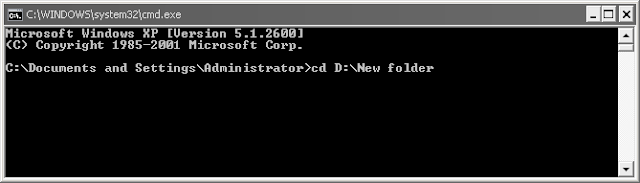
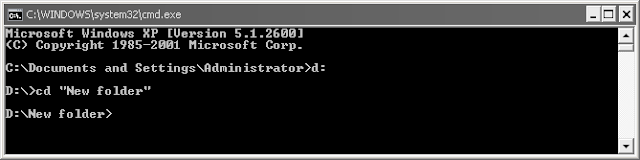
3] Now to append the splitted mkv etc files, type copy<space>/b<space>filename.mkv.001+filename.mkv.002<space>filename.mkv
Note: Use Tab/Shift+Tab key to navigate your file names in order (.001,.002,etc) instead of typing.

4] Press Enter key to join the files. Patiently wait for few minutes till it displays "file(s) were copied successfully" message.
Note: You can also append a subtitle(.srt) file with the resulted new mkv file using the above copy command.
1] Note the location of the folder (or) Right click in the address bar and copy the address of the folder location.
2] Open command prompt > type cd <space> right click and select paste option and hit Enter key.
(or)
Directly navigate your folder path by typing commands as in XP.3] Now to append the splitted mkv etc files, type copy<space>/b<space>filename.mkv.001+filename.mkv.002<space>filename.mkv
Note: Use Tab/Shift+Tab key to navigate your file names in order (.001,.002,etc) instead of typing.
4] Press Enter key to join the files. Patiently wait for few minutes till it displays "file(s) were copied successfully" message.
Note: You can also append a subtitle(.srt) file with the resulted new mkv file using the above copy command.
Available link for download

Subscribe to:
Posts (Atom)