Showing posts with label activating. Show all posts
Showing posts with label activating. Show all posts
Saturday, March 4, 2017
Activating IIS on Windows 8
Activating IIS on Windows 8
In this Article Im going to Show u how to activate IIS on Windows 8-->
Step 1--> Open Run Box.
Press Window Key + R.

Step 2--> Type Control Panel and Hit Enter.
 Step 3--> Click Uninstall a Program.

Step 4--> Click on "Turn Windows Features on or off".

Step 5--> Select "Web Managemet Tools" and "World wide Web Services" under Internet Information Services" and then Click OK.
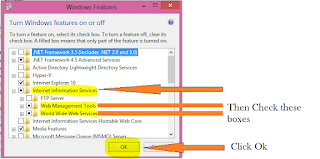
Step 6--> Wait untill Changes are applied.
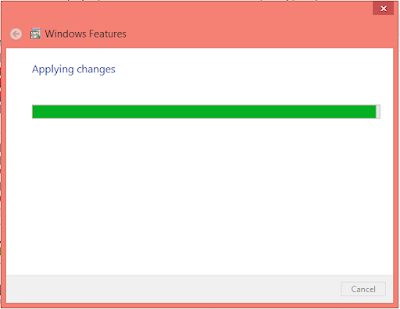
Step 7--> Click Close After changes are Applied.

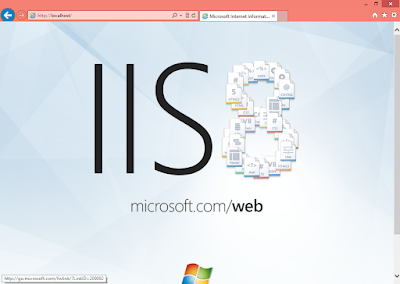
Step 8--> Open your browser and type localhost in adress bar and hit enter to confirm working of IIS.
Hope this post help many people....
You Can Read this Article on 7pm Tech here--> Activating IIS on Windows 8 Read Comments for more Info...
Step 1--> Open Run Box.
Press Window Key + R.
Step 2--> Type Control Panel and Hit Enter.
Step 4--> Click on "Turn Windows Features on or off".
Step 5--> Select "Web Managemet Tools" and "World wide Web Services" under Internet Information Services" and then Click OK.
Step 6--> Wait untill Changes are applied.
Step 7--> Click Close After changes are Applied.
Step 8--> Open your browser and type localhost in adress bar and hit enter to confirm working of IIS.
Hope this post help many people....
You Can Read this Article on 7pm Tech here--> Activating IIS on Windows 8 Read Comments for more Info...
Available link for download

Tuesday, February 14, 2017
Activating NET on Windows 8
Activating NET on Windows 8
Today Im Going to show u how to activate .NET Framework on your Windows 8 Machine without downloading it from Internet...
Step 1:- First of all mount your Windows 8 Boatable onto your PC and remember the drive letter...
 Step 2:- Open Command Prompt with administrative privilege short cut is shown in the picture...
 Step 3:- Type or Copy paste this command into cmd prompt.
dism.exe /online /enable-feature /featurename:NetFX3/Source:H:sourcessxs /LimitAccess
 Note:- Replace the colored letter "H" in the cmd with your drive letter...
Step 4:- Wait a While...

Step 5:--> Type Y
Note:--> Your PC will restart immediately as you type Y so before typing Y save your other works.
 Step 6--> During Restart your PC will configure New feature. Dont turn off your PC during this process. And after Restart your PC will be Having .Net Framework installed...
 Enjoy...

You Can See This Post of Mine in 7pm Tech forum also here--> Activating .NET on windows 8 There are some good comments on it which can solve your Problem if any...
Step 1:- First of all mount your Windows 8 Boatable onto your PC and remember the drive letter...
dism.exe /online /enable-feature /featurename:NetFX3/Source:H:sourcessxs /LimitAccess
Step 4:- Wait a While...
Step 5:--> Type Y
Note:--> Your PC will restart immediately as you type Y so before typing Y save your other works.
You Can See This Post of Mine in 7pm Tech forum also here--> Activating .NET on windows 8 There are some good comments on it which can solve your Problem if any...
Available link for download
Subscribe to:
Posts (Atom)